India Technology Blogs Network |
| Hide your online status on yahoo from various services like buddy spy [Technix Update] Posted: 14 May 2008 08:45 AM CDT Now a days ,there are large number of applications and services available on web to track your online or offline status activity of your yahoo ID.
If you want to pretend your self offline to all these applications from where your friends or buddies would be tracking your online offline status , you just need to set a simple option which is available Account Information Section of your yahoo id. Let see how can check that option which says: Check the box to hide my online status ( Follow the procedure given below 1. Login to your yahoo mail and click the link options ( above all mails in the right top ). 2. Click Account Information from the links in the sidebar left. 3. Click on the Edit / Create Profile link in the right sidebar, a new window will open up. 4. You will see a check box which says: "check this box to hide my online status from other users" as shown in the image below.
5. Check this option to hide your online existence on yahoo from your friends. If you check this option there will be nothing on web that can track your yahoo online / offline activity or time. We hope this small tweak will help. If not then please let know through comments.     |
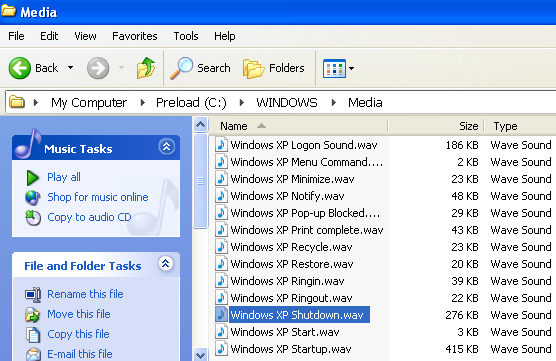
| Change Windows startup and shutdown sounds [Online Tech Tips] Posted: 14 May 2008 06:22 AM CDT I personally hate the default Windows startup and shutdown sounds, they are just plain loud and annoying! I changed mine a long time ago and since someone asked me how to do this recently, I thought I would go through the steps in order to change the Windows login and logoff sounds. Interestingly, you can also change other sounds in Windows, such as the empty recycle bin sound, the new hardware insert sound, the error sound and lots more! You can take an MP3 of your favorite artist, convert it into WAV format and then use it to replace the default Windows sound. You can use a freeware program like JetAudio to convert audio files into WAV format. The only thing you’ll need to keep in mind is that you want to keep the size of the file quite small, less than 500KB if possible. So you may need to first take an MP3 and cut out only the portion you want. You can use an audio editing program like Audacity to chop up the music. Step 1: Find a song and convert it to WAV format. Try to keep the file size small, max at 1MB if you must. Step 2: Now you need to rename these files to Windows XP Startup.wav and Windows XP Shutdown.wav respectively. Step 3: Now we’ll go ahead and navigate to the folder with the current startup and shutdown Windows sounds. Go to My Computer and go to C:\Windows\Media. Here you will find the files Windows XP Startup.wav and Windows XP Shutdown.wav along with a bunch of other Windows sounds. Go ahead and move the two original files from the Media folder to some other backup folder. This is just in case the two WAV files you created do not work and you want to revert back to the original sound. Step 4: Now copy the two renamed files to the C:\Windows\Media folder and restart your computer! You should now hear the new music, songs, or sounds play rather than the default sound. If you don’t like some of the other default Windows sounds, you can change them also in the same manner. Just create a file that is named the exact same as the one in the Media folder and then either replace it or move the original and then put in your new one! Overall, it’s really simple to change the Windows login and logoff sounds, so it’s something most people will be able to do! Also, there’s no real way you can “harm” or “mess up” your computer. Enjoy! Source: TechnoSpot Technorati Tags: change windows sounds, change windows startup sound, change windows sound, how to change windows startup sound, changing windows sounds
Related postsCopyright © 2007 Online Tech Tips. Aseem Kishore (digitalfingerprint: a59a56dce36427d83e23b501579944fcakmk1980 (66.150.96.121) ) Change Windows startup and shutdown sounds        |
| Remove spyware from your computer for free [Online Tech Tips] Posted: 14 May 2008 06:11 AM CDT Once upon a time, there was a company called GIANT Software. Their flagship product, GIANT Antispyware, was one of the best anti-spyware products at the time. Though they had only been around a short period of time, in the software world, their product had enough market strength to grab the attention of larger software development companies, one of them being Microsoft. Microsoft purchased the company, and changed the GIANT Antispyware brand into what we know now as Windows Defender. Many applauded the decision by Microsoft to make Windows Defender free to registered users of Windows XP. Later they integrated Windows Defender into Windows Vista. How great a move this was; to have a real-time scanning, free anti-spyware product for Windows users! Short lived was this applause as people began testing the Defender platform. Most tests, comparing it to other products on the market, rate Defender at somewhere in the neighborhood of 55% - 65% effectiveness at finding and eliminating spyware. Granted, no anti-spyware program is perfect, and finding a free one my prove tricky. Would it not make more sense to find one with a decent eradication rate and have other tools to boot? After being revamped, Spyware Terminator 2.2 comes out strong in the Anti-Spyware arena. While I will admit, it may not have the highest rate of catching spyware, the other complimentary tools help make up for it. Firstly, the fact that a free anti-spyware program comes with a real-time shield feature is a big plus. Other free programs rely on the user to run manual scans. The real-time part is not the only useful feature though. When the user opens up the main console to Spyware Terminator, they will notice two things right off the bat. Large, easy to read, menu buttons decorate the upper right hand area. These help the user to navigate between the various area of the program. Secondly, on the left-hand side, there is a wide column with three separate menu area. These areas deal specifically with the most important aspects of the program: Spyware Scanning, Real-Time Protection, and Updating the program. If one wants to run a Spyware Scan at that moment, they have but to click on Run Scan. This will prompt Spyware Terminator to run a quick down and dirty scan of the areas of the computer most likely to be infected by Spyware; for example, the Windows directory, Temporary Internet Files, and other locations commonly targeted by malware. Here we see Spyware Terminator running an active scan routine. Pay particular attention, when using this program, to the Critical Objects section. As Spyware Terminator finds bad items (Tracking Cookies, Spyware, etc.) it will be annotated here. While this is the quick spyware scan that was run, one can choose a more through scan by clicking on the green magnifying glass icon (Spyware Scan) on the large menu bar. Doing so will give a person the option of the Full Spyware scan (looks over the entire hard drive), and the Custom Scan; where the user chooses the specific area they want to be scanned. If you look at the small rectangle on this screen shot, you will notice two other options marked with a red X. These options become available if you choose to install the integrated Clam Anti-Virus option. At that point, Spyware Terminator and Clam AV become your all-in-one Anti-Spyware / Anti-Virus solution. Let’s look at some of the other settings and options we can manipulate within Spyware Terminator. We know that a real-time shield can be activated to protect your computer from accidentally running spyware. There is another feature in that menu, which people may find useful. Within the Real-Time Settings menu, and just below the checkbox to toggle the real-time shield on and off, in an option called HIPS (short for Host Intrusion Prevention System). The alluring feature of HIPS is how it benefits your computer’s security. HIPS takes a “snapshot” of your currently active programs and services, and creates a bouncer’s list. If a program is not on the list when it runs, you have to approve it (think ZoneAlarm, but slightly less annoying). Perhaps you do not care for the occasional, or more frequent, pop-up message asking for your approval. Maybe you just want Spyware Terminator to be silent and run a daily scan instead. Easily done! Just turn off the setting for the real-time feature, and navigate over to the Settings menu button on the main console. After clicking on Settings, click on Schedule Settings. Here is where you can tell Spyware Terminator to perform a scheduled scan (or not to), when to run the scan (Daily, or choose a day), what time of day, and to check for program updates before the scan is run. There are no oddball options like on the 13th full moon of each leap year, if gas is cheaper than $2.98, when… well, you get the picture. However, there is once choice where Spyware Terminator will run if you miss a scheduled scan. For instance, if your computer was shut off at the appointed time, it will prompt you to run the next time you turn on your machine. Last but not least, the program updates. Within the Settings menu button, and just below the Schedule Settings button, lies the Update Settings button. Clicking on this will give the user the choice of when, and at what interval, they want Spyware Terminator to update itself. Here you can choose to check for updates at 1, 2, 6, 12, and 24 hours. One also has the option of running it fully automatic, and quiet; notify them of pending updates, or to disable automatic updates. This is also the locale when the user can let the program know if they use a Proxy server or a Direct connection for their Internet connectivity. There are other options to explore, and various configurations to try with Spyware Terminator. Once one can get past the somewhat silly name of the program, they will be surprised to find a rather sturdy application that does more than simple manual scans for spyware. It ultimately comes across more like a multi-faceted protection suite, that just happens to be free.
Related postsCopyright © 2007 Online Tech Tips. Aseem Kishore (digitalfingerprint: a59a56dce36427d83e23b501579944fcakmk1980 (66.150.96.121) ) Remove spyware from your computer for free        |
| How to add hindi fonts in OS X! [ReviewSaurus - The Techie Dino!] Posted: 14 May 2008 03:52 AM CDT Recently I was accessing few websites and I noticed that they had some hindi text, however the text was garbled and the reason for that was that the hindi font wasn’t installed by default with OS X. Although I’d selected India as the country, it never installed the local language fonts and I think that’s kind of bad on the part of Apple. Anyway, let me tell you that how we can install various languages : 1. Go to the apple menu. That’s it. This installs the language support for other languages and you won’t see the garbled text as by default Firefox works on UTF-8 Encoding and thus you’ll be able to see webpages in your local language. © BloggingSaurus - ReviewSaurus | TipsoSaurus Partner : TechZilo - useful software reviews and hacks, web tips and applicationsCopyRights : ReviewSaurus       |
| Read Air- Google Reader Build on Adobe Air [-| Life Rocks! 2.0 |-] Posted: 14 May 2008 01:57 AM CDT Ever since the launch of Adobe Air, there are lots of applications being developed on this platform. The latest app which has been developed on Adobe Air is Google Reader. ReadAir is an Adobe AIR-based utility that lets you launch Google Reader as a standalone application. Since it’s built on AIR, ReadAir runs on Windows, Mac, and Linux systems. Features
Currently the application features a mac look, but it will be skinable in future. Download ReadAir [Via DownloadSquad]       |
| Chyrp : A promising blogging engine & under-rated too! [ReviewSaurus - The Techie Dino!] Posted: 14 May 2008 12:58 AM CDT
1. Twitter - mother of all micro-blogging services. This post is dedicated to Chyrp as yesterday was the first time, when I tried it and fell in love with it. What I really loved about it was that it’s pretty light weight, extendable and pretty easy to use. Here’s what Chyrp has to say about itself : “Chyrp is a blogging engine designed to be very lightweight while retaining functionality. It is driven by PHP and MySQL (with some AJAX thrown in), and has a pimpin' theme and module engine, so you can personalize it however you want.” Well, after looking at Chyrp and the way it works, I got a feeling that I’m looking at a stripped version of WordPress but still holds all the power to be extended to a level that it can compete with WordPress. Well, that may be called exaggeration but I can say that it really impressed me too much. In fact after such a long time, any product excited me so much. Chyrp can be extended like WordPress with available modules (plugins in case of WP) and has got themes too. However, I still believe that theme engine of WordPress is far better than any other blog client. To be honest, it’ll be unfair to compare Chyrp with WP and it will be called a direct competitor to Tumblr and I believe that it certainly deserves more and more praise than it gets. It’s pretty simple to use and installing it, is simplest stuff you can ever think of. It’s even simpler than WordPress. What the heck! you can test drive it right away and I’m sure you’ll know what I’m referring to. I’ve built my own profile (mayank) on Chyrp platform and will extend it further according to my own needs. I believe that if you are thinking of starting a tumblelog/micro-blog then you should consider Chyrp as it’s powerful and extendable. © BloggingSaurus - ReviewSaurus | TipsoSaurus Partner : TechZilo - useful software reviews and hacks, web tips and applicationsCopyRights : ReviewSaurus       |
| FlashForward 2001 Video [Brajeshwar] Posted: 14 May 2008 12:34 AM CDT A two-hour video footage of FlashForward 2001 (New York). From Eric E. Dolecki.
Related Articles
Rights reserved © Brajeshwar 2001-2008. Quotes, excerpts or reproduction of any of the article is possible solely under the Attribution-Noncommercial-No Derivative License.  |
| Posted: 13 May 2008 11:49 PM CDT Microsoft has made available a beta version of Windows Advisor at MS Connect, a system maintenance tool that continuously runs in the background in the system tray checking for potential errors and problems with your computer in real-time and notifies you when it finds one. It then provides you with quick and easy to fix solutions, if any. Here is the description of the product from Microsoft Connect: “Windows Advisor is an easy-to-use self-help tool that notifies users about problems on their PCs and helps fix them. Windows Advisor scans users' PCs continuously, notifies them about important issues, and, when possible, suggests easy fix solutions. The program also provides users with self-help solutions, such as including a one-click checkup function that enables them to check their PCs whenever they like; tips and tutorials that teach users how to perform certain actions on their PCs; and a toolbox that concentrates the important tools that are found in the operating system into one easy-to-find location.” Click here to download Windows Advisor Beta for Windows XP and Vista. [13MB]          |
| Bring Google Reader To Your Desktop With ReadAir [Techie Buzz] Posted: 13 May 2008 11:49 PM CDT I am turning on to become a big fan of Adobe Air as they are bringing more and more applications to the confines of my desktop. For those who are not aware of Adobe Air, it is a runtime created by Adobe Inc which allows developers to create rich Internet applications that can run on any desktop irrespective of the operating system. I have been using quite a few Adobe Air applications including Google Analytics AIR application (Google Analytics for your desktop), AirTalkr(Multi Protocol Client for IMs), Feedalizr (Freindfeed Desktop Application), Thwirl ( Tweeter Client) and Klok ( A project management tool).
The theme of the application is based on OSX the Mac operating system.
ReadAir Features
There are a couple of missing features like Offline mode support and Keyboard shortcuts but the developer of this application is most likely to release a update for those shortly. To put in short this is definitely one thing I was looking for and is much more better than Prism which I was earlier using to read the feeds in a isolated window on the desktop. If you would like to find more useful Adobe Air application you can refer back to my guest post Top 7 Adobe Air Applications or check out FreshAirApps where you can find new Adobe Air Applications for use. Via: [FreshAirApps] Featured Ads: Get Your Questions Answered. Visit the Techie Buzz Forums. © Keith Dsouza for Techie Buzz, 2008. | Permalink | No comment | Add to del.icio.us ---
       |
| Posted: 13 May 2008 11:30 PM CDT Microsoft Office Labs has released a free addon called Search Commands for Office 2007 for the 32-bit version of Windows XP or Vista. Search Commands helps you find commands, options, wizards, and galleries in Microsoft Office 2007 Word, Excel and PowerPoint, better than the in-built help file of the respective programs. Just type what you're looking for in your own words and click the command you need. Search Commands also includes Guided Help, which acts as a tour guide for specific tasks.  You can launch Search Commands from the Ribbon using the Hotkeys Windows key + Y. Click here to download Search Commands for Office 2007.          |
| Download ReadAIR: Google Reader on Your Desktop [Killer Tech Tips] Posted: 13 May 2008 11:02 PM CDT If you didn’t know, I’m a big fan of Adobe AIR apps. They’re quite cool that I’ve found myself using twhirl, etc. very often.
The advantages:
The first thing you’ll notice is ReadAIR’s pleasing UI that mimics a Mac OS X application. Additional themes are coming soon. Don’t worry about losing the socializing features of Google Reader - ReadAIR provides access to your friends’s shared items (something I really love in Google Reader). You can add, remove tags from the ReadAIR app itself. You won’t miss anything except the keyboard shortcuts and offline access via Google Gears. Don’t worry, these features are coming soon, according to the developer. Did you try ReadAIR? Tell us in the comments! Partners: TechZilo - useful software reviews, tips and hacks, web tips and applications       |
| Posted: 13 May 2008 10:42 PM CDT SISContents is a freeware utility for Windosw Xp, 2003, Vista and 2008 that allows you to unpack and edit Symbian 9.x based SISX files which includes Nokia S60 3rd Edition and Sony Ericsson UIQ 3.x platforms. It allows you to inspect the files contained in SIS package, view certificates against which it was signed as well as view the PKG script that describes the on-device installation process. Key features of SISContents include:  - Read the contents and show information on SIS package; Click here to download SISContents for Windows OS.          |
| How to Open Two Excel Files Side by Side in Separate Monitors? [Lyte Byte] Posted: 13 May 2008 10:38 PM CDT If you are working almost the entire day in front of your computer at your office with lots of Excel Sheets and Word, then probably you might be working with a dual monitor or may be even more than that. Studies have shown that having an additional monitor increases the productivity by 20 to 30 percent (Source: NY Times) But some applications like MS Office Excel, even though you open multiple files, they are all from the same instance of the application. So if you want to compare two Excel files, then you may not be able to have it in two separate monitors as the files are loaded using the same instance of Excel. If you move one Excel file to the other window, the other Excel files are also moved to the other window. So how to have two separate Excel files or other application side by side in dual monitors?
Option A: In Excel 2003, go to Tools -> Options -> General tab. Make sure the option, 'Ignore other applications' is checked. Now all the Excel files will be opened as separate instance and you can move the Excel files individually across the monitors. In Excel 2007, Click the Office button -> Excel Options -> Advanced. Under General, check ‘Ignore other applications that use Dynamic Data Exchange’. As this method forces each Excel file as a separate instance, the memory consumption will be more. If you don't want too many memory consumption then you can open only two instances (see Option B) and manage wisely to view in both the monitors. Note: If you are having issues like Excel opens without displaying a workbook, then you may have to uncheck this option. (See Microsoft Help for more details on this). You can use option B in this case. I have this option checked and I have not faced any issue yet. Option B: They key here is, the application has to be loaded as separate instances. Lets say you have opened an Excel file in Monitor 1 and you want to open the next excel file in Monitor 2. You can usually open another instance of Excel by browsing through the Start Menu -> Programs -> Microsoft Office -> Excel. Make sure this newly opened Excel file is the last Excel file you had viewed and then double click on the Excel file that you wanted to open. This will force the Excel to open in the second instance of Excel. Now you can move these two excel files separately across windows or monitors. This may be little cumbersome way to open new instances of Excel every time. The easy solution would be to keep these links in the quick links near the Start button. So, every time you want to open a new instance of the application, you can just use those quick links. Copyright © 2008 This feed is for personal, non-commercial use only. The use of this feed on other websites breaches copyright. If this content is not in your news reader, it makes the page you are viewing an infringement of the copyright. (Digital Fingerprint: qfjk452hj34hjfjh12h4f1hj3dld45jd312j4112341d4hjdh) ---
    |
| Take Google Reader To Your Desktop With ReadAIR [dailyApps] Posted: 13 May 2008 10:16 PM CDT For those of you who are big fans of Google Reader, here’s an app that you must check out. You’ll love this new Adobe AIR app called ReadAIR that completely syncs with Google Reader and has the same basic layout as Google Reader, so you should have no problems starting out.
You could be easily be fooled into thinking that this app was developed by Google because it is that well polished. It features full synchronization with your Google Reader account and requires you to log in with your credentials the first time you use it. The viewing panes can be resized but the columns in the list view can't. It also has a search feature for going through all of those feeds and you can use tags as well as add or delete subscriptions. Sounds cool eh! The interface of ReadAIR has been designed keeping OSX in mind, but it surely does look good on Windows machines as well. The UI is simple and effective and is a joy to use. There are some important features missing at the moment, but the developer plans to add it as soon as possible. Here’s what the developer has in the pipeline :
I can’t wait for keyboard shortcuts to be a part of ReadAIR. I found myself using J for next item and S for starring it while playing around with ReadAIR, such is the striking resemblances between Google Reader and ReadAIR.. For the first release ReadAIR looks promising indeed. I suggest you all to give it a try. Download ReadAIR from here Related Posts at DailyApps      |
| Posted: 13 May 2008 09:59 PM CDT Many a times, I get asked, what do you do in social media marketing? And before I answer, there would be a warning saying - I already submit to Digg and other social media sites…so what is it that you do apart from that? That’s an interesting question altogether. The fact is that social media marketing is not just about Digg, or submitting to a few sites as Digg. There is a much larger picture to be revealed. Submitting to Digg is in itself a big chapter. We’ve discussed it on this article and this one. Anyone can submit to Digg. But not all of them get popular, be it a great story or not. There are strategies you must follow while submitting to Digg, a lot depend on who the submitter is, what the crowd is, what your story is about, who are your contacts, how long have you been digging…and 1432 other things as well. And that’s exactly the reason why everyone’s story isn’t the top dugg one. Precisely, that’s why you need experts help on it. Coming back to social media, there’s more to it than Digg. It’s about connecting the dots. Between you and your target audience. And the initial step of a social media marketing campaign is to find your target audience, define them and track them. Studying them for their behavior and delivering them “food” is the final stage of social media marketing. It almost ends with it. Post this phase, you start getting results and the beauty is that the bounce rate is very minimal unlike SEO. So essentially, Social Media Marketing doesn’t end with digg or SU, it only starts there. A careful full stretch social media marketing goes through as many processes and steps as a market researcher and an ad-agency would go through combined with that of an SEO. It is a healthy combination of all that, and only someone who is well verse in all of these fields can help you through a successfull social media marketing campaign, or else you get stuck with a few submissions on digg with one number diggs. Copyright © 2008 DailySEOblog.com. This Feed is for personal non-commercial use only. If you are not reading this material in your news aggregator, the site you are looking at is guilty of copyright infringement. Please contact legal@www.dailyseoblog.com so we can take legal action immediately. Plugin by Taragana Do you want to place your link here for just $ 10 ? Contact me now. Ask your doubts on SEO at the discussion forums and get them answered by experts. FREE of course! Social Media Marketing ends with Digg and SU ? Random Posts   |
| Protect Yourself from Internet Threats [Detailed Instructions] [Techie Buzz] Posted: 13 May 2008 09:00 PM CDT
Well no famous person wrote that quote it was just me elaborating a point that every time you connect to the Internet you may be vulnerable even though you may be safely visiting your favorite email site or just browsing news from your favorite newspaper. It all boils down to who is watching you and how? What are Spam Softwares and Trojan Horses?Spam softwares and Trojan horses without Internet are useless (even some viruses that look to spread rather than destroy). The main aim of these softwares (they are softwares but malicious in nature because they do things which you never authorized them to do) is to collect personal information of any sort including surfing habits and going to the extremes of critical information like banking passwords and sending them to other servers so that they can send you ads or maybe loot your money. How to Monitor these things?To be quite frank it is quite hard to monitor what kind of Internet activity goes on in your PC. If you think that the only Internet activity that takes place on your PC is when you open a browser or a mail client then you are deeply wrong because softwares themselves can participate in several Internet activities without your knowledge. If you really want to see the number of Internet connections made by various softwares simply follow these steps and you will be amazed at what goes on even when you are not actively using the Internet connection, of course the Internet connection has to be up and running.
After following these steps you may see a lot of amount of text being shown, it’s not the Matrix but these are the active connections made by various softwares from your PC to other servers. These things may be not easy to devour or understand that is why we will help you find softwares and advice you some precautions that will help you thwart attacks without you ever having any knowledge about them. How to Avoid and Safeguard Your PC Against these Softwares?There are quite a few things that happen without you paying attention and which is what many writers of these softwares tend to exploit. Here are few things that you should either completely avoid or pay keen attention to; Avoid Accepting Attachments or Visiting Sites from Unknown Persons Many a times the subject of the email may be so enticing that you may download any given attachments or click on any links in the email. This should be avoided at any cost. The attachment you may download may be quite vulnerable or the link you may have visit may install some malicious softwares on your PC. The best precaution is to completely avoid clicking on links or downloading attachments from strangers. Keep Your Windows Updated The most basic protection you can have is by keeping your Windows updated all the time. Microsoft time and again releases critical security patches to address exploits in the operating system. You should regularly apply these patches as and when they are available, or else your system will be open to critical exploits. The best way to keep your operating system updated is by setting the Windows Update to automatically download and install critical updates for your system. You can do this by visiting the Security Center in Control Panel and setting Windows Update as on. Have A Good Anti-Virus Software and Anti-spyware software running Continuously They say “precaution is better than cure” and that saying applies to your computer too. If you are using the Internet on your computer you should definitely have a anti-virus and anti-spyware detecting software on your system. You do not need to spend tons of money to get a good anti-virus and anti-spyware monitoring software, there are quite a few free alternatives you can get. AVG Anti-Virus 8 is a very good Anti-Virus software and it comes built in with a anti-spyware monitor. It also comes with a Email scanner to scan incoming and outgoing emails of desktop softwares and also has a web shield to protect you from web threats online. There are other alternatives available too like; You can find many more such alternatives but the one’s listed here are the best of the lot. Installing a good anti-virus and anti-spyware is not the only thing that will keep your PC protected, you will need to regularly keep the software updated to fight newer threats. Most of these softwares come with automatic update features which you should opt for. Install a Good Firewall A firewall is a dedicated appliance, or software running on a computer, which inspects network traffic passing through it, and denies or permits passage based on a set of rules. Having a good firewall is equivalent to having a good secured door to your house. The firewall software helps you monitor which processes are trying to connect to the Internet and lets you choose whether you should allow it to do so or not. Windows comes with a built in firewall which is good enough but quite basic in nature. After installing a firewall you may see quite a few alerts asking for your permissions to allow access to a software, this may look annoying but once you have granted access to all the application you use to access the Internet you will not be asked again. Again there are quite a few free firewall softwares which you can use to thwart unwanted Internet activities. My personal favorite is PC Tools Firewall Plus which is free and does the job better than the regular Windows firewall software. You can also choose from other free firewall softwares; Cleanup Your PC regularly Most of the viruses or Trojans usually are downloaded to your temporary Internet folder. It is recommended that you clean up your PC regularly by deleting temporary Internet files and cookies. To save yourself some time and work you can download and use CCleaner one of the best tools clean up your Internet and other files. It supports a most of the popular browsers like Internet Explorer, Firefox, Opera, Safari. Most Important Use a Safe Browser Having a safe browser is one of the most important things you should take care of while surfing the Internet. If your browser is not safe you are more vulnerable to being attacked by phising and harmful sites which are ever ready to steal your confidential data. I highly recommend you download and use Firefox which is one of the most safe browsers available today. Download Firefox now. SummarizingFollowing the above tips will definitely help you stay more safer on the Internet. In addition to following the above tips you should also run regular scans for your PC so that you can be protected from any new files that may have been infected. If you have any other better things to add to this list please feel free to add it in your comments. This will help the readers more to help protect their PC from threats and unwanted softwares. If you liked the tips and tricks here don’t hesitate to tell me about them through your comments. Featured Ads: Get 5 Terabytes Bandwidth. Signup for Dreamhost. © Keith Dsouza for Techie Buzz, 2008. | Permalink | 2 comments | Add to del.icio.us ---        |
| Add Windows Live Messenger to Facebook [-| Life Rocks! 2.0 |-] Posted: 13 May 2008 02:30 PM CDT One of the best features of Facebook is the support of lot of applications. Nowadays the support for instant messaging applications in Social sites is increasing. Windows Live Messenger is available in the form of widgets for adding to blogs and websites and now Windows Live messenger is available as an application in Facebook. With this application your friends can chat with you when they visit your profile. You can also chat with other friends who have installed this application. 1. Install the Windows Live Messenger application from here. 2. Login with your Windows Live ID. 3. The application is added to your profile and your friends can chat. In case you use Windows Messenger, you can add me to your network from my profile. Windows Live Messenger Application       |
| Cleanup your hard drive with WinDirStat [Online Diary] Posted: 13 May 2008 01:39 PM CDT At my workplace I somehow managed to eat up almost all of the 40GB on the primary partition and I had no clue as to what directory/file was eating up the space. As usual, Windows XP has no inbuilt tools to accomplish the simple task of finding the culprit directories/files. In my earlier post, I had mentioned about some of the tools which could help in a similar situation. Some of the tools that I mentioned on that post are no longer supported and hence I had to “google” to find the right tool for the cleanup task. WinDirStat was one of the useful tool that I found ! Its a disk usage statistics viewer and cleanup tool for Windows. The tool can either scan all your disk drives or the individual drives or even specific folders. The entire directory tree is read and the information is displayed in 3 views:
The treemap is an amazing feature which helps you to quickly identify the file occupying the maximum space. The selection of the colored block automatically highlights the file in the tree view and you can delete the file from within the UI of WinDirStat. A must have software for Windows       |
| Google Socializes the Web with Friend Connect [TechBuzz] Posted: 13 May 2008 01:28 PM CDT Google has initiated a brand new project which aims at helping website owners to add social features to their site without any coding efforts. The project is called Google Friend Connect, and it will use data from existing social network such as Facebook, Orkut (Google Talk?), Hi5 and MySpace to help users interact. With Friend Connect, it’s unbelievably simple for website owners to add social elements like user registration, invitations, members gallery, message posting… etc. Third party applications developed by OpenSocial developers can also be added to any webpage. You just have to add a snippet of code to your site for the social features to be enabled. For Visitors, it will be more like a Facebook app embedded into any site. You’ll be able to use the profile information from any of the participating social networks and interact with other users of the site. For instance, Ingrid Michaelson (musician) has added music application called iLike with Google Friend Connect. His fans will be able to connect with their friends, without leaving his site. I personally believe that Google Friend Connect is going to be an instant hit. What are your thoughts? Via: Google Press Release  |
| Get VCOM Fix-It Utilities License Key Worth 30$ for Free [Techie Buzz] Posted: 13 May 2008 11:57 AM CDT During the past few months many software vendors have been releasing free licensed version softwares which in would require you to pay some license fees to the people for free. Most of the software vendors release their older version for free so that people can usually try them out and opt in for licenses in newer version of the software. The new marketing strategy brought out by the companies definitely seems to be working in their favor. Today’s freebie though is VCOM Fix-It Utilities 7 Express which is a software that optimizes the performance of your system by providing you with options to check your PC and optimize it for optimal performance.
In order to get the VCOM Fix-It Utilities 7 Express Licensed copy worth 30$ for free, follow the steps below.
If you are a fan of free softwares and are looking to get some paid softwares with genuine Licenses for free keep a track on this category and get your fill of free softwares. Via: [Raymond CC] Featured Ads: Start making money on your site. Sign up for Text Link Ads. © Keith Dsouza for Techie Buzz, 2008. | Permalink | No comment | Add to del.icio.us ---
       |
| Top Free PDF to Image Convertors [Techie Buzz] Posted: 13 May 2008 11:50 AM CDT Quite sometime back I had spoken about viewing PDF files online without the need for any software. It was quite useful for those who did not have any softwares installed on their PC to view the PDF documents. To take it one step further you can always convert the PDF files to images which can be readily viewed on any computer without the need to install any other software. Most operating systems which have a desktop version have inbuilt capabilities to view most of the image formats. In fact you may even use the convertors if you want to insert a PDF into a PowerPoint presentation or into a Word document. To help you convert your PDF files to images like JPEG, PNG, GIF, tiff or other graphical formats here is a list of softwares that can help you easily convert and are completely free to use. PDF to JPG
PDF to JPG is a free to use convertor to convert your PDF document to image formats. The software uses print capabilities to convert the document using the Universal Document Convertor. Read More | Download PDF To JPG PDF Image Converter
PDF Image Converter is is an easy-to-use application that converts PDF pages to image files with excellent quality. The product is shareware but does not have time limitation for personal use. The software supports JPEG, PNG and Gif and also has a feature to batch convert files. What do you think of these converters? Do you use any other free tools to convert PDF files to images? If yes do let me know about them in your comments. Technorati Tags: pdf to image,pdf to jpeg,pdf to jpg,pdf to gif,pdf to png,pdf to tiff,pdf to image converters Featured Ads: Looking for a job. Find one at Techie Buzz Jobs. © Keith Dsouza for Techie Buzz, 2008. | Permalink | No comment | Add to del.icio.us ---
       |
| Google Friend Connect Adds Social Features to Websites [Quick Online Tips] Posted: 13 May 2008 10:12 AM CDT Google Friend Connect is a new Google service that lets you grow site traffic by easily adding social features to your website and more people engaged more deeply with your site. Wouldn’t you like to bring along friends from social networks like Facebook to interact on your site! The best part is just copy and paste snippets of code into your site, and Google Friend Connect does the rest. You can now see, invite, and interact with new friends or friends from social sites on the web like Facebook, Google Talk, hi5, LinkedIn, orkut, Plaxo etc. and be able to do things together. See some sites where Friend Connect is live right now like My Latest Piece, Guacamole, Ingrid Michaelson and BibleApps. See steps required to add Google Friend Connect to websites. Since Google Friend Connect is a preview release, it is being made available to a limited number of site owners only. You need to fill a form to get started when it is available for you. Related Copyright 2008. Quick Online Tips. All Rights Reserved.      |
| Vote for Best Google Doodles [Quick Online Tips] Posted: 13 May 2008 09:47 AM CDT
The Doodles are arranged by age group and you can vote for one doodle per grade group. Vote now and make the best Doodle win. Watch Google Doodler Dennis Hwang draw a Google Doodle. See Doolers in Action in this video Related Copyright 2008. Quick Online Tips. All Rights Reserved.      |
| Microsoft WorldWide Telescope Explores the Universe [Quick Online Tips] Posted: 13 May 2008 09:27 AM CDT Microsoft Research has launched the public beta of WorldWide Telescope, a rich Web application that showcases imagery from the best ground- and space-based observatories across the world to allow people to explore the night sky on their computers. WorldWide Telescope is created with the Microsoft high performance Visual Experience Engine and allows seamless panning and zooming around the night sky, planets, and image environments and lets you see their precise positions in the sky from any location on Earth and any time in the past or future. Microsoft Research is dedicating WorldWide Telescope to the memory of Jim Gray and is releasing WWT as a free resource to the astronomy and education communities. Take advantage of a growing number of guided tours of the sky hosted by astronomers and educators at major universities and planetariums. Before you download WorldWide Telescope (21MB), check some minimum system requirements For PC: Also remember to explore Google Earth (now packed with street views), Google Moon (in a high resolution) and Google Mars like never before. Related Copyright 2008. Quick Online Tips. All Rights Reserved.      |

 ) from other users.




 Micro-blogging is amazing, it’s simply wonderful and there are many reasons as to why it’s


 Today, DailyApps


 This year’s


| You are subscribed to email updates from India Technology Bloggers To stop receiving these emails, you may unsubscribe now. | Email Delivery powered by FeedBurner |
Inbox too full?  Subscribe to the feed version of India Technology Bloggers in a feed reader. Subscribe to the feed version of India Technology Bloggers in a feed reader. | |
| If you prefer to unsubscribe via postal mail, write to: India Technology Bloggers, c/o FeedBurner, 20 W Kinzie, 9th Floor, Chicago IL USA 60610 | |

13 comments:
Our company has been helping the student community with their requests of “write my essay” in the UK for years. If you have the same request for your pending essay paper, we have the perfect solution for you. We have exceptionally superb essay writers to write your essay paper as a result of which you will not have to face any more troubles when you get an essay to write for your academic module.
Get the best essay writing service by experts at affordable prices. Get the best essay writing service from UK by professional assignment writers of UK. On-Time Delivery. A+ Quality.
Get the best corporate finance assignment help by experts at affordable prices. Get the best corporate finance assignment help from UK by professional assignment writers of UK. On-Time Delivery. A+ Quality.
Get the best assignment editing services by experts at affordable prices. Get the best assignment editing services from UK by professional assignment writers of UK. On-Time Delivery. A+ Quality.
Get the best university assignment help by experts at affordable prices. Get the best university assignment help from UK by professional assignment writers of UK. On-Time Delivery. A+ Quality.
Get the best college assignment help by experts at affordable prices. Get the best college assignment help from UK by professional assignment writers of UK. On-Time Delivery. A+ Quality.
Check out how to write a business report if you are looking for best writing help with Low Prices.
Being a Cheap Academic Writers UK from the past several years providing the Pro Academic Help and essays to college and university students and also associated with one of the best platforms of education in all over the UK. I am dedicated to providing Online Academic Writing Services to college students.
We are the best online course help with 2500+ experts to hire or pay someone to Take My Course Online for me with online course takers today.
We are the best online homework help with 100+ homework writers to hire or pay someone to Do My Homework for me with online homework takers today.
Proctored Exam Online boost grades and provides reliable Online Exam help for students looking up professionals to take my online exam for me or do my online exam.
Still, the path from preparation to actually enrolling in a foreign university is rather difficult. From selecting the correct university and course to handling money, writing strong SOPs, and clearing visa interviews, there is a lot on the plate of any aspirant international student. Here is where study abroad consultants in Noida become quite helpful on the path. Still, the process is complex and calls for wise judgments. Working with a reputable Abroad Study consultancy guarantees not only direction but also a committed partner who will walk with you from the start until you have settled in your dream location.
Post a Comment