India Technology Blogs Network |
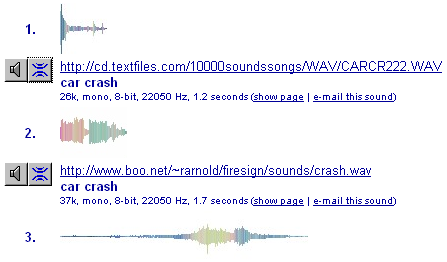
| How to find free sounds and sound effects [Online Tech Tips] Posted: 03 May 2008 06:25 AM CDT Looking for a cool sound effect for your video editing project? With simple to use video editing programs like Windows Movie Make and iMovie, just about everyone knows how to create short movie from video clips. I have well over 100 videos taken from my digital camera and using Windows Movie Maker, I can create titles, add sound tracks, put in transitions, overlays, and lots more! However, sometimes you need to “jazz” up your video a little bit with some extra audio. Adding MP3 music files is one way to go, but that’s usually if you want a long background track. If you are looking for a sound to match some type of action in the video, you’ll need to look for free sounds effects online. Luckily, there are a couple of sites out there that crawl and index sounds files for you from the web. You can then search for the files and filter by format, quality, file size, etc. My favorite site for finding free sound effects and loops online is SoundSnap. What I like SoundSnap is that they break it down into categories, so you can find the sounds you are looking for quickly. They have animal sounds, music loops (can be continuously repeated without an abrupt break), nature sounds, and tons more. You can then preview the sound effects online and if you like it, download it in MP3 or WAV format. You can also upload your own sounds and add it to the database if you have some on your computer. FindSounds is a free site where you can search the Internet for sound effects and musical instrument samples. The search engine is probably the largest collection of sound effects you will be able to find, all of which can be previewed and downloaded easily. FindSounds also has a lot more filters when performing a search, so you can really get granular in your criteria. For example, you can search on file format (AIFF, WAV, MP3, or AU), number of channels (Mono or Stero), minimum resolution, minimum sample rate, and maximum file size. After you perform a search, you’ll get a listing of all the sounds that matched your phrase, i.e. “Car Crash”, along with all the details about the sound: To download the sound, just right-click on the link and choose “Save Target As” or “Save Link As”. You can also click on the second button (blue one) and that will find sounds that are similar to that particular sound! Very useful for finding related sounds that may have no come up during searching. That’s it! Of course, everything you download from here is legal, since it’s not music or copyright protected. These sounds are great for not only add effects to your videos, but also for custom Windows sounds themes and phone ring tones! Enjoy! Technorati Tags: find sounds, find sound effects, find sound effects and loops, free sound effects, online sound effects
Related postsCopyright © 2007 Online Tech Tips. Aseem Kishore (digitalfingerprint: a59a56dce36427d83e23b501579944fcakmk1980 (66.150.96.121) ) How to find free sounds and sound effects        | ||||||||||
| Q-Dir, Windows Explorer Alternative with Four Panes [Online Tech Tips] Posted: 03 May 2008 06:12 AM CDT The default file manager in Windows - Windows Explorer - is far from perfect. It has only one navigation pane and one action pane. If you are going to copy, paste or move a lot of files to multiple folders, you will have to move back and forth between many different folders before you can finish your work. Have you ever wished that Windows Explorer had multiple panes so you can open many folders at once? Enter Q-Dir, a Windows Explorer alternative that comes with four panes to increase your file and folder management productivity. Q-Dir makes file and folder management easier by improving the interface shortcomings of Windows Explorer. It offers what it calls a Quadro-View, a 4 panel Explorer panes where you can open up to four different folders in one shot. You don’t have to worry about losing any Windows Explorer capability - all the usual nuts and bolts of a file manager will stay intact and further extended, with the aim to speed up your folder and file management tasks. Q-Dir Features
I love the fact that Q-Dir is a very simple program to use. The 4 pane Quadro-view really helps me in moving files quickly from different partitions and folders inside my hard drive. Coupled with the Quick Link shortcuts, Q-Dir is an absolute file management time saver. This freeware even comes with a warning message (lol!) which I have agreed upon - “Once Q-Dir, always Q-Dir!” Try this Windows Explorer alternative today! This is a guest post by Syahid A. from TechMalaya Tags: Q-Dir, file manager, windows explorer alternative, windows explorer
Related postsCopyright © 2007 Online Tech Tips. Aseem Kishore (digitalfingerprint: a59a56dce36427d83e23b501579944fcakmk1980 (66.150.96.121) ) Q-Dir, Windows Explorer Alternative with Four Panes        | ||||||||||
| How to Hide Groups in MySpace [-| Life Rocks! 2.0 |-] Posted: 03 May 2008 05:17 AM CDT MySpace is by far the most used social networking site with majority of users are from US. A large number of users would be viewing your profile daily and you may want to keep some data private and one such data is the groups. You may want to keep it private the groups you have joined, so that profile viewers wont be able to see them. Hiding groups on MySpace is a simple task. 1. First login to your account and click on Settings link. 2. Next click on “Miscellaneous” link which can be seen in the right corner of the menu. 3. In this menu, uncheck the option “Display groups in Profile” and then save the changes. From now on, profile viewers won’t be able to see the groups you are part of.       | ||||||||||
| How to make your Photos look old [Technospot.net] Posted: 03 May 2008 02:11 AM CDT So, how about making your photo look old, the photo u clicked these days, making it look the way as if it was shot when your grandpa was a kid….lol. http://labs.wanokoto.jp/olds, access this page, and have fun, choose the English option on top right position of page, now you can see the 'Browse' button, so give the path and then click on the button below, named as 'Convert' and you will get the output, an antique counterpart of your modern photo. Save and enjoy. You cant beat the way it looks after the conversion is over. Check my picture and see. It works pretty fast, photos really look old enough after conversion, Nice service to have fun.
Your Play Ground
        | ||||||||||
| Posted: 02 May 2008 10:59 PM CDT Hey, do you have a doubt on SEO? I’ve opened a new forum at DailySEOblog, to let you ask those questions and discuss it with the community. Many a times the doubts I get on emails are interesting that it’s worthy to share it with others. The articles on them are fine, and I’ll keep doing that, but just more than clearing the doubt, i thought it’s important to pool in others ideas and discuss it. So we have a forum. Check out the DSB How To forums here. It’s a very simple forum with all the basic features, no fancy stuff. The idea is to enable everyone to learn from practical experiences, and guide through the trouble shooting process of SEO. There are a few categories I’ve already put up, but if you think more in needed, please feel free to let me know and we can work it out. Thanks to the beta testing community for reporting me errors and providing suggestions on the board. Copyright © 2008 DailySEOblog.com. This Feed is for personal non-commercial use only. If you are not reading this material in your news aggregator, the site you are looking at is guilty of copyright infringement. Please contact legal@www.dailyseoblog.com so we can take legal action immediately. Plugin by Taragana    | ||||||||||
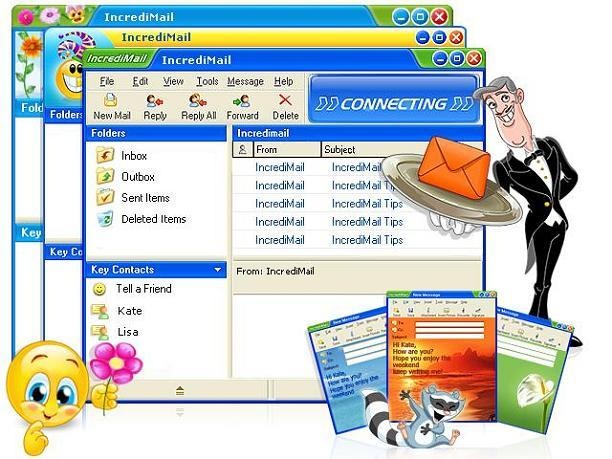
| Personalize your Emails with IncrediMail- Free Email Client [-| Life Rocks! 2.0 |-] Posted: 02 May 2008 06:00 PM CDT If you are using a desktop Email client to check emails, then you might be bored seeing the default look of all email client even if its the paid Outlook or Free Thunderbird. IncrediMail is a free desktop client which can give you much more than sending and receiving emails. IncrediMail allows you to personalize your emails by adding interesting backgrounds, emoticons, sounds, animations and 3D effects. Functionality wise, it comes with all normal features like POP access, advanced message filtering, HTML formatting etc. It also gives other features like animated email notifiers which uses funny and interesting animated character to notify you when new email arrives. Features of IncrediMail;
      | ||||||||||
| Safari 3.1 for Windows Triples its Marketshare [TechBuzz] Posted: 02 May 2008 01:26 PM CDT
I was left wondering, whether users would actually try Safari as their web browser in Windows. It turns out that this strategy worked for Apple, and Safari’s browser share has tripled in a month! Here’s a graph from Net Applications: Safari 3.1 which had 0.07% market share in March 2008, jumped to 0.23% in May. This jump is relatively small compared to Internet Explorer or Firefox, but still Apple managed to triple the market share in a month, which is quite astonishing. Should Apple be appreciated or criticized? Tell us through comments. [via: CyberNet]  | ||||||||||
| Yahoo! Messenger for Vista Gets Voice & SMS [TechBuzz] Posted: 02 May 2008 01:02 PM CDT Despite all the efforts made by Skype and Google Talk, Yahoo! Messenger is still the most popular instant messenger around. About a year ago, they told us that a Vista specific version of Yahoo! Messenger was coming and they gave us a preview of what it looked like. Yahoo! went silent after that announcement, which left us wondering whether the development was stopped. Hopes regained after a downloadable preview of Yahoo! Messenger for Vista was rolled out last December. It lacked few features like Voice and SMS. Yesterday, they announced that they’ve filled the gap by adding some new feature. Here’s a list of key features in Yahoo! Messenger for Vista:
Webcam view and chatrooms are still missing, but I’m pretty positive that they’ll make their way into Yahoo Messenger once they push it out of beta. Take a look at the screencast of Yahoo! Messenger for Vista before downloading it:
Well, it certainly looks the fanciest instant messengers of all time. Neatly designed! Download Yahoo! Messenger for Vista Beta  | ||||||||||
| Akismet treats my own comment as a Spam [Madhur Kapoor's Blog] Posted: 02 May 2008 12:35 PM CDT I have faced many problems with Akismet before but none so weird as this. Yesterday, my own comment which i left on my own blog was treated as a spam by Akismet. Don’t believe it, have a look at the image below.
The comment doesn’t even contain a single hyper link. So why the hell is it being treated as a spam. Have any of you faced this problem before? Any suggestions?        | ||||||||||
| How to Enable AnswerTips on your Blog [-| Life Rocks! 2.0 |-] Posted: 02 May 2008 12:07 PM CDT Today, one of my friend Aseem has written an article on KillerTechTips where he has mentioned about a feature in Newyork times by which you can get the meaning of any word on the website by double clicking the word. A pop up opens out showing the meaning of the word clicked. This feature can be enabled for any website and all you need is to add few lines of Javascript code. 1. Navigate to AnswersTips website and at the bottom of this page you can see different icons. Select any icon from the list and click Submit. 2. In the next page you need to enter your details and Website url and then click Submit. 3. Once you submit, you get the code. Copy the code, then paste it into your site or blog’s HTML template. 4. Double click on any word and you can see meaning of the word selected. This feature is also available as a Firefox plugin and Windows installer in case you need to have this feature for all the websites you open.       | ||||||||||
| Microsoft Live Labs Launch Photosynth [dailyApps] Posted: 02 May 2008 11:24 AM CDT Recently Microsoft Live labs introduced cool app called Photosynth. Microsoft says that this app brings in new technology which will forever change the way people think about digital photos. Photosynth is currently supported as an addon for Mozilla Firefox and Internet explorer.Another requirement is a good graphic subsystem installed for all the graphic shine. So if you have an older graphic card on your pc like the Intel’s 8xx series then Photosynth will not work.The application is free to boot and has an inbuilt image gallery to view some cool stuff. Here is a screenshot of Photosynth in action: Here are some notable features of Photosynth :
Microsoft Live Labs says their are plenty of other features as well which are to be explored, but i suggest you try out Photosynth Now! Related Posts at DailyApps      | ||||||||||
| 15 Smart Ads You just cant Miss!! Part 3 [Technospot.net] Posted: 02 May 2008 10:14 AM CDT The awesome response for the first part of 15 smart Ads which was on Digg Fp and Second part of 15 Smart Ads which gets overwhelming response from Stumble, Here are some more business Ad which shows us how creative ad agencies have become. This Time I am putting up instead of Ashish as he is busy with his Random Thoughts series and The Sugar Sync Give away ( Check it if you had not yet ) . As It takes a lot to make them and put then . You might have seen some but you wouldn't have seen it all. So just check out the Smart Ads and comment what do you think ? Disclaimer: I had received this all in email. If anybody wants to claim those images I will link them back from here Dont forget to stumble!!!
Your Play Ground
        |






 Apple was highly criticized in March for


| You are subscribed to email updates from India Technology Bloggers To stop receiving these emails, you may unsubscribe now. | Email Delivery powered by FeedBurner |
Inbox too full?  Subscribe to the feed version of India Technology Bloggers in a feed reader. Subscribe to the feed version of India Technology Bloggers in a feed reader. | |
| If you prefer to unsubscribe via postal mail, write to: India Technology Bloggers, c/o FeedBurner, 20 W Kinzie, 9th Floor, Chicago IL USA 60610 | |

No comments:
Post a Comment