India Technology Blogs Network |
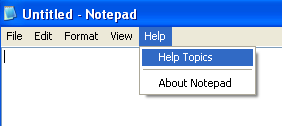
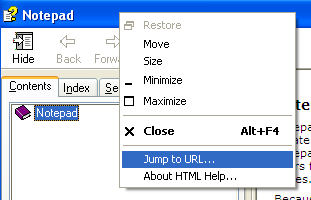
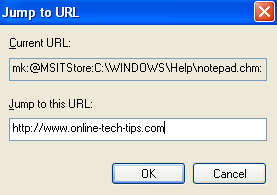
| Internet Explorer disabled or blocked at the office? Bypass restrictions [Online Tech Tips] Posted: 08 May 2008 06:31 AM CDT Is Internet Explorer disabled by an Administrator? Depending on the corporation you work for, your level of Internet access can vary from completely blocked to full access. One common restriction that many corporations place on computers is disabling Internet Explorer. This basically prevents you from opening Internet Explorer at all and just gives you a message that it has been disabled by an Administrator. On top of that, if you try to install a different browser, such as Firefox, Safari, etc, you might not have install privileges. So is there any way to bypass this if Internet Explorer is disabled on your computer? Yes! It’s actually a pretty sneaky way to use Internet Explorer without ever opening it! Here’s how. The workaround for this problem is to use Windows Help Files. Yes, oddly enough, you can use the help files that are available in most Windows applications to surf the web without using Internet Explorer directly. First, let’s open up a Windows application like Notepad or Wordpad or MS Paint. Then go to Help and click on Help Topics or press F1 to bring up the Help section. Now in the Help section, right-click anywhere on the main window bar (the blue bar) and click on Jump to URL. A new window pops up and there is a line for you to enter in a URL of a website you would like to view. Go ahead and type in any website that you want to visit! Remember to type in the full URL, like http://www.online-tech-tips.com, not just www.abc.com. Go ahead and click OK and you’re now browsing the web again inside of the Help window! Sweet eh! Note that this only solves the problem of Internet Explorer being disabled on your computer. It does not mean that the company does not have other security measures in place like proxy servers or a firewall that could prevent browsing of the Internet. If you want to figure out how to access blocked websites, read my article on using a service called JAP to do just that. Enjoy! Source: Tech Xpress Technorati Tags: internet explorer disabled, internet explorer blocked, IE disabled by administator, access blocked websites
Related postsCopyright © 2007 Online Tech Tips. Aseem Kishore (digitalfingerprint: a59a56dce36427d83e23b501579944fcakmk1980 (66.150.96.121) ) Internet Explorer disabled or blocked at the office? Bypass restrictions        | ||||||||||
| TwitBin - bring Twitter to your Firefox sidebar [TechZilo] Posted: 08 May 2008 06:29 AM CDT Twitter is gaining popularity and thousands of new users are joining every day. With a large audience to cater to, web applications, standalone desktop applications, Adobe AIR applications and Firefox addons are being made. TwitBin is one such Firefox addon for Twitter. Residing on Firefox as a sidebar, TwitBin can be used to send tweets, read tweets and view public timeline. There is an option to view only public tweets, friends’ tweets, direct messages or replies.  Perhaps the biggest reason why I liked it was because of the neat and beautiful design. Unlike some other Twitter addons which are downright ugly, TwitBin is elegant. Some crucial features are missing in TwitBin, though. There is no single click method (like clicking message icon in Twhirl) to send direct messages, though you can always use “d username direct message” format. Since this is an application in development, these features will in all probability, be added in future. The service uses TwitBin servers which might be a cause of privacy concern. Also, the service may slow down if the number of users increase greatly. The TwitBin website mentions that advertisements at the bottom will be used for monetization, but I have not yet seen any advertisements. However, TwitBin is recommended for active Twitterers due to the fact that it is beautifully-designed and lives inside Firefox sidebar (though an option to move it to right would have been better, since we all read from left to right, and TwitBin gets in the way). Visit TechZilo for more exciting content! View our top posts    | ||||||||||
| AbiWord - Fast, Multi-platform, Free Word Processor [Online Tech Tips] Posted: 08 May 2008 06:12 AM CDT Microsoft Office is a suite full of applications, of which only a few are used commonly. The most popular Microsoft Office application is Microsoft Word. However, Microsoft Word requires a more powerful computer as you move from one version to the next, making it impossible to run on low end computers. Furthermore, the product itself is not free and can be run only in a few, proprietary operating systems. If you want a fast, free word processor that is compatible on most of operating systems out there, go try AbiWord. AbiWord, which is one of the many applications from the AbiSource project, is a powerful word processor with lots of features suitable for work or just plain typing. While it is free, you can expect that AbiWord has all the features of a modern word processor. If you have ever used a word processor before, you won’t face a problem in using AbiWord because the interface will be not much different from any other word processing programs. AbiWord Features
You don’t have to worry about saving your documents with AbiWord. AbiWord saves your document with an open document format, which means that it is written in plainly readable text with XML markup, thus making it viewable by any text editor out there. This way, you don’t have to worry about other users that wanted to read your document without having AbiWord installed in their system. It is also recommended for users that want to share their documents to save their documents in Rich Text Format, to ensure best document compatibility between multiple word processing applications. Try this feature-rich, free word processor today! This is a guest post by Syahid A. from TechMalaya.com Tags: word processor, free word processor, fast word processor, microsoft word alternative
Related postsCopyright © 2007 Online Tech Tips. Aseem Kishore (digitalfingerprint: a59a56dce36427d83e23b501579944fcakmk1980 (66.150.96.121) ) AbiWord - Fast, Multi-platform, Free Word Processor        | ||||||||||
| Posted: 08 May 2008 03:01 AM CDT Just a fancy title that one. Just got my hands on a Macbook, and it feels really good. It’s a sexy baby and an inspiring one. Viewing websites on a Mac and safari is a great feeling to me as it reminds me every time of the quality levels. Every minute detail about the Mac is very impressive and it oozes out sheer brilliance in every application. Gradients, shadows, crisp lines, blunt corners and smooth curves it’s a beauty inside out. I was always a Mac/Steve fan and always wanted to get one. I don’t feel pity for Windows or my old Toshiba satellite, it’s a bull and have stood with me during hard times, now that there’s a stallion in the stable, we might have some ego problems working together. Copyright © 2008 DailySEOblog.com. This Feed is for personal non-commercial use only. If you are not reading this material in your news aggregator, the site you are looking at is guilty of copyright infringement. Please contact legal@www.dailyseoblog.com so we can take legal action immediately. Plugin by Taragana Do you want to place your link here for just $ 10 ? Contact me now. Ask your doubts on SEO at the discussion forums and get them answered by experts. FREE of course! An apple a day keeps the windows/toshiba away Random Posts   | ||||||||||
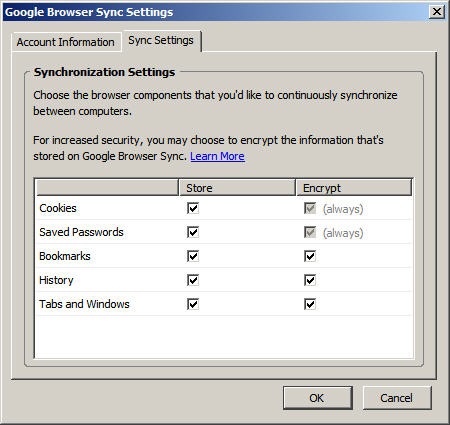
| Sync up Firefox browser with your google account [Technix Update] Posted: 08 May 2008 01:30 AM CDT I use firefox web browser every where, at my office pc, on my home desktop pc and as well on my laptop. I always wanted to sync up my firefox on all these locations automatically, including my firefox bookmarks, browser settings ,add ons so I don’t have to configure my firefox at all these places etc. So. I decided to google out the ways for syncing up my firefox browser with my google account. Basically there are certain things which needs to be in sync like firefox settings , its bookmarks, browsing history etc. Let’s cover them one by one Following are the firefox extensions required in order to sync up your firefox with your google account. 1. Google Browser Sync - It is a Firefox is an extension that continuously synchronizes your browser settings – including bookmarks, browsing history, browser cookies, and saved passwords – across your different computers where you use firefox. Note: It also allows you to restore open tabs and windows across different machines and browser sessions. So, it works restore the opened tabs any where you use firefox but the only precondition is google browser sync extension has to be installed. But ?
Are you worried of using your google account in firefox ? then don’t worry as this extension is provided by google itself which gives the option of encrypting of all the information you share across all the web browser locations. Encryption option is checked by default under settings of the extension(as shown in the image above). Still if you are not willing to to use this extension but would like to sync up your firefox bookmarks only at all the locations, then some other options are given below. 2. Foxmarks Bookmark Synchronizer - This is again a firefox extension which allows you to sync up your firefox bookmarks and it will work silently in the background to keep your bookmarks synchronized. You can also log in to my.foxmarks.com to manage your bookmarks from any computer. 3. Sync up using Microsoft Folder Share - To know more about how can you sync up using Folder Share. See this post on lifehacker here. If you find more ways for syncing up firefox in a better way, let us know through comments.     | ||||||||||
| OpenOffice.org 3.0 Beta Available for Download [-| Life Rocks! 2.0 |-] Posted: 08 May 2008 01:29 AM CDT OpenOffice.Org 3.0 which is due in September has released a beta version. This beta release is made available to allow a users to test and evaluate the next major version of OpenOffice.org, but is not recommended for production use at this stage. OpenOffice.org 3.0 features new “Start Centre”, fresh-looking icons, and a new zoom control in the status bar. Features of new version;
Download OpenOffice.org 3.0 [Via,Img Src DownloadSquad]       | ||||||||||
| Good Reads from the Blogosphere- Link Attack [-| Life Rocks! 2.0 |-] Posted: 08 May 2008 01:04 AM CDT It has been a long time since I published good reads from the blogosphere. So starting this series again, here are some of the good articles from the blogs I read regularly. Dont forget to add these blogs to your feed reader.
Hope you enjoyed reading them.       | ||||||||||
| DAISY makes Word Files Talk [Techie Buzz] Posted: 07 May 2008 10:18 PM CDT Well its not a joke but a Word add-in called DAISY (Digital Accessible Information SYstem) will allow you to listen to your word files. The add-in adds a additional option to your save menu to allow you to save as the file as “DAISY XML”. The add-in was created through an open source project with Microsoft, Sonata Software Ltd. and the Digital Accessible Information System (DAISY) Consortium and can be downloaded on SourceForge. Download Save as DAISY XML add-in. Via: [BetaNews] Featured Ads: Get 2 GB free space for free. Try Mozy now. © Keith Dsouza for Techie Buzz, 2008. | Permalink | No comment | Add to ---        | ||||||||||
| Blog move to another host [Alpesh Nakars' Blogosphere] Posted: 07 May 2008 07:53 PM CDT | ||||||||||
| Top 35 Text Editors Which Rock [Techie Buzz] Posted: 07 May 2008 05:02 PM CDT Smashing Magazine has put up a review of 35 useful source code Editors. Those editors can be quite useful for editing HTML, CSS or programming code or just as a notepad replacement. Here are some of my favorite picks from the list most of which I currently use too. The one editor that finds a worthwhile mention from my end if Eclipse which I use to create java and PHP projects. I use eclipse for creating WordPress plugins and client projects because of the better management features it provides me with. Would love to know which is your favorite editor. © Keith Dsouza for Techie Buzz, 2008. | Permalink | No comment | Add to ---
       | ||||||||||
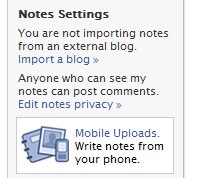
| How to Import RSS Feeds to Facebook [-| Life Rocks! 2.0 |-] Posted: 07 May 2008 03:00 PM CDT Facebook has an feature by which you can add RSS feed of your blog into Facebook. By this feature you can share the posts of your blog with your friends and display them on you profile. To add your blog feed, login to your Facebook account and click on notes in the left navigation. Once you click notes, you can see “Import a blog” in the right side under note settings.
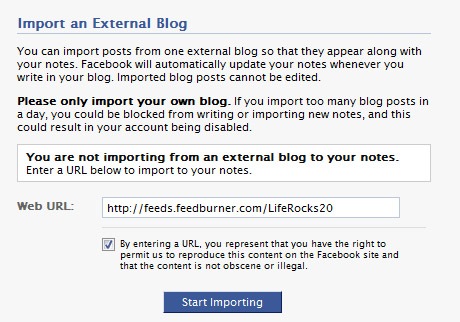
After clicking Import a blog, you need to enter the url of RSS feeds of your blog and click start importing. Facebook will automatically update your notes whenever you write in your blog. Imported blog posts cannot be edited. After importing, you need to confirm the import. Now all your blog posts will be available in notes and will keep updated. You can share these posts with your friends and also display them on your profile page.       | ||||||||||
| End of the Random Thoughts Series [Technospot.net] Posted: 07 May 2008 01:54 PM CDT
Some of the things that happened with this
There are few of them and many more which would take a long time if I start writing. I hope you enjoyed ( Some of them did not but still thanks as you read the posts ) and we will be back with our regular posts soon.
Your Play Ground
        | ||||||||||
| YouTube for India! [Quick Online Tips] Posted: 07 May 2008 01:16 PM CDT Google has launched the localised version of YouTube for India, which means that now netizens in India can browse the India-flavored version of Youtube and see what videos are popular right now among the Indian community! The top video charts on Youtube India will reflect what Indians are watching now, the featured videos are programmed to cater to an Indian audience, and they have signed up local partners to distribute their content through YouTube. Related Copyright 2008. Quick Online Tips. All Rights Reserved.      | ||||||||||
| Yahoo Warns Users from Dangerous Search Results [TechBuzz] Posted: 07 May 2008 01:16 PM CDT
SearchScan works by removing search results which use browser exploits to stealthily harm your computer by just visiting the link. Warnings will be shown next to search results, which potentially offer viruses or adware packed inside screensavers or any other software download. SearchScan will also flag sites which send unsolicited emails or sell your emails address. You can configure SearchScan from the settings page to never show potentially dangerous sites, or stop SearchScan completely.
Google has a similar initiative called StopBadware which flags malicious sites in search results. Google redirects users to a different page which warns the user about the potential danger instead of just showing warning notes in the search results. However, Google does not flag sites which send unsolicited emails. [Via: Yahoo! News]  | ||||||||||
| TiECON Chitika Blogpreneur Contest [Quick Online Tips] Posted: 07 May 2008 01:07 PM CDT Chitika has partnered with TiECON East to launch The Blogpreneur Contest which will feature the success of bloggers. If you can share the secrets to your blogging success and think entrepreneurs can learn from you, then you have chance to win some cool prizes. Simply publish a blog post on your blog highlighting the factors of your success in free form, include the contest badge within your post and email them your post link. Three winners will be chosen by a panel of experts from TiECON and Chitika on May 25th. Share your blogging success story and you could win immense exposure for your blog - showcase your story in front of thousands of entrepreneurs at the TiECON East Conference May 29th in Boston, MA, get featured as "blog stars" in a promotional spotlight on the TiECON Entrpreneur Forum, blog visibility on the TiE Boston website, Chitika Blog and much more… Hurry! The contest ends May 8th, 2008. Related Copyright 2008. Quick Online Tips. All Rights Reserved.      | ||||||||||
| YouTube India Goes Live! [TechBuzz] Posted: 07 May 2008 12:54 PM CDT
YouTube India will feature the same video content as YouTube’s main site, but popularity charts are based on the videos that are being watched in India. As IndiaTimes reports, Google had acquired YouTube.in and YouTube.co.in (both of which redirect to in.youtube.com) for approximately 2.44 lakhs late last year. Most of the partnership deals were signed around the same time, so we knew it was coming! Check out this funny YouTube India promotional video:
 | ||||||||||
| Winners of SugarSync Competition - Congrats!!! [Technospot.net] Posted: 07 May 2008 11:37 AM CDT Few days back we started competition in our forums where we decided to give our one year 30 Gb subscription for free . Here are the names of the winners Their account had already been upgraded ( Confirmed by The sponsor) and I will be contacting the winners personally on email. Many congrats to them for winning this. You can read their answers right in our forums post.
Your Play Ground
        | ||||||||||
| Google Adsense Status Page Tracks Known Issues [Quick Online Tips] Posted: 07 May 2008 10:52 AM CDT Yesterday Google Adsense had a huge lag in updating data for earnings, clicks, and impressions. As the confusion spread across the blogosphere due to lack of any official response, they realized the need for a status page to report downtimes and other known issues. Google Adsense has now presents their Known Issues page, that will list of currently known AdSense issues and possible work-arounds. Status pages are a great idea for top sites to inform users and visitors about technical errors and downtimes (Even QOT has a status blog!) Some issues live right now are-
When I noticed my low Adsense ad impressions yesterday, the first thing I did is check my hourly traffic statistics to look for significant web hosting downtime which can lead to low pageviews and poor ad impressions. But that was all ok. Then I checked out the buzz in other forums and it was a buzz everywhere… As Google engineers investigated the issue, my earnings data are fixed. Yesterday and today’s earnings are reflecting correctly (in fact a little higher!). Check your earnings and next time you notice a strange Adsense technical problem (besides strange adsense ads!), simply visit the known issues page and see if it affecting everyone. Related Copyright 2008. Quick Online Tips. All Rights Reserved.      | ||||||||||
| Join 9Rules: Round 6 Open for 24 Hours [Quick Online Tips] Posted: 07 May 2008 10:26 AM CDT The popular 9rules network has relaunched and round 6 is underway today. It is a 24 hour submission window when you can suggest your blog to 9rules, and become part of the network. The 9rules member agreement has also significantly changed and many hurdles that stopped you before are now gone. Take an objective look at your blog and check the obvious stuff. If you think your blog is worthy of the fame, submit your site to 9rules right now… In the last Round 5 in 2006, there were 1190 blogs submitted and 134 blog got in. Hurry! Round 6 starts will last till 11:59pm Eastern Standard Time today. If you missed it today, the next round is on August 6, 2008. Remember that - “Due to the number of submissions we receive, we’re not able to personally respond to each one unless we have some questions, advice, or are asking you to be a member.” All the best for 9rules. Related Copyright 2008. Quick Online Tips. All Rights Reserved.      | ||||||||||
| Windows XP SP3 Available on Windows Update [TechBuzz] Posted: 07 May 2008 02:21 AM CDT
If you haven’t installed SP3 already, head over to Windows Update and perform an express or custom install. Most of the changes in SP3 are visible only under the hood, so it won’t change your user experience in anyway. Just as a recap, check out last week’s post "Inside SP3" Automatic Updates will start rolling out in the next few months. Systems affected with DRM issue won’t be able to perform the upgrade because they’ve been blocked from Windows Update until the problem is fixed. Download Windows XP SP3 | Announcement  |





 del.icio.us
 digg
digg Technorati
 BlogPulse
 Google





 It was a nice experience for me experimenting with the


 Yahoo! and McAfee have teamed up together to make search results safer. Named as SearchScan (beta), it uses McAfee’s SiteAdvisor database to filter or flag potentially dangerous search results.


 Google has launched the localized version of YouTube for India at


 Windows XP Service Pack 3 is finally available on Windows Update and Microsoft Download Center. The release was delayed by a week due to some last minute DRM compatibility issue.

| You are subscribed to email updates from India Technology Bloggers To stop receiving these emails, you may unsubscribe now. | Email Delivery powered by FeedBurner |
Inbox too full?  Subscribe to the feed version of India Technology Bloggers in a feed reader. Subscribe to the feed version of India Technology Bloggers in a feed reader. | |
| If you prefer to unsubscribe via postal mail, write to: India Technology Bloggers, c/o FeedBurner, 20 W Kinzie, 9th Floor, Chicago IL USA 60610 | |

No comments:
Post a Comment