India Technology Blogs Network |
| HTC Touch Diamond Unveiled - Its Beautiful !! [dailyApps] Posted: 06 May 2008 09:33 AM CDT HTC officially unveiled its HTC Touch Diamond high-end handset during the “May 6 HTC Event” held in London which ended a few hours ago. As expected and as seen in several leaked images that appeared yesterday, the new device from HTC is slim and compact, and has a very nice overall aspect. The rumored diamond-like pattern on the phone’s back case is real, providing a look that is not only unique but also awesome to look at. HTC Touch Diamond’s official dimensions are: 102 x 51 x 11,5 millimeters, and weighs about 110 grams. In this slim case, HTC managed to put together enough advanced features to attract about any user who wants to have the latest technology in a handset and I seriously believe that it is going to give the iPhone some serious run for its money. Here are the official specs :
The HTC Touch Diamond is scheduled to be available to the general public sometime in June, when we are also expecting Apple 3G iPhone. The price of HTC is not yet known but the retail one will surely be pretty high in my opinion. But even otherwise, the price of a phone generally depends on country, operator and/or data plan, so the Diamond will surely have lots of price tags when launched. All we can do now is wait until June. Here are some more pictures of the HTC Touch Diamond for you to enjoy :
The only advantage that the iPhone currently has is its simplicity and effective design. The iPhone UI is one of the best in the industry and the Windows Mobile interface just doesn’t cut it for the iPhone. Another thing is that with the impending launch of 3G iPhone things are definitely going to hotter in the smartphone market. Do you think the HTC Touch Diamond has the punch and prowess to put a blow on the mighty iPhone? For more information on the HTC Touch Diamond visit the official page here Related Posts at DailyApps      | ||||||||||
| Posted: 06 May 2008 09:23 AM CDT This is a great advancement on the Google custom search product. Now, Google allows you to customize your custom search by - - Letting you chose the sites from the which the results are to be displayed. - Letting you specify keywords so that the searches are related to those keywords I think this is an excellent way to refine and show more accurate results on the custom search. How much of this improvement converts to clicks is to be proven though. More information here. Copyright © 2008 DailySEOblog.com. This Feed is for personal non-commercial use only. If you are not reading this material in your news aggregator, the site you are looking at is guilty of copyright infringement. Please contact legal@www.dailyseoblog.com so we can take legal action immediately. Plugin by Taragana    | ||||||||||
| Link attack on fellow bloggers! [ReviewSaurus - The Techie Dino!] Posted: 06 May 2008 08:07 AM CDT There are thousands of bloggers but fortunately I’m part of a wonderful group of tech bloggers, who churn out wonderful posts almost everyday. Here is the list of some of the most wonderful links and I’m sure you’ll love to bookmark them for later reference : 1. Abhijeet tells you that how you can manage those incoming flow of wonderful ideas. 2. Vodafone to sell iphone in 10 countries (including india) - Thilak from Tech-Buzz. 3. Vaibhav tells us that why it’s good to use Outlook 2007 than the web interface of Gmail. 4. Keith has mentioned 4 windows explorer replacements and suggested you to use QTTabbar. 5. Aseem kishore tells that why he loves new york times at Killer Tech Tips. 6. Reduce memory consumption of Firefox - ultimate tip by Nirmal. 7. Prevent the playlist from getting lost in winamp : Abhishek 8. Haris tells us that how we can get Kaspersky internet security for free and that too for six months. 9. Madhur, who’s always fasicanated with games reports that a new version of Prince of persia is expected by end of this year. 10. Well after all the productive tips, here comes the time waster from Ram of Teknobites - 200 flash based games for your entertainment. I’m sure that you’ll love these wonderful posts and don’t forget to include them in your favorite feed reader too! © BloggingSaurus - ReviewSaurus | TipsoSaurus       | ||||||||||
| Vodafone to sell iPhone in 10 countries [TechBuzz] Posted: 06 May 2008 06:37 AM CDT After losing to O2 to sell iPhone in Britain, the British telco giant, Vodafone, has entered into an agreement with Apple to sell iPhone in 10 countries. Vodafone will sell iPhone in Czech Republic, Egypt, Greece, Italy, India, Portugal, New Zealand, South Africa and Turkey at some time later this year. That’s all we know for now! I’ll keep you update when we have more information on this deal. The number of unlocked iPhones here in India is shockingly high. Even though iPhone lacks 3G, it should sell here in India (since we won’t be seeing 3G networks atleast for another 3 or 5 years).  | ||||||||||
| Measuring your ROI on SEO [Daily SEO Blog - SEO tips for wordpress and blogger users] Posted: 06 May 2008 06:37 AM CDT It makes sense for someone to look for the ROI when he’s investing money on an SEO project right?
And I think that’s an interesting question because, in any other project, there is a ROI calculator, especially SEM. When you are opting for PPC ads, there is a clearly a mathematics involved. In PPC, you have a daily budget and you know how much traffic you get, it’s all out there in numbers at the end of the day. But does the same happen with SEO?
Now, it’s not difficult to answer these questions you know. More than answering these questions, what helps is “educating the client”. The client would be only familiar of PPC campaigns and online advertisements, the ROI of which he calculates by using the simple formula of “No. of visits/No. of purchases.” Unfortunately, this simple formula when applied in the SEO perspective becomes a little vague. If you had all the numbers in place for SEO, probably a formula similar to the following would have made sense. (For product selling/ecom websites) ROI on SEO = (No. of goals achieved x Price of product) - Cost to SEO Conversion ratio OR Efficiency of an SEO = (No. of organic visits(traffic) / No. of goals achieved) Things are more tough in the case of non product selling websites. Here the core metrics would be (i) Page Views (ii) Traffic and (iii) Subscriptions The above formula can be tweaked to suit them. For sites dealing with subscriptions as their final objective. ROI on SEO = (No. of subscriptions x Effective revenue from Ads) - Cost to SEO Conversion ratio OR Efficiency of an SEO = (No. of organic visits(traffic) / No. of subscriptions) Basically, any website that employs an SEO can take the organic traffic to be their primary goal. The rest depends on what the goals are and what the revenue model is. Most of the times, if SEOs can ensure a boost in “value traffic” then things become easier to handle. And interestingly, this is where many clients gets into disagreement. Increasing traffic is not important, but “value traffic” is. What is the difference between “traffic” and “value traffic”? Meanwhile, “Value Traffic” is the one which has come from relevant sources, through a pull strategy, in the right amount. This traffic is likely to have more conversions as compared to the “bought” Digg traffic. There might only be 500 new visitors but 400 new subscriptions. But this makes more sense to the client. So essentially, even though it is tricky to find ROI ratios on an SEO project, if you dig into the details and have clear cut ideas on what the metrics are, it is quite possible. I have an inclination to believe that SEO Efficiency is far more better than SEO ROI though. Copyright © 2008 DailySEOblog.com. This Feed is for personal non-commercial use only. If you are not reading this material in your news aggregator, the site you are looking at is guilty of copyright infringement. Please contact legal@www.dailyseoblog.com so we can take legal action immediately. Plugin by Taragana    | ||||||||||
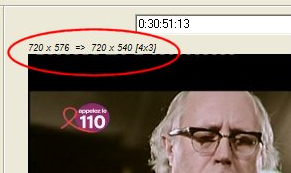
| How to capture and extract still images from video [Online Tech Tips] Posted: 06 May 2008 06:22 AM CDT Wish you could take a frame right out of your video and save it as a picture? I have a bunch of videos stored on my computer taken from my digital camera with scenes that I would want to extract to still images. If you’re in the same boat, then read on! For some reason, it’s pretty hard to find an application that extracts images from videos and that is free! I’ve been looking for one for a long time and I finally found one after reading a related tech blog. ImageGrab is a free program that you can use to extract images from all kind of videos including AVI, MPEG, WMV, live video streams, un-encrypted DVDs and many others formats. It’s pretty easy to use and works well! Also, the great thing about this program is that it requires no installation, just download and run the EXE file, so it won’t slow down your computer or add keys to your registry! That’s what I like to hear! First you need to load a video into the program, so click the open folder icon at the far left. You should now see your video in the window below along with the navigation keys at the bottom. You’ll also see the size of the video and the size of the image still at the top left. If for some strange reason your video is upside down, which the author of the program suggests it could be because of the decoder on your system, you’ll need to press the Invert button, which looks like two arrows in opposite directions. Now it’s time to actual grab a still image from your video! First set the folder where you want the pictures to be saved by clicking on the folder icon at the top right. Finally, navigate the video until you reach the frame you want to grab. You can use the arrow keys on your keyboard for precision. Now when you have the desired frame in view, use any of the buttons in the second group to extract the image:  or F12: Grabs a picture and saves it to the indicated folder. or F12: Grabs a picture and saves it to the indicated folder.
I don’t really know why you would want to take a snapshot and not save it, but the option is there for those who enjoy that!
Related postsCopyright © 2007 Online Tech Tips. Aseem Kishore (digitalfingerprint: a59a56dce36427d83e23b501579944fcakmk1980 (66.150.96.121) ) How to capture and extract still images from video        | ||||||||||
| Comodo Backup - Excellent, Free Backup Utility [Online Tech Tips] Posted: 06 May 2008 06:10 AM CDT Have you done a file backup lately? Imagine the stress if you lose your resume, business spreadsheets, browser bookmarks, blog posts, nearly completed thesis, precious vacation photographs etc. There are a lot of things that can destroy your important data: hard disk crashes, accidental deletion, power failure are just some of them. Be aware that data loss can be costly in the form of time, money and stress levels. To avoid these catastrophic mistakes, backing up is the best solution that you can take. If you haven’t already installed a backup utility on your computer yet, give Comodo Backup a try. Comodo Backup is a free backup utility from the creators of the well-praised Comodo Firewall; therefore you can be sure of its software quality. Comodo Backup allows you to quickly create a backup set in less than 3 minutes. How it works are pretty easy - give a name to your backup, choose a backup type, select the files / folders that you want to backup and choose the backup destination. Comodo Backup also translates as a set-and-forget application, you can set it once and it will work like a charm in the background. In case you lose any of your files in the future, a one click restore wizard will always be there to assist you. Comodo Backup Features
By default, Comodo Backup will start its backup service automatically on Windows startup to provide real time backup for service dependent backup sets. Therefore, you can leave this backup utility to work silently in the background once you have defined all your backup rules. This is a plus because no one loves to define a backup rule for over and over again. Overall, Comodo Backup is a painless, excellent free backup utility for any beginning or advanced backup users out there. Try it today! This is a post by Syahid A. from TechMalaya Tags: backup, backup utility, free backup utility, backup freeware
Related postsCopyright © 2007 Online Tech Tips. Aseem Kishore (digitalfingerprint: a59a56dce36427d83e23b501579944fcakmk1980 (66.150.96.121) ) Comodo Backup - Excellent, Free Backup Utility        | ||||||||||
| Posted: 06 May 2008 05:20 AM CDT
IF YOU WEREN’T A BELIEVER IN LUCK BEFORE, WOULD YOU BE AFTER THIS? Disclaimer: I got this in one of the forwarded email. I am looking for the original photographer or at least the posts if any. Do let us know so we can give the credit
Your Play Ground
        | ||||||||||
| Well written and Complete or Verbal and Halfway [ Random Thoughts ] [Technospot.net] Posted: 06 May 2008 04:59 AM CDT
Lets take an example of a post which is Well Written and Complete:
Effects :
What I find is the conversation is reduced between the authors and the readers unless there is scope of debate there. Now lets take an example of post which is Verbal and Halfway
Effects:
I gained 50% of what I aimed for with this experiment and these posts. So time for readers feed back.
Feel free and lets get the discussion going on .
Your Play Ground
        | ||||||||||
| Get Funny Status Updates in Facebook with Status Generatr [-| Life Rocks! 2.0 |-] Posted: 06 May 2008 04:16 AM CDT Status updates in Facebook are like any other status in IMs or other social networks. This helps your friends to know what you are doing or planning. In case you want to make this status more interesting and funny, here is a Funny Status Generatr for Facebook. This generator will provide you with some funny and long status messages which you can add to your Facebook Profile. Each time you click on the “Generate random Facebook status”, you get a new funny and interesting status. Copy this status message and paste it into your Facebook status message box. Funny Status Generator for Facebook       | ||||||||||
| Adobe Feeds Aggregator [Brajeshwar] Posted: 06 May 2008 01:29 AM CDT MXNA’s been a good resource site for Adobe Technology with articles being aggregated from many blogs. However, of late, there were lots of uproar from the community as MXNA wasn’t able to withstand the traffic onslaught. It was plagued with regular downtimes and slow in serving the aggregated contents. MXNA was started, during the times of Full as a Goog, by Mike Chambers and Christian Cantrell as a simple aggregation site for Macromedia technology related blogs. My website was lucky to be one of those first few which MXNA aggregated during its early days. With the move to Adobe, MXNA grew tremendously, outgrew its infrastructure and it has been really seeking attention for an improvement. Currently, Adobe Feeds runs on a new architecture;
The initial MXNA was powered by one single server running ColdFusion 6 and MySQL on Apache. Related Articles
Rights reserved © Brajeshwar 2001-2008. Quotes, excerpts or reproduction of any of the article is possible solely under the Attribution-Noncommercial-No Derivative License.  | ||||||||||
| Replace your windows explorer with something better [Techie Buzz] Posted: 05 May 2008 04:55 PM CDT I have used a couple of cool windows explorer replacements that adds tabs to to the regular explorer navigation. If you want to switch to a tabbed windows explorer experience then I recommend you one of these below. If you are one who opens more than a couple of windows to work with files from different folders then QTTabBar is the right software for you. xplorer² lite is a very good alternative for your regular Explorer windows and performs better than QTTabBar. It is a lightweight version of xplorer² software which is available for commercial usage. It is free for personal and academic use. ExplorerXP is a very fast, small, compact and innovative FREEWARE (for non - commercial use) file manager for Windows 2000/XP. Unlike the regular Windows Explorer, it displays the total size of each folder and allows you to browse multiple folders from a tabbed interface. XPlorer is a substitute for the Windows Explorer, adding multi tabbed features. So it is possible to have lots of locations opened at the same time, while we can manage them in an easy and eficient way. All of the above softwares help you add tabs and make your navigation easiers I am currently using xplorer² but have loved QTTabbar which is a awesome replacement for explorer, try out these and let me know how these work for you. Do let me know your experiences with these softwares. If you have not used these then I definitely recommend you start using it. © Keith Dsouza for Techie Buzz, 2008. | Permalink | 11 comments | Add to ---
       | ||||||||||
| Insert Images from Flickr into Word 2007 with Flickr4Word [-| Life Rocks! 2.0 |-] Posted: 05 May 2008 02:00 PM CDT If you need to integrate photos from Flickr into your word documents, then Flickr4Word is the best extension. This free word extension adds a program interface in Word 2007 that allows direct access to Flickr content through dialog box. Images cab be easily inserted into the document. To install this software, first exit all word documents and then run the msi file. This will add an option in the upper menu when you click insert. To select an image, click on the Flickr button and then search for the image using user name or search terms. Select the size of image and then insert it into the document.       | ||||||||||
| Xobni is now publicly available [Online Diary] Posted: 05 May 2008 01:54 PM CDT Xobni is an excellent add-on for Microsoft Outlook and has definitely simplified email management for me. Even Bill Gates fell in love with this application and referred it as the next generation of social networking. (Microsoft did try to acquire Xobni and it failed due to various reasons) Xobni was initially invite only and today they have made it publicly available to everybody. If you use Outlook and manage a lot of mail, Xobni is a must have. The following video highlights the unique features in Xobni I have been using it for quite some weeks now and it has negligible effect on Outlook’s performance. Try Xobni !       | ||||||||||
| Microsoft Withdraws, Yahoo! Stock Goes Down [TechBuzz] Posted: 05 May 2008 01:27 PM CDT Over the weekend, Microsoft officially withdrew their unsolicited bid to acquired Yahoo. Yahoo’s CEO, Jerry Yang, refused to settle down for anything less than $37 per share. Microsoft made some last minute efforts on Friday by raising the bid to $33 per share or an extra 5 billion dollars, but that didn’t work out for Yahoo. On Saturday, Yang and Yahoo’s co-founder, David Filo, had a face to face negotiation with Microsoft’s CEO, Steve Ballmer in Seattle. Yang told him in person that anything below $37 is unacceptable for Yahoo’s shareholders. The negotiation failed and Microsoft pulled away from the proposed acquisition shortly thereafter. Yahoo’s stock took a huge nose dive of about 16% and it has come down to $23.90 per share today. Yang must think of a strategy, else he’ll feel the wrath of his fellow employees who are under stock-options. If it continues to drop further, we could see Microsoft knocking Yahoo’s doors again, but this time for a much lower cost. Perhaps, we’ll see Yahoo merging with AOL or Google? Do you think Jerry Yang took the wrong decision? Tell us through comments. [Via: AP]  | ||||||||||
| What’s Your Blogging Personality? [Quick Online Tips] Posted: 05 May 2008 12:46 PM CDT Guest post by Alan Johnson, the author of The Online Business Handbook. That being stated, it’s obvious that, if you are interested in long-term results, being yourself is the best way to go. People are different, that’s how things stand and, obviously, that’s the way they will always stand. There’s no need to think that, as a blogger, you need to always go down a certain ‘proven’ path. What Do Case Studies Tell Us? Just take a few of the Web’s most successful bloggers as an example. Are all of their blogs identical? Of course not! Each and every one of them has achieved his or her status in his or her own way. If you were to analyze a few popular blogs, you would quickly understand that there is something special about each and every one of them. In other words, each and every blogger has, based on a series of factors such as personality, chosen a certain approach. I’m sure it’s more than clear what role the personality of the blogger in question has played, so that you have an important question to answer: Who Are You? What are you all about? What is your blog all about? What have you chosen to approach the market with? These are just a few of the questions you need to ask yourself if you are serious about making it in the long run as a blogger. Be yourself and make sure that your posts reflect that. In the end, answering the “what’s so special about this blog?” question can and will get you far. Having such an approach is indeed a must if you are interested in running a blog which stands out rather than one which always seems to go by unnoticed In the end, it’s all a matter of making sure that your blogging personality reflects who you are as a person, all a matter of having: That Little Something Which Makes You Special What is it about your personality that makes you special? What exactly is it you have to offer to the world? You have to try your best in order to come up with an objective answer to this question because, all in all, if you analyze all of the successful blogs out there, you will notice that each and every one of them has ‘that little something’. What’s your little something? What do you bring new to the blogosphere? What makes you stand out? Before publishing your first post, you have to make sure that your blog is built on a solid foundation to begin with because, if not, you would be the only person losing out as a result of such an attitude. I am convinced that, as far as you’re concerned, that is not an option so that it’s time to ask yourself: what’s your blogging personality?
Related Copyright 2008. Quick Online Tips. All Rights Reserved.      | ||||||||||
| YHOO Shares Crash: MSFT, GOOG Stocks Rise [Quick Online Tips] Posted: 05 May 2008 11:17 AM CDT After Microsoft withdrew the offer to buy Yahoo!, the expected happened on NASDAQ stock exchange - YHOO shares crashed, while MSFT and GOOG are holding firm and rising. The stock sell off has wiped out huge investor gains that followed after the Microsoft bid started. YHOO vs MSFTAt time of writing this, the Yahoo stock (YHOO) has crashed by over 16% in the stock market to around $24 while the Microsoft (MSFT) and Google (GOOG) share prices gained by 2% . The Yahoo! share crash has wiped out a huge 50 percent gain in Yahoo stock price since Microsoft Corp. made its initial offer on Jan 31. Imagine Microsoft had offered upto $33 per share to Yahoo! shareholders and now the stock is hovering at $24! I suppose some speculative investors are still hoping that the falling Yahoo! stock price might make Yahoo! reconsider the Microsoft bid again. Anyway, these stock market games will continue and I am sure some big bulls have earned a fortune out of this battle of the web giants. Related Copyright 2008. Quick Online Tips. All Rights Reserved.      | ||||||||||
| OoVoO - Video Conferencing Redefined [dailyApps] Posted: 05 May 2008 09:44 AM CDT
I got an invite email from a friend of mine, and it was for a product named OoVoO. I usually delete all invite emails before marking them as spam. But this time, I opened this one to see what it had to say. After reading the features, I ended up installing he product and now I feel so happy for having opened that email, because I’m now a big fan of OoVoO. OoVoO also happens to be a Webware 100 Winner and here’s what it does basically :
OoVoO is a real time video conferencing product. We can easily compare it with Yahoo messenger or Live messenger. But OoVoO is far superior, when we compare the video conferencing aspects of the product. The video and audio quality is really mind blowing. Even when the bandwidth is limited it performs above what you’d expect it to. The video is almost instantaneous and there are no jerks in the voice. OoVoo supports video conferencing for upto 6 people at a time. Even when all the 6 people are active the conference quality remains the same. The product has a neat interface in which all the 6 videos can be arranged. One major feature that most of the other products in this niche lack and OoVoO has is the conference record facility. We can record the audio and video conferences that we conduct at the press of a single button. Already many companies here in India are using OoVoO for conducting discussions and recording them to be distributed. I suggest you give this amazing app a try. You can download it from here.
This post was guest blogged by Kenney Jacob. He is a Successful Entrepreneur and Technology Evangelist. He blogs regularly at I am a Techie and his Personal blog. Related Posts at DailyApps      |



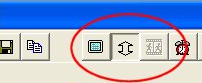

 or F5: Takes a snapshot without saving it to the disk.
 or F7: Saves the previous snapshot to the disk.
 or CTRL+C: Copies the snapshot to the clipboard.
 That’s it! You have just captured a still image from a video! Now go post it somewhere so we can all see! Enjoy!


 Today I got a very honest comment one of our posts on


 del.icio.us
 digg
digg Technorati
 BlogPulse
 Google


 This guest article was written by


| You are subscribed to email updates from India Technology Bloggers To stop receiving these emails, you may unsubscribe now. | Email Delivery powered by FeedBurner |
Inbox too full?  Subscribe to the feed version of India Technology Bloggers in a feed reader. Subscribe to the feed version of India Technology Bloggers in a feed reader. | |
| If you prefer to unsubscribe via postal mail, write to: India Technology Bloggers, c/o FeedBurner, 20 W Kinzie, 9th Floor, Chicago IL USA 60610 | |

No comments:
Post a Comment