India Technology Blogs Network |
| Free System Mechanic and Iolo Anti-Virus Genuine License Key [-| Life Rocks! 2.0 |-] Posted: 02 May 2008 08:01 AM CDT One year License and Download of Popular software System Mechanic and Anti-virus from Iolo is available for FREE. System Mechanic is a very useful all-in-one software for computer beginners to maintain your computer in tip top condition. It automatically repairs errors and fragmentation, cleans out clutter, and tunes up your PC so that it runs smoothly, reliably and faster. iolo AntiVirus keeps you safe by using advanced real-time technology that provides continuous maximum protection and automatically repels viruses before they can enter your computer. The procedure for downloading and getting FREE license key is same for both software. 1. Navigate to this link for System Mechanic and this link for Anti-Virus and press continue button 2. Now you can see a page with the Item Code, Description with the software name and Free Download Offer with the order total showing $0.00. Click Secure Checkout button. 3. Next step you enter your details, most of the fields are mandatory, but only the email ID need to be valid, this is where the license code is being sent. 4. Now select Email delivery and place the order. Once the check out is finished, you get email from iolo technologies, with the user ID and license. 5. Download the software and enter the license keys you received in email. Download System Mechanic | Download iolo Anti-Virus This could be a limited period offer, so hurry and download your copy of Free softwares which is valid for one year. Thanks to Raymond for finding these offers.       | ||||||||||
| Free PC Tools File Recover with Full License Key [-| Life Rocks! 2.0 |-] Posted: 02 May 2008 07:20 AM CDT PC Tools File recover is one of the top rated softwares for recovering deleted files.File Recover is a safe, affordable and easy-to-use file recovery solution, designed to recover and restore deleted files from hard drives, floppy drives and other types of fixed media. PC Tools File Recover license key is priced at $29.95. Raymond has found a way to get a free license key for PC tools File Recover. 1. Visit this page and enter your name and email address and click “Request Free License” to get your license key. Make sure that you enter the valid email address as key is emailed to your address. 2. Download PC Tools File recover from this link. 3. Install the software and register using the license keys which has been mailed to you from PC tools. Now you have a recovery software worth $29.95 for free, but there is one catch to this offer, this will be expire on 7th September 2008. But still you get full recovery software for 5 months.       | ||||||||||
| How to setup a live real-time polls using Google Docs [Online Tech Tips] Posted: 02 May 2008 06:29 AM CDT I don’t think many people noticed, but Google Docs released a new feature a while back that lets you create live polls instantly and share the data with the participants while the poll is going on! That’s pretty neat! They can see the live data of the responses as people fill out the form. Basically, you have to create a Spreadsheet and then setup a form on the spreadsheet. I’ll go through the steps to do this as it’s pretty easy to do and very cool! How to create a real-time survey/pollFirst step is that you need to log into your Google Docs account and create a new spreadsheet. Now click on the Share tab at the far right of the screen. It’s between the Discuss and Publish tabs. Name your spreadsheet something that represents the type of poll you are creating, i.e. “Best Game Console” or “Best Looking Celebrity”. Click OK and you’ll be brought to the share options. Under the Invite People section, you need to choose “to fill out a form” radio button, then click Start editing your form. A new window will pop up that lets you create your form. It’s pretty self-explanatory in that you can create a text question, multiple choice, check boxes, or a list. You can continue to add as many questions as you like. Click Done when you are finished and you’ll see a preview of the form. Click Next to choose who you want to send it to. You can choose from your contacts or you can simply copy the link at the right and send that in an email. To see the form itself, click on Go to live form at the top right. Now to see to the data coming in, simply close the pop up window to get back to your main window. You can now click the X at the right to get back to the main spreadsheet itself. You should now see that it says this spreadsheet is receiving entries via a form. Go ahead and fill out the form yourself and you’ll see the results show up automatically in the spreadsheet! Pretty neat! You can keep the form open as long as you like and the data will be updated automatically! Even as the data is coming in, you can create formulas and charts to graphically represent the data! Enjoy! Technorati Tags: google docs, create live polls, create real-time polls, live surveys, real-time surveys
Related postsCopyright © 2007 Online Tech Tips. Aseem Kishore (digitalfingerprint: a59a56dce36427d83e23b501579944fcakmk1980 (66.150.96.121) ) How to setup a live real-time polls using Google Docs        | ||||||||||
| Create your own photo galleries with Photo! 3D Album [Online Tech Tips] Posted: 02 May 2008 06:07 AM CDT From the last few years, digital photography has become a favorite past time for Internet buffs, with a huge number of photo sharing sites that popping up like Flickr, SmugMug, PhotoBucket and more. The best part of sharing your photos online is it makes the whole experience interactive - I can comment on your photos and vice versa, no matter where live. If you are looking for another interactive way to show off your photos, you can try Photo! 3D Album to create a 3D album gallery based on your digital photo collection. Photo! 3D Album is a free software you can use to create fantastic, picturesque 3D galleries from your digital photo collection. You don’t have to read some lengthy manuals before you can start creating your own 3D album because Photo 3D! Album is so easy to use. Launch the software and choose the “Create photo gallery” option to get started. Next, you need to choose a 3D gallery environment to display your photo showpieces. By default, there are 11 exquisite galleries to choose from including Art Gallery, Exhibition Hall, Showroom, Yard and more. Take a look at the accompanied screen shot to help you make your choice. If none of the galleries suit your needs, you can always download more galleries from the software’s homepage. You can start viewing your chosen gallery by clicking and dragging your mouse on the 3D view pane. A navigation arrow will show your movement to guide you through the gallery. To add a photo to a picture frame, you need to navigate to your photo folder on the left pane and drag the photo directly to any chosen frame. Repeat the same step for all the photos that you wan to include in the gallery. You can also move between gallery rooms using the 3D view pane to add more photos. Additionally, you can modify the alignment of your photos with the rotate tool at the bottom left of the interface. You can choose the most appropriate frame layout for your photos too - crop, fit or adapt. You are also allowed to leave comments and notes that will act as guides for your gallery visitors. Once you are done adding photos, you can view your finished gallery by clicking on the “Preview” button. The program will then switch to a full screen mode to show off your photo gallery in a glorious 3D view. You can enjoy the fully automatic 3D view or move through the gallery on your own by choosing the “Free Move” mode. To share your photo gallery among your friends, click on the “Share” button. There are 6 options that you can choose to save and share your 3D gallery. I strongly feel that the standalone .exe format is the best option because with it, you can show off your galleries anywhere, even without Photo! 3D album installed. If you plan to display your 3D album gallery on a website, choose either the VRML or Shockwave format. You may have to reduce the image quality too, so it can load much faster on the Internet. Overall, I love the fact that Photo! 3D Album is very easy to use and the 3D album galleries it creates are simply amazing. What can be better than showing off all your breathtaking photos in your own, personal 3D album gallery? Try Photo! 3D Album today! This is a guest post by Syahid A. from TechMalaya Tags: photo 3D album, 3D album, 3D gallery, 3D album gallery
Related postsCopyright © 2007 Online Tech Tips. Aseem Kishore (digitalfingerprint: a59a56dce36427d83e23b501579944fcakmk1980 (66.150.96.121) ) Create your own photo galleries with Photo! 3D Album        | ||||||||||
| Posted: 02 May 2008 05:51 AM CDT Well, if at all you come across a situation where you don’t have MS Powerpoint or Powerpoint viewer installed on a machine then here are some of the ways through which you can easily view that PPT file, which you thought wasn’t possible without Powerpoint or powerpoint viewer : 1. GMail : Send that file as attachment to yourself and you’ll see the option of viewing that file over the internet. Apart from that it gives you the option of importing the attachment in Google docs too. 2. Scribd : One of the best service when it comes to document sharing. You can use this service to upload the presentation file and it will show you the exact presentation in a way that you won’t miss your powerpoint at any point of time. 3. Zoho Show : is another excellent service which allows users to upload the file and view it. Well, you can even edit the file with it. Else you can always use Zoho Viewer, in case you are interested only in looking at the file. 4. Convert that file : Well, you can also convert that file in Jpeg or any other image format using Zamzar and you’ll be able to view the pages using any image viewer. All browsers can act as image viewer for Jpeg, Gif, Png extensions. Do you know any whacky way of viewing powerpoint files ? If you know one, do share it with us. © BloggingSaurus - ReviewSaurus | TipsoSaurus       | ||||||||||
| Lock the icons to your favorite position! [ReviewSaurus - The Techie Dino!] Posted: 02 May 2008 05:19 AM CDT Everyone gets familiar or used to certain stuff in life and if you are a regular computer user like me then I’m sure you would even prefer the desktop icons at specific locations. For e.g. I prefer that Recycle bin should be placed exactly below Internet Explorer, like we used to have it in the Win 9x series. Anyway, DesktopOK is one such utility which helps those people who love to see specific icons at specific places. Even if you change the resolution, the icons won’t leave their place. This small utility doesn’t require any installation. Just download it, extract it and run it and guess what you won’t even need to shell out enough space from your computer’s hard disk as well! It’s a very small utility and just takes around 34 Kb of space, even a document file is larger than that (heh)! If you want to ensure that the icons stay at their place and don’t move here and there, then DesktopOK is one utility which you want. Just ensure that if you run this utility from the deskop then use the same utility to keep it’s icon at a place where it won’t interfere with others :) © BloggingSaurus - ReviewSaurus | TipsoSaurus       | ||||||||||
| Tracking Pro-bloggers How [ Random Thoughts ] [Technospot.net] Posted: 02 May 2008 05:09 AM CDT
Here are my Tips to find more on pro bloggers without even asking them
So whats your way ? Got more Share with us…
Your Play Ground
        | ||||||||||
| Pagerank updated and the site is downgraded ! [Online Diary] Posted: 02 May 2008 03:52 AM CDT There has been another round of pagerank update and I see that many sites have got a higher pagerank and few of them have even managed to get a PR of 4 within few months ! This site had a PR of 4 from quite some time and even during the last update where few sites were penalized for selling Text Link Ads the PR of this site remained at 4 At that time, I thought that I wasn’t penalized since I was not selling Text Link Ads from my home page (which had PR4) and was only having post level ads (Around 5 post level ads were active). However this round of pagerank update has taken the PR from 4 to 2, reminding me of QOT’s PR downgrade from 6 to 3 ! I am not sure if dividing existing PR by 2 is the way of Google penalizing sites selling text link ads. I immediately stopped Text Link Ads and in a way it was even easy since a new month just began ! I have also raised a reconsideration request with Google ! But again I am not completely sure if TLA is the core reason behind this downgrade ! I moved my hosting from Dreamhost to MT some time back and one of the biggest mistakes I made was not to check on the XML sitemap. After the hosting change, the XML sitemaps generator plugin for some odd reason started putting the XML file on venukb.com/blog while Google was searching for it on venukb.com. I had manually set to venukb.com and during the move, the option changed to “Automatic” and happened to select the subdomain. And I realized this only after 3 weeks ! Duh ! The crawl stats also confirmed that the sitemaps were not accessible from quite some time ! I fixed the issue and even then I see that 0 pages from sitemaps are included in the search index. Has the PR downgrade affected traffic ?This site for one gets almost 80% of the traffic from search engines (mainly Google) and I have noticed that some of the high traffic pages are not longer in the Top 10 ! I do see a dip in the number of unique visitors, but after including the landing page, the pageview count hasn’t changed much. I am hoping the reconsideration request to fix the PR And yes be careful about XML sitemaps when you are moving to a new hosting ! (Though not sure if this is also the reason for downgrade !) Talking of PR, do share your experience as well ! Has it improved ? Do you see change in traffic with the improved PR ? ---       | ||||||||||
| Posted: 02 May 2008 01:21 AM CDT Someone who doesn’t want his name published asked me this question -
Average blogger here means who does not have large amount of traffic coming on his site and also who is not popular. This sounds very interesting to me. I was wondering why he wouldn’t google down the information. Because there are already thousands of blogs on “making money online”. Well, I did the same and found that all the information on the web is not really helping the “average blogger” as he puts it. An average blogger is someone who doesn’t have loads of traffic and doesn’t enjoy a “guru status”. So every money making guru us speaking of monetizing using affilate ads, adsense and image ads, but how effective is it on a blog with less than 100 uniques a day? The guys who advice this is probably enjoying a thousand uniques a day and it makes all sense for them to put up a chitika minimall ads or an ebay affiliate ad, but not for an average blogger. So let’s get down to the facts. First off, a little clarification on the “money making theory” and the “buy a Ferrari with your website” dreams. There are two models of monetization models available as I see it. (let me known if you have more.) Plan A. Plan B. Plan C. Plan A - works well and helps you make loads of money if you get the basics right. Phase 1 (Reaping Traffic) Phase 2 (Content hook) The idea is that the search engine traffic are predominantly “information seekers”. And they are on the lookout for finding the thing they want from all around the web. And they are the perfect target for you. Shortfalls Plan B Here, you may not get great CTR on the ads, but the following will be loyal and if you are selling a service or product, it’s easier to sell your services. Now, having discussed about the two models - Let’s see how a low traffic blog can monetize it. 1. Subscriptions 2. AdSense Ads 3. Image Ads 4. Product and Service Reviews 5. Offer a service So essentially, these are the main branches of methods to make money online, there are lot more available but all that makes sense only if you have a decent amount of traffic. Though I believe that there is scope for making money with less traffic, it is suggested that your efforts be to make your blog unique with rich content and unique followers, because if a blog stays without traffic for a long time, I don’t think anyone would be interested in it. Copyright © 2008 DailySEOblog.com. This Feed is for personal non-commercial use only. If you are not reading this material in your news aggregator, the site you are looking at is guilty of copyright infringement. Please contact legal@www.dailyseoblog.com so we can take legal action immediately. Plugin by Taragana    | ||||||||||
| vim As A Personal Wiki [iface thoughts] Posted: 02 May 2008 12:57 AM CDT vim is an extremely flexible and versatile editor and is one of those tools which have a cult-like following. Typically these tools are liked a lot by these followers and hated by others. So, this post is for those who like to use, or who are open to trying out, vim. One thing I have learnt from experience is that the tool to collect and organize our information must be easily available and easy to use. And that is where vim scores higher than any other tool to build a wiki. Some Backgroundvim inherently supports tags. These tags are more like bookmarks, and a tags file maintains an index of these tags. Using this, looking up a tag is extremely easy and fast. These tags have really been popular with the vim users, however, primarily for source code browsing. But there one more type of non-code tag that vim covers extremely well - the helptags. Whenever you use the command Here is the example: *zf* *E350* zf{motion} or {Visual}zf Operator to create a fold. This only works when 'foldmethod' is "manual" or "marker". The new fold will be closed for the "manual" method. 'foldenable' will be set. Also see |fold-create-marker|. We can use this to build a raw wiki system for ourselves. For example, we can have a file called ideas.txt, which has various entries with corresponding tags. Once the tags index is created, which we will look at shortly, you can jump to those tags using the command How toI needed to do two things to start using this system:
So we do the following.
That is it. We now have a system where we can create text files, tag its various sections using Nowadays I use the vim as a combination of wiki and outliner to record my ideas and thoughts, documentation, tasks and even contacts. I believe you can go to any extent to customize vim. You can create your own commands, your own syntax and your own operations. This was an attempt at showing how we can efficiently use vim as more than a code editor, on multiple platforms, using its inbuilt capabilities.       | ||||||||||
| One New York Times Website Trick You May Not Know [Killer Tech Tips] Posted: 01 May 2008 10:28 PM CDT This is a guest post by Aseem Kishore, a technology enthusiast and lead blogger for Online-Tech-Tips. I get my daily news from multiple sources, and my favourite online news source is the New York Times simply because it has the most well-written and engaging articles. Also, they cover just about every topic under the sun in great detail. The New York Times is not only a great way to get news, it's also a great learning tool. You can do everything from reading product reviews of digital cameras from CNET to researching stocks and mutual funds. You can also find jobs, find real estate, and look for new and used cars! However, there is one feature of the New York Times Website that I just love. It's is probably the most useful out of all the features on the site. So what is this great feature, you ask?
Go to the New York Times website and click on any article to read it. Now read it until you hit word that you don't know or understand. If you want to get more information on that word, simply double-click on it! Yes that's it! You can get the definition of any word by just double-clicking on it. That's probably the neatest feature ever! Once you double-click on a word, a pop-up window will appear that automatically passes that variable to a search query against Answers.com/Reference. You get the dictionary definition always, and depending on the term, you will get other information that is related. For example, I double clicked on the word synapses and I got a pop up with a dictionary definition along with links to jump to the Columbia Encyclopedia entry for the word, a Science dictionary and Medical dictionary definition also! Now that's cool! Double clicking on a different word will pull up different resources, along with the definition. For a tech person like me, this is a great use of newer web technologies. Get personal computing tips, tech news, software reviews and more by subscribing to Aseem’s blog at Online-Tech-Tips.com.       | ||||||||||
| The Best of Last Month from Lyte Byte - Apr 08 [Lyte Byte] Posted: 01 May 2008 08:37 PM CDT Its been a while since I write the post on the series ‘The Best of Last Month‘ and I thought it would be appropriate to start it again. If you have missed any top posts over the last month, here is the top 5 from April 2008.
My new mobile phone helped me to write Nokia N95-4 8GB review which has become one of the top post of Lyte Byte. These days, I am writing more on Excel Tips. Although I am planning to write more on other Office Applications like Word and Powerpoint and also more on free applications for Vista. Stay connected for the upcoming How-to tips and tweaks. As a reader of Lyte Byte, what is your suggestion? Should I diversify the topics covered or should I just concentrate on one field? Copyright © 2008 This feed is for personal, non-commercial use only. The use of this feed on other websites breaches copyright. If this content is not in your news reader, it makes the page you are viewing an infringement of the copyright. (Digital Fingerprint: qfjk452hj34hjfjh12h4f1hj3dld45jd312j4112341d4hjdh) ---
    | ||||||||||
| Flash SWF and FLV/F4V Video is now Open Source [Brajeshwar] Posted: 01 May 2008 03:13 PM CDT  Image from Adobe Open Screen ProjectA consistent, more open platform for developers to drive rapid innovation, vastly improving the user experience. Today, Adobe announced the Open Screen Project and with it came the ultimate good news — the SWF and FLV/F4V formats are now totally open source. Adobe has dropped the licensing restrictions on the formats. So, not only can you create tools that writes SWFs (this was already open) but now you can create tools that plays the formats back (you no longer need to just rely on the Flash Player). The Open Screen Project initiative by Adobe is supported by a group of industry leaders, including ARM, Chunghwa Telecom, Cisco, Intel, LG Electronics Inc., Marvell, Motorola, Nokia, NTT DoCoMo, Qualcomm, Samsung Electronics Co., Sony Ericsson, Toshiba and Verizon Wireless. Well, one of the missing name in the list above is that of Apple, which feels that Flash is not good enough for the iPhone. It may be remembered that CEO Steve Jobs has publicly criticized Flash for being too slow. The project is dedicated to driving rich Internet experiences across televisions, personal computers, mobile devices, and consumer electronics. Also supporting the Open Screen Project are leading content providers, including BBC, MTV Networks, and NBC Universal, who want to reliably deliver rich Web and video experiences live and on-demand across a variety of devices. The Open Screen Project will enable a consistent runtime environment that will remove barriers for developers and designers as they publish content and applications across desktops and devices, including phones, mobile Internet devices, and set top boxes. The Open Screen Project will address potential technology fragmentation by enabling the runtime technology to be updated seamlessly over the air on mobile devices. The consistent runtime environment is intended to provide optimal performance across a variety of operating systems and devices, and ultimately provide the best experience to consumers. Adobe’s work towards accelerating the deployment of content and Rich Internet Applications (RIA) includes;
So, we see that the next version of the Flash Player and the AIR runtime will have two separate parts. The layer that is platform specific will be separate from the layer that is the real brains of the Flash system. This means that it will be easy to embed the Flash player any new non-PC device. All you will have to do is port the platform specific layer to your device. And Adobe will be providing a reference implementation so that you can see exactly how to do it, just making minor changes related to the specifics of your platform. The Silicon Alley Insider went ahead to speculate that Adobe is finally ready to start competing with Google and Apple for mobile platform developers. What does this mean for the Flash Platform Developers and Designers? I think Aral put it on a much better way. It means Flash everywhere. It means you picked the right platform to develop your skills on. It means Flash will be around for a long, long time! References; Related Articles
Rights reserved © Brajeshwar 2001-2008. Quotes, excerpts or reproduction of any of the article is possible solely under the Attribution-Noncommercial-No Derivative License.  | ||||||||||
| Three 30-GB SugarSync subscriptions free give away [Technospot.net] Posted: 01 May 2008 02:12 PM CDT Sugar sync is an application which allows you to create a back of your files on web but also sync them between your PC , Mac and Phone and on top sync between them. You just makes changes on your phone and it gets reflected both on your PC and MAC. You can read the complete review here. We have 3 subscriptions to give away which is 50$ each and with a subscription of One Complete Year free of cost with 30GB storage. Awesome isn’t it!!!! So now we have gives aways we have some rules laid down so you we can have some interaction done here.
So don’t wait just start working on it and make some good answer or something creative and attractive. Hit it and will be yours. Comments are closed on this post.
Your Play Ground
        | ||||||||||
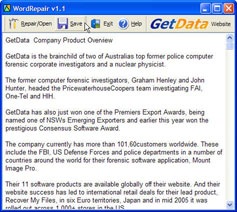
| Repair Corrupt Word Files with RepairMyWord [-| Life Rocks! 2.0 |-] Posted: 01 May 2008 01:40 PM CDT Repair My Word is a free data recovery program for Microsoft Word documents. It is designed to recover text from damaged or corrupt Word files that will not open normally. The recovered text can then be saved as an error free Microsoft Word document. Repair My Word will allow you to obtain access to the contents of corrupt word documents. It will repair Microsoft Word 6.0, Word 95, 97, 2000, XP, and 2003 for Windows. Repairing corrupt files is easy task, all you need is to open the corrupt or damaged file and review the recoverable text in the preview window and save this text to a new error free Word file. This software can repair the following types of word document errors.
This software does not support Word 2007 documents.       | ||||||||||
| Iron Man, the Movie [Brajeshwar] Posted: 01 May 2008 01:02 PM CDT  Images of Iron Man Iron ManTony Stark is forced to build an armored suit after a life-threatening incident, he ultimately decides to use its technology to fight against evil. Tony Stark (Robert Downey Jr) is a billionaire geek-techno-business-tycoon of the Stark Industries that supplies some of the latest high-tech weapon system to the US military. He leads an obnoxious lifestyle, punctured with an abundant dry sarcasm oozing out of his jokes and an immense sense of humor firing at stunningly rapid reflexes much like many of his company’s own weapons. Iron Man, released today, has plenty of humor, lots of snappy one-liners, a surprisingly good plot, stunning action sequences, those moments of self discovery and realization, betrayal, forgiveness, love all nicely packed into one hot movie for this summer. The movie opens with Tony on a trip to Afghanistan to demonstrate his latest weapon, the Jericho Missile to the US Military. His convoy was attacked, ironically by the same weapons produced by his company. He was taken captive by the Afghani militants. He wakes up in a cave with a battery powered electro-magnetic disc carved into his chest which prevents the shrapnel from piercing his heart. In exchange for his freedom, the militant warlord Raza (Faran Tahir), asked Stark to make the same Jericho Missile prototype.
Stark’s assistant Pepper Potts (Gwyneth Paltrow) is an extremely smart lady who have a secret crush on him. She does everything for him, from setting up appointments to “taking out the trash” he slept with the night before. In the cave, Stark knew he won’t be free even if he completes the missile prototype and thus builds himself a crude yet working, effective iron suit, loaded with some powerful weapons and propellants. The escape scenes in the movie was one awesome shot and you won’t even realize the CGI involved here. You’ll hear a bunch of familiar home-tunes, yes, there are lots of Hindi, besides Afghani and perhaps some Urdu, spoken by the militants and there were no sub-titles, so I’m assuming those conversations are not important to the movie. Nonetheless, later in the movie Pepper “Translates” some portion of the Hindi, good enough to spark even more romance for her boss. After destroying the terrorists’ supply of Stark Industry manufactured weapons, Tony’s Iron suit shoots him skyward, safely out of the camp and into the inhospitable desert. With his suit destroyed on impact, he gets a lift home to America courtesy of his close friend and military liaison Jim Rhodey Rhodes (Terrence Howard) who never stopped searching for him during all the time he was held hostage. Back in the US, he discovers what he really wanted to do and shuts himself in his “every boy’s dream lab” building and improvising his better, efficient, Iron Man suit. He even beta-test his suit and saves innocent men, women and children in Afghanistan from the same militants that tortured him. Well, beyond that, it will be rude on my part to spoil any more of fun. By the time the movie ends, you’ll realize that this is just the beginning of another franchise — the Iron Man series — looks like we’d be seeing lot more of Iron Man in future. This time Marvel is doing it themselves, they ain’t outsourcing their comic characters to other studios no more. Iron Man is self-made, pretty much like Batman but without the brooding demeanor. Tony wasn’t stung by an insect nor was sent to earth from a superior planet, he isn’t mutated nor alien-like but is rather the casual bad-boy with a taste for one-night-stands, engineering, and scotch. This “not the superhero type” attitude, is something that makes Iron Man so effective, taking well-worn feats of courage and subverting the candied results with a pinch of adulthood and plenty of acidic humor. The whole 126 minute was a wonderful treat. I was just thinking, India saw the Hindi dubbed version being released today. How would they have translated those indicative one-liners? Related Articles
Rights reserved © Brajeshwar 2001-2008. Quotes, excerpts or reproduction of any of the article is possible solely under the Attribution-Noncommercial-No Derivative License.  | ||||||||||
| Yahoo Messenger for Vista with Voice and SMS [-| Life Rocks! 2.0 |-] Posted: 01 May 2008 12:39 PM CDT Yahoo has announced the release of Yahoo Messenger Beta for Vista. This new version has Voice and SMS features added. You can now make free PC-to-PC calls to other Yahoo! Messenger friends, or if you have a Phone Out account, make low-cost calls to landlines and mobile phones for as low as 1¢ a minute. Another feature added is the support for free text messaging to mobile phones (SMS). Just enter a friend's mobile phone number, type a message and click Send. Your friend will receive your message on their mobile phone and when they reply back, it comes to you in Yahoo! Messenger for Vista. Yahoo Messenger for Vista also feature Email alerts, by clicking on the alert you can directly go to read the mail. This feature can also be disabled in the preferences. Apart from these features, the messenger has a new interface for Vista with skin chooser, tabbed Conversations and Customizable Contact List. Download Yahoo Messenger for Vista [Via Cybernetnews]       | ||||||||||
| Google TV Ads: Google Adwords on Television! [Quick Online Tips] Posted: 01 May 2008 12:38 PM CDT Want to see you Google Adwords on television. The new Google TV Ads promise to show your ‘Ads by Gooooogle’ to millions of television viewers glued to their TV sets and waiting to click. Google TV Ads is a flexible, all-digital system for easily buying measurable TV advertising and a great way to showcase your business products and services to a new audience. Google TV Ads for Television AdvertisingGoogle says the program has been invitation-only beta test since June 2007 and is now available to all US-based advertisers. Now you can launch a national television ad campaign right from your existing Google AdWords account!
You can start by visiting the Ad Creation Marketplace to create a television commercial, where industry professionals can provide script writing, editing, production, and voice-over talent. There is a deal where they can reimburse the cost of creating your ad through Ad Creation Marketplace by up to $2,000 as a credit in your Google TV Ads advertising account after it goes live. You can request a Custom Campaign Proposal to let specialists create a customized campaign to help you get started. Join the webinar (May 7) where experts in TV advertising and will reveal tips on how Google TV Ads can help you drive more web traffic and increase your sales volume — turning TV viewers into customers. With Google TV Ads, you can reach over 13 million households nationwide on 94 channels like CNN, ESPN, Discovery, CNBC, FOX, National Geographic etc. Watch this video about a client’s success with Google TV Ads. Related Copyright 2008. Quick Online Tips. All Rights Reserved.      |


 Its a human thing to get fascinated by seeing somebodies success and imagine I wish. Its good we wish and we dream about it but how much Are you doing about it ? Pro-bloggers secrets are not actually secrets. They are just before you but your mind is so much over whelmed with their success you just cant see.


 And if any of you are running Text Link Ads and also get a huge amount of traffic from Google, you should consider switching the text ads off !


 ( aff link ) which is 10gb for 45 days.. This is necessary as the winners account will be upgraded to 30GB plan for a year.




 Just prior to this, the movie fills in with the origin of Tony Stark as a genius inventor, but a Pompous smirk, suave cockiness, and nonchalant quips in tow, Scotch-swigging, fast-talking womanizer, who would rather enjoy the casino game than to receive a prestigious award. He lives in a breath-taking Smart House built atop a hill in Malibu, California. He even appears on the cover of Rolling Stone, have a childhood photograph with Bill Gates of Microsoft.


| You are subscribed to email updates from India Technology Bloggers To stop receiving these emails, you may unsubscribe now. | Email Delivery powered by FeedBurner |
Inbox too full?  Subscribe to the feed version of India Technology Bloggers in a feed reader. Subscribe to the feed version of India Technology Bloggers in a feed reader. | |
| If you prefer to unsubscribe via postal mail, write to: India Technology Bloggers, c/o FeedBurner, 20 W Kinzie, 9th Floor, Chicago IL USA 60610 | |

No comments:
Post a Comment