India Technology Blogs Network |
| Technix Update Finally Moved to new web host [Technix Update] Posted: 05 May 2008 09:17 AM CDT After facing some issues , finally we were able to move Technix Update from the old web host ( lunarpages.com ) to the server with new web host ( zzhosting.com ). As the lunarpages offered to us upgrade our account from basic hosting to vps hosting with an approximate amount of 600$ excluding the cost for moving the data from the server which is 75$ per hour job for them. All these charges forced us to change our web host. For those who are interested in reading, let me tell you guys the story in detail. On the weekend( 3 and 4th may ) we decided to move Technix Update which is the largest site of our group, from the shared server on lunarpages , due the repeated warnings from the lunarpages admin team that our account ( which has three sites mobiletipstricks.com , technixupdate.com , troublefixers.com) was using too much resources which is far beyond the acceptable limit in terms of CPU usage, RAM usage and MSQL etc. Basically this was the first time for both us, to move our blog and we did not know the procedure do’s and don’t, so first we studied across the web for any type of info regarding this, also consulted with some of the friend blogger’s . Time 12:30 pm 4th may: We take the blog database backup , and entire public_html folder as we don’t want to take any kind of risk on Saturday 3rd May in the night. Time 11:00 am 4th may: Around this time I talked with Sahil from tricks4fun.com on phone, before purchasing an account on zzhosting.com , then after puchasing the account we were very happy as we were ready with the backup and ready to move all the stuff to the new host as soon as our account got activated. Time 3:00 pm 4th may: Our account on the zzhosting.com got activated , we connected with new ftp account on the server and started restoring the public_html folder as it is, then we imported the database with the phpmyadmin interface, which initially gave some errors as we have not created a blank database, then after some tries we were able to restore the database. Then it was the final step for us to configure the wp-cofig.php with the new database username and password, then we opened the blog with the temporary url given by the new host. Time 4:00 pm 4th may: Technix Update opened successfully but with a 404 page in the posts section, all other sections like sidebar ,latest post , latest comments were successfully displayed was working fine, but there was no post in shown then we think there could be a problem with the single.php of our theme we replaced it but does not work. Time 7:00 pm 4th may: We were struggling with the problem which still persisted, then finally we realised our mistake of not changing the dns server entries of the domain name, then modified the dns server entry which will definitely take some time and we were not sure that this will resolve the problem or not. Time 8:30 pm 4th may: By this time we were so much disappointed as things has not worked the way we have assumed, we turnoff our system ,our laptops decided to look on this issue later with some expertise help. We leave for the market to refresh ourselves, we roam here and discussing about the issue then rohit decided to leave after dropping me at my place. Time 10:00 pm 4th may: I came home and, I was not able to resist my self from checking the status So, I checked the technixupdate.com and was amazed to see blog was totally redirected to new web host and with the new dns server entries came into effect in 3-4 hours and with all the posts started appearing on the main page. Finally I was so happy as our work has been fruitful, I called rohit and told him that we are finally successful. We were able to save so much money which we could have given for the upgrade, and learned a lot after recovering from the issues we had faced while moving the blog.:) We were totally layman’s in this but learned a lot, Please let us know your thoughts on this through comments.     | ||||||||||
| Orkut lets you put status messages ! [ReviewSaurus - The Techie Dino!] Posted: 05 May 2008 08:12 AM CDT Orkut has rolled out a new feature where it allows you to update the status message and lets you shout any message which you want to tell your friends. This feature isn’t available dynamically like we have in Facebook, which allows you to without loading any page and is done with the help of Ajax. Strange fact is that you can’t see the update status feature until and unless you go in the edit profile and until you click on the Update button. Once you do that you’ll get the option of updating the status and that’s just below your name. Well, as Thilak suggested that it’ll be cool if Orkut could integrate twitter with it and it will also be cool if at all, it puts the updated message in the update timeline or may be if it puts it right below the profile name (in left sidebar, where we get the status message of Gtalk). Well, I guess someone should come up with a Twitter update orkut app, after all Orkut now supports app installation. © BloggingSaurus - ReviewSaurus | TipsoSaurus       | ||||||||||
| How to edit the right click menu in Windows [Online Tech Tips] Posted: 05 May 2008 06:20 AM CDT The last time I right-clicked on a file, I was annoyed by the fact that it took 2 full seconds to load the menu. Why? Well because I had installed so many different applications on my computer that a couple of them added themselves to my right click context menu automatically! Some program ask you if you want to option and others do not. Now granted, I probably said yes a couple of times, thinking how useful it would be to have that in my right-click menu, but there are still some I don’t even use! If you’re looking for a way to remove applications from right click menu for files and folders, you can do it yourself with a little bit of registry hacking. First, take a look at my ridiculously long right click menu: Now that’s long!!! Too long! There’s Dreamweaver, Notepad, anti-virus, Pinky basket, PKZIP, SmartFTP, and PowerISO! Whew! So how can we customize the menu to something more manageable? First, make sure to back up your registry in case something gets messed up. Now open the registry editor by going to Start, then Run and then typing in REGEDIT. Edit right click menu for filesThere is a right-click menu for files and another for folders. To get to the one for files, head over to this registry key:
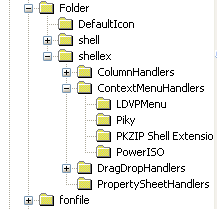
You should now see a listing like this: All the folders listed under ContextMenuHandlers are applications that show up when you right click on a file in Windows. You can either delete the folder to remove the option or simply disable the folder, which is better in case you want to bring it back later on. You can disable an application by clicking on the folder in the left pane and then right-clicking on the key value in the right pane and choosing “Modify“. All you need to do is add a minus (-) in front of the key value like shown below: Click OK, then the refresh button at the top and then try right-clicking on the file! The program should now be gone from the context menu. Edit right click menu for FoldersYou can follow the same steps as shown above for folders also, it’s just a different registry path. In order to edit the menu options for right clicking on folders, go here:
You’ll have to scroll quite a bit, but once you get there, it should look something like this: Again, you can either delete the folders under ContextMenuHandlers or you can simplt disable them by editing the key and putting a - in front of the value. Simple as that and works like a charm! Enjoy! Source: CypherHackz Technorati Tags: right click menu, right click context menu, windows right click menu, edit right click menu, right click start menu, change right click menu, customize right click menu
Related postsCopyright © 2007 Online Tech Tips. Aseem Kishore (digitalfingerprint: a59a56dce36427d83e23b501579944fcakmk1980 (66.150.96.121) ) How to edit the right click menu in Windows        | ||||||||||
| iComment - Turn any web page into an online discussion board [Online Tech Tips] Posted: 05 May 2008 06:01 AM CDT If you take a look at the bottom of this blog post, there is a comment section that acts like an online discussion board to allow web readers to voice their opinions, views, criticisms etc. Each day, a huge number of people leave comments on websites and blogs which are, in my opinion, a good way to build a more knowledgeable society. The problem is that some websites out there does not have a proper commenting system, which makes it troublesome for users to share their views on a particular issue. Therefore, iComment offers a free solution that can turn almost any web page into an online discussion board. iComment is a browser plugin that allows you to add, read, edit and share comments on any particular web page. All you need to do is to download iComment and install it into your computer. The only thing that iComment will add to your browser is an all-in-one toolbar button that won’t clutter your browser’s interface. How iComment works is pretty easy - you can add comments to a web page by clicking on the iComment button on your browser’s toolbar and select “Add Page Comment“. Next, type in your thoughts, give your comment some simple formatting (bold, italic etc.) if you wish to and click OK. Comments left by any users will be displayed as tiny, little minimized icons on the right side of your browser. You can click on the icons to read other user’s comments, reply to any comments made, edit your comments and more. If you have previously comment on any blog or websites before, using iComment will comes naturally to you. iComment Features
Like any community based tool out there, iComment thrives based on the number of people that use it. The more people that use iComment, the merrier it will be. I love the fact that it is very easy to use and provides an alternative, quick online discussion board for websites that does not have a place for web users to voice out their thought via commenting. Try and invite your friends to use iComment today! This is a guest post by Syahid A. from TechMalaya.com Tags: comment, discussion board, online discussion board
Related postsCopyright © 2007 Online Tech Tips. Aseem Kishore (digitalfingerprint: a59a56dce36427d83e23b501579944fcakmk1980 (66.150.96.121) ) iComment - Turn any web page into an online discussion board        | ||||||||||
| Display Thumbnail Previews in Taskbar with Visual ToolTip [-| Life Rocks! 2.0 |-] Posted: 05 May 2008 05:49 AM CDT Windows Vista has a new feature of thumbnail previews of open programs in taskbar. This feature can be enabled in Windows XP as well, all you need is the freeware Visual Tooltip. This freeware creates thumbnails for the taskbar which can positioned as you like and it can also replace your taskbar. Visual Tooltip makes it possible to show a thumbnail of a window by putting the mouse cursor over a button of the taskbar. After downloading the software, install and run it. The tool appears in the system tray and right click for selecting options. You can set the size, background and transparency of thumbnails. You can also pull a thumbnail at any place on the screen by dragging and dropping it. It remains in the foreground and is updated regularly. Visual Tooltip can also replace your taskbar with a three dimensional dock bar, similar to the ones in Mac. Thumbnails added as a dock bar. The thumbnails can have various rotations ( from 0 to 80 degree, CTRL key + mouse move on dock or on thumbnails, without clicking ). The dock bar can replace the taskbar. Visual Tooltip is a great software with lot of options considering the fact that its a freeware. Visual Tooltip is available for Windows XP and Vista users. Img Src: Visual ToolTip       | ||||||||||
| Gmail or Outlook [ Random Thoughts ] [Technospot.net] Posted: 05 May 2008 03:01 AM CDT
I agree that its the user and the usage decides which fits for whom but when I see to myself , probably simplicity and light weight applications is what I prefer too. How about you ? What you intend to use ? Discuss with us in comment and suggest me something more.
Your Play Ground
        | ||||||||||
| Is that email from Paypal or not? [ReviewSaurus - The Techie Dino!] Posted: 05 May 2008 01:54 AM CDT If you use Paypal then I’m sure that at least once in your lifetime you must have thought that if you have received the email from PayPal or is it that phishing email trying to take your username and password! Well, over the time spam filtering software and services have improved (thanks to GMail for raising the bar), however still there are many times when we get in such confusing situations. Well, here comes little handy tool from Iconix called eMail ID. It’s also marketed under TrendMicro’s brand too with the same name. eMail ID is an excellent tool which tells you if the email you’ve received is from the original source or not. It helps you in being safe from the phishing emails. The wonderful thing about this utility is that not only it works with Outlook express but it also works with web based email services like GMail, Yahoo Mail, Hotmail (Windows Live Hotmail..to be precise). For the complete list of supported platforms and services , you can check this page. I think that this is a really wonderful addition to the list of security products and one should definitely install it. It gives the peace of mind that no matter what, you won’t entertain any stupid phishing email and instead will work with real email only. © BloggingSaurus - ReviewSaurus | TipsoSaurus       | ||||||||||
| Orkut Adds Status Updates [TechBuzz] Posted: 05 May 2008 01:35 AM CDT Orkut is rolling out a new feature which allows you to set your status message. It’s pretty similar to the one which is implemented in Facebook, but Orkut allows emoticons (smiles) to be added in your status message.
Surprisingly, status updates don’t show up in your updates, just like how they do in Facebook. This means, when you update your status, it wouldn’t be published in your friend’s updates. That makes it a little pointless to have another status update, since Orkut already uses our Google Talk status message. I find it a little odd to have two status updates in a single profile page. I come across so many people on Orkut, who use last name to shout their status. Hopefully, those people will adapt to the new status update feature. It would have been awesome, if Google provided some basic integration with Twitter. I seriously hate updating my status on more than one service.  | ||||||||||
| Stop helping the spreading of spam from your computer! [ReviewSaurus - The Techie Dino!] Posted: 04 May 2008 11:57 PM CDT Well, don’t get surprised by the heading of the post. Yes, it’s quite a big possibility that you may be helping spammers in spreading the spam and that too unknowingly. There are various malicious software called bots and once they get installed on your computer, they make your computer participate in botnets. What are botnets ? Botnets is a network of various infected machines and the target of these botnets is to create nuisance in various ways. They use your computer to send spam, bombard servers from various DoS attacks, infect other computers, to serve porn or other stuff and make your computer act as a web server (anything illegal can be served from your computer and you can be held liable for all that activity!) How can be I safe from all this crap! In order to be safe from these botnets, you can take the following precautions : 1. Keep your computer up to date by running the windows update or any other system update in case you are running any other OS. Well, by taking all these small steps you can help not only yourself but many more. Happy Safe Computing! © BloggingSaurus - ReviewSaurus | TipsoSaurus       | ||||||||||
| Posted: 04 May 2008 09:42 PM CDT Multi Virus Cleaner 2008 is freeware, stand-alone utility for Windows that lets you scan, detect and remove major virus infections from a compromised system. It is not a substitute for full anti-virus protection, but rather a tool to assist administrators and users to clean already infected systems. It is similiar to McAfee’s AVERT Stinger utility, updates for which have been discontinued since last year. Multi Virus Cleaner is regularly updated and can detect over 6,000 common viruses, worms, trojans and dialers (including all variants of the Sober, MyDoom and Bagle viruses). The program features a fast, user-friendly scanner that requires minimal processing power. This program is better than running an online web based scan services such as Trend Micro Housecall, Symantec Security Check or McAfee FreeScan, some of which are highly inefficient at removing infections. Click here to download Multi-Virus Cleaner 2008 for Windows.          | ||||||||||
| Posted: 04 May 2008 09:27 PM CDT FileTypesMan is a freeware alternative to the “File Types” tab in the “Folder Options” menu of Windows XP or Vista. It displays the list of all file extensions and types registered on your computer. For each file type, the following information is displayed: Type Name, Description, MIME Type, Perceived Type, Flags, Browser Flags, and more. FileTypesMan also allows you to easily edit the properties and flags of each file type, as well as it allows you to add, edit, and remove actions in a file type. Also, sometimes, when you install a new software, it automatically replaces the file types associated with various file extensions. This means that when you double-click the file, the new installed application is opened, instead of the old one. The ‘Replace File Type’ feature allows you to set the file extension back to the original file type.  In order to start using FileTypesMan, simply copy the executable file (FileTypesMan.exe) to any folder you like, and run it. After running it, you should wait a few seconds until the list of file types and extensions is loaded. The main window of FileTypesMan contains two panes. The upper pane displays the list of all extensions/file types registered on your computer. When you select a single file type in the upper pane, the lower pane displays the list of all actions of the selected type. Download FileTypesMan for Windows x86 | x64          | ||||||||||
| Posted: 04 May 2008 09:06 PM CDT Menu Editor by OPDA is a freeware application released at SF forum that gives you control over your Nokia S60 mobile phone’s context menu. You can create and edit your own custom categories in any folder, rename applications, change folder icons and sort the menu per your requirements. Using FCA’s platform hack and ROMPatcher, it allows users to visually tweak the menu instead of manually editing the appsheldata.xml file. You can use the Menu Editor to create and rename application categories that you require and sort applications by them. Key features of OPDA Menu Editor for Nokia S60 include: + Edit menu on any folder name and modify the folder icon Click here to download the signed, Python version of OPDA Menu Editor for Nokia S60 3rd Edition mobile devices.          | ||||||||||
| Download Free AVG Anti-Virus 8.0 with Anti-Spyware & LinkScanner technology [Tech[dot]Blog] Posted: 04 May 2008 08:17 PM CDT AVG Technologies has released AVG Anti-Virus Free 8.0, the latest version of the company's popular freeware security software, which incorporates protection against spyware through a new combined anti-virus and anti-spyware engine. AVG Free provides basic protection against viruses and spyware, together with the safe-searching component of the their patent-pending LinkScanner technology. AVG Anti-Virus Free 8.0 does not include the proactive safe-surfing of the full LinkScanner module included in the commercial AVG products, nor the protection against hackers, keyloggers, spam, phishing attacks, rootkits and malicious file downloads that can come through instant messaging and attachments. Also, it does not include anti-rootkit, Anti-Spam and firewall capabilities offered by the commercial versions of the application. But if you cannot afford the cost of commerical security software including AVG, Symantec, McAfee, Trend Micro or Kaspersky, AVG free edition is the way to go since it does include basic real-time protection against viruses, worms, trojans, spyware and malware. Being free doesn’t mean that the software isn’t good. AVG Anti-Virus scores decently in anti-virus tests conducted by various security authorities. Click here to download the free edition of AVG Anti-Virus 8.0 for Windows XP and Vista.          | ||||||||||
| Real-Time Surveillance for iPhone/iPod Touch with Motion Detection using PC Webcam [Tech[dot]Blog] Posted: 04 May 2008 07:57 PM CDT Shape Services has released a new version of home surveillance software Mobiscope for Apple iPhone and iPod Touch devices. Mobiscope allows you to monitor your home/office activities in realtime. All you need is a webcam on your computer to record everything that goes on while you are away. Mobiscope can monitor the area for motion and transfer the video in realtime to your mobile phone. You can access multiple computers with webcams from one iPhone device. However, you will need to install Mobiscope Desktop on each of them and register them in Mobiscope Online Service.  Other features include: + Webcam-recorded video playback right on your mobile Mobiscope for iPhone works only with Windows OS, Mac OSX users may need to wait for a while. Visit iphone.mobiscope.com to sign up for the service.          | ||||||||||
| Clean up Registry with Free Wise Registry Cleaner [-| Life Rocks! 2.0 |-] Posted: 04 May 2008 04:45 PM CDT Every time you uninstall a software, it will leave out entries in your registry. If you are looking for a free software to clean up registry, the Wise Registry Cleaner is a good solution. Wise Registry Cleaner speeds up your PC by cleaning your Registry. This freeware does a neat job of cleaning out the Registry junk. It scans the Registry, flagging orphaned or bad Registry entries, and shows you the name and values for each. Wise Registry Cleaner also identifies Registry entries that may be dangerous to delete, and those that are safe to delete, so you can distinguish between the two. It also lets you decide which entries to delete, and which to keep. For safety’s sake, it can also back up your Registry before a scan, so that you can restore it, if the program causes any problems. It is also one of the best freewares for cleaning your registry. Download Wise Registry Cleaner Free       | ||||||||||
| Best free alternatives to paid security software [Windows] [TechZilo] Posted: 04 May 2008 03:58 PM CDT Windows is probably the most vulnerable operating system around, but by using the right tools and proper judgement, at least some of the problems can be avoided. Here, we have a collection of the best free security tools available for Windows. Most of these tools are known to uber-geeks, but by highlighting them here, we hope to spread the awareness among those who are less aware of the existence of these free tools. This is also an attempt to mitigate the common belief that good free tools do not exist, and those that do, are not as good as the paid software. Many of the software mentioned here have beaten paid software in third-party tests too, re-enforcing the fact that paid software doesn’t necessarily mean better software. Note that this is not yet another of those huge lists of free tools, but rather a hand-picked selection of best free security tools that we have used for years now. Only the best two or three tools in each category, in terms of ease of use, performance and resource usage have been listed. Furthermore, most of these tools are free for home use only, and requires a paid license for commercial/enterprise usage. Anti-virus softwareNorton Antivirus is perhaps the most popular and publicized anti-virus software. This is thanks to the hundreds of millions of dollars that they have spent in advertising and marketing. However, independent tests have shown that Norton Antivirus is not the best software, and also that it slows down the computer start-up times and uses extremely high resources. Avast is a free anti-virus, and a credible alternative to Norton Antivirus. It is free for home use, and requires the least system resources in terms of CPU and memory usage. The virus definition updates are usually very small in size (less than 1MB), which can be a boon for those with slower connections.  Avast Antivirus As regards its performance, it has often been found to be neck-and-neck with Norton AV, and in some cases, better than Norton AV (in tests performed by third-parties). Its default interface is quite tacky, but skins can be used (download from Avast Skins repository). My personal favourite is the Mac Lovers skin, but you may also want to look at aVist Vista theme for tight integration. Download Avast Antivirus (free for home use) AVG Free is also a good anti-virus, but it uses more system resources (as compared to Avast) and updates are also larger. Anti-adware and anti-spyware toolsAdware can slow down your computer and use network resources to pull in and display ads. They may also track your browsing habits to determine relevant ads (which is a cause of privacy concern). Spyware can spy on your system and send all sorts of data to external servers chosen by the makers of the server. Possible data spying may include personal details (credit cards, passwords etc.). Spybot S&D is a popular anti-spyware tool, and has been around for some time. Initially developed as a part-time project, it has grown to be a full-time project for its developer. The default interface is a bit drab, but can be spruced up with skins from the official skins repository.  Spybot S&D Ad-Aware (pictured below) is a reliable anti-adware tool free for home use. It works well in tandem with Spybot S&D, and they complement each other well.  Ad-Aware Spyware Blaster is also a good antispyware software, should you find that either of the above is insufficient. FirewallThe best protection would be provided by a combination of hardware and software firewalls. Here, we have listed the best free software firewalls for home use. The basic function of a firewall is to prevent undesired network activity, by preventing access to incoming or outgoing connections to unauthorized applications. This can reduce security risks greatly, as malware typically contacts an external server (which will be prevented by the firewall. Comodo Pro Free is a well-known and recommended free firewall. Like most of the applications mentioned here, Comodo also has a ‘pro’fessional version, but upon closer inspection, one would realize that the free editions are adequate for normal use.  Comodo Pro free firewall Zone Alarm is well known for their paid internet security suite, but they have a free edition of their firewall for home use, which is worth a try if you do not like Comodo Pro for some reason, for example its jazzed up interface. Download Zone Alarm free [take care to choose the firewall and not the Internet Security Suite, which is paid] System cleanerWhen using a computer, installed programs will mostly leave traces of your activity. While your immediate reaction may be to suggest using portable software, this is not practical for daily use in your own computer (portable apps are slower and have less features). CCleaner is a free computer cleaner which can remove temporary files (some of which are created during browsing), unused files (including those from uninstalled applications) and unused registry entries.  CCleaner It can remove temporary and configuration files from Internet Explorer and Firefox, which can be invaluable. Furthermore, it can remove Recent Documents list, recent search history, Run history, Windows prefetch data and memory dumps (all of which can yield personal details or invade privacy). Encryption softwareWhen you store valuable documents with personal details, it is best to encrypt them for added protection. TrueCrypt is a free and open-source encryption software. Files, folders or entire partitions can be encrypted using TrueCrypt, with a good choice of encryption algorithm.  Truecrypt BrowserInternet Explorer is closely integrated into the Windows core, which increases the vulnerability of the operating system at large. The integration weakens the OS, because any security exploit targeted at the browser can also affect the OS. Firefox is a secure, free web browser with a very large collection of themes and extensions that can improve the functionality of it. Though Firefox is the obvious choice when choosing a browser in such circumstances, any other secure browser which is not integrated with Windows core can be used - Safari, Opera etc. Note: Firefox, CCleaner and TrueCrypt are not actual security software, but they can reduce security exploits, and hence they have been included here. By using these tools, you can reduce the risk of malicious attacks against your computer. Along with some simple wisdom (which will be covered here in a post later this week), I have reduced malicious attacks to such extent that I have had only one malware attack in the last two years [subsribe to our RSS feed or email updates so that you would not miss that post and many more] Visit TechZilo for more exciting content! View our top posts    | ||||||||||
| Moving WordPress to a different domain [Online Diary] Posted: 04 May 2008 02:27 PM CDT This site is powered by WordPress and when it came online 2 years back for some odd reason I opted to install WordPress on the "blog" sub-domain. I guess it was popular then to have the blog installed on its own domain. And even though I knew the kind of content I would write, I still opted to use my name for the domain. Something which I can’t change easily now
I was of the opinion then that the move would affect the Pagerank and hence had held making such a move. After the recent tanking of Pagerank I decided that it was the right moment to make this switch. I had 2 ways of making this switch: Method 1 - Changing the Blog Address in WordPress OptionsWordPress can power your site’s root and yet can be copied to a separate subdirectory. In my case You should also update the permalinks and rebuild the sitemap after making the above change. However Google’s Index and sites linking to your pages would still have "blog" in the URL and this requires you to redirect all those requests to the root domain. I accomplished this easily by adding the following directive in .htaccess file Redirect 301 /blog http://www.venukb.com Everything worked fine until I tried to access the WordPress Admin console which was at The only option was to fall back on mod_rewrite is a one complex library and regular expression is something which I can probably never understand If someone has already done this with mod_rewrite, please let me know as to what directive worked for you Method 2 - Moving the WordPress contents to the root domainI gave up on mod_rewrite and moved my entire blog directory including the WordPress core files to the root. With SSH access to the server, this was done in seconds with a In addition to Blog Address, I even changed the WordPress Address and as in the previous method, updated permalinks and the sitemap. The mod_alias Redirect directive worked like a charm and I had no issues in accessing the WordPress Admin console. What else do I need to do ?The main thing to do after moving to a different domain is to set the permanent redirection (301) and building your sitemap. The pages in your blog might have linked to several other internal pages and all this might point to the "blog" URL’s. Even though the Redirection will take care of these links, its better off to modify these links.I am considering using the Search Regex WordPress plugin from Urban Giraffe. If you are using a desktop based client like Windows Live Writer to publish posts, you have to update the account settings. You might also want to monitor the 404 errors on your server and for this I am again using Urban Giraffe’s Redirection Plugin Redirection plugin is also a powerful way of setting up Redirects in WordPress and this method totally avoids .htaccess. The author is also testing a beta version of this plugin which modified the .htaccess file itself. If you also happened to move WordPress across domains, do share your experience.       | ||||||||||
| Digsby Supports Facebook Chat [TechBuzz] Posted: 04 May 2008 12:54 PM CDT Facebook recently added a chat feature to their social networking site, which enables you to see online friends and talk to them through Facebook’s web interface. Our favorite chat client, Digsby, pushed out an update late last week which adds support for Facebook chat. Digsby is one of the first 3rd party applications to bring Facebook chat to your desktop. It features popup notifications, status messages, as well as buddy icons. Facebook chat is quite different from Facebook social network support in Digsby, so you should be adding an addition IM account for Facebook Chat. The addition of Facebook chat takes the list of supported instant messengers to 7 and that includes Google Talk, AOL, MSN, Yahoo!, ICQ, and Jabber. Besides Facebook chat, Digsby has also improved their Yahoo! Mail implementations. International Yahoo! Mail accounts should now work properly. Those who use Yahoo!’s new mail interface will be taken to the right place for inbox, compose and open links. Long back, I was using Trillian, then Pidgin… but I kicked both of them after trying Digsby. I feel IRC and Skype is being missed out of Digsby, hope they’ll support them both in the near future. If you haven’t downloaded Digsby already, you can get it from here.  | ||||||||||
| [Rejoice] Microsoft Finally Gives Up On Yahoo! [dailyApps] Posted: 04 May 2008 10:15 AM CDT Finally it looks like Steve Ballmer and his team found too much of trouble running behind Yahoo for the past three months. Microsoft considers Yahoo to be its golden goose, and it feels that it will lay golden eggs in the future of online advertising.. I had written a post detailing What A Combined Microsoft Yahoo Looks Like weighing all the pros and cons if this deal went through. Somehow Yahoo managed to push Microsoft to such an extent that it had no choice but to accept defeat. Now that Yahoo is staying on as an independent company, Jerry Yang and his team have some important tasks at hand. Let me reserve what exactly do they need to do for another post and focus on the ramifications of the breakout of this deal. Microsoft issued a statement here
Yahoo! responded by issuing a statement
Looking at the two statements, it is clearly evident that Microsoft sounds like a looser while Yahoo sounds like a clear winner either way you look at it. Considering that Yahoo already has a search advertising deal with Google, Yahoo should now focus on improving the services and increase the ad revenue across the board. With the Microsoft hurdle out of the way, I feel that there are more important Google and Yahoo tie ups on the way. This is just the beginning and from now on, Google has got some interesting times ahead, and it will be worth watching how Google dodges the challenges being thrown at it. Look out for a post soon, wherein I’ll be detailing as to what Yahoo needs to exactly do to stay clear and profitable in the future. I’m no guru but I love Yahoo and would never want it to go into the evil hands of Microsoft. What do you think about the fall through of this deal? What do you think is going to happen to Microsoft, Yahoo and Google as individuals? How do you think the Internet will react to this? Pitch in your opinion by dropping a comment. I never wanted to this deal to go through and it looks its finally happening. Yay! I can’t be more happy for Yahoo than am right now Related Posts at DailyApps      | ||||||||||
| Review: Killer Domains[ebook], excellent resource for budding domainers [TechZilo] Posted: 04 May 2008 09:09 AM CDT Domaining is a complex art that requires constant vigilence, hard work, skill and some luck. Anyone who has tried to follow the dream and buy up expensive domains would know that it is no simple task.
The content is presented with proper margins and padding (hence less width), which makes it readable (the reaseon for narrow newspapers in newspapers is the same too). Images are sprinkled liberally for visual relief in an otherwise text-heavy ebook. Content has been organized into several chapters (which can be useful if you want to refer to it quickly):
Daniel is known in the blogosphere as a ruthlessly professional, efficient and sincere blogger, and it is fair to say that he does justice to his reputation with this ebook. He starts off the introduction page with an amazing statistic of the prices of some domains (which is also advised by Copyblogger). He then proceeds to outline 7 key points to look for, while you are in the domaineering game. One thing that struck me immediately is that many of those points were outlined at his blog on various occasions. Regular, long-time readers of his blog (like me) would recall it immediately. However, the content does not end there. To me, the best part of the ebook is the section(s) which contain advice on the ‘what’ and ‘how’ aspect of buying good domains. This is because common sense and some reading can ramp up your knowledge of what a good domain is, but knowing the right methods and tools requires a professional source of advice, like this ebook. Domaining can be a treacherous ground because of the moolah involved in it. Cheating and fraud can come from multiple quarters, from the registrars themselves to tools that you use. Being an experienced domainer with a good portfolio of domains, Daniel also provides tips on protecting your domains and also decreasing chances of fraud. Perhaps, the only complaints that I have is that he has not used a particularly impressive front page (which is only a minor deterrent) and also that he has not included links to external resources in the same topic. On a personal side, I managed to grab a two-word domain, Blog Creativity for my new blog about blogging, SEO and WordPress. The tools used for researching the domain were mostly those mentioned in the ebook. The suffix used for ‘blog’ (initial keyword that I determined) was taken from the ebook’s large list of useful prefixes and suffixes. Overall, Killer Domains is a very solid ebook that is worth the money, and then some. See Daniel’s Killer Domains launch page or buy Killer Domains ebook directly. You can also read Darren’s review of Killer Domains at Problogger. Visit TechZilo for more exciting content! View our top posts    |




 Gmail and Outlook Express both had been the best tools for checking mails and each having its own set of features which them to be used depending on users choice and likeness and the complexity of usage. I had tried using Microsoft outlook express man a times but every time I tried harder It was one step moving back from using it. So what bothered me using Outlook Express and why I use Gmail instead.


 .
. 

 To make the task of an aspiring domainer easier, Daniel Scocco, the blogger behind

| You are subscribed to email updates from India Technology Bloggers To stop receiving these emails, you may unsubscribe now. | Email Delivery powered by FeedBurner |
Inbox too full?  Subscribe to the feed version of India Technology Bloggers in a feed reader. Subscribe to the feed version of India Technology Bloggers in a feed reader. | |
| If you prefer to unsubscribe via postal mail, write to: India Technology Bloggers, c/o FeedBurner, 20 W Kinzie, 9th Floor, Chicago IL USA 60610 | |

No comments:
Post a Comment