India Technology Blogs Network |
| Copy Files Faster in Windows with TeraCopy [-| Life Rocks! 2.0 |-] Posted: 17 May 2008 07:16 AM CDT Many times when you copy files in Windows, we encounter file copy errors and the copy rate is very slow. TeraCopy will help you copy files faster and saves lot of time. TeraCopy employs dynamic buffers and asynchronous copy methods that considerably reduces time. TeraCopy is a compact program designed to copy and move files at the maximum possible speed, providing the user a lot of features. Features of TeraCopy;
If you need to copy multiple files, you can drag and drop files into the interface, select the Copy or Move to folder. TeraCopy also allows you to pause file transfers and then resume it later. To copy files with TeraCopy, you dont need to start the program every time, it is integrated into right click menu of Windows.       | ||||||||||
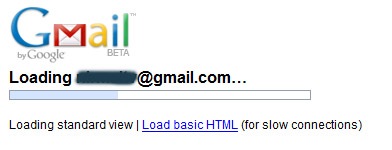
| GMail sports new loading screen [TechZilo] Posted: 17 May 2008 07:04 AM CDT GMail has previously had a plain-text loading screen which usually says “Loading” (and an option to use basic mode if you’re on a slow connection). Google has silently rolled out an upgrade to the loading screen, which now sports a horizontal progress indicator, along with an option to switch to basic mode (which was earlier limited to when it took a long time to load). The screen is as plain as ever, in typical Google fashion, with no background or fancy stuff - just a progress bar and some text. Check out the screenshot below to see what I mean.  GMail’s new loading screen - minimalist and plain as ever
Partners:
   | ||||||||||
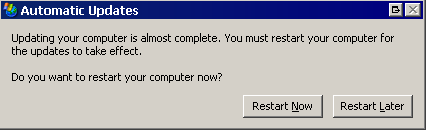
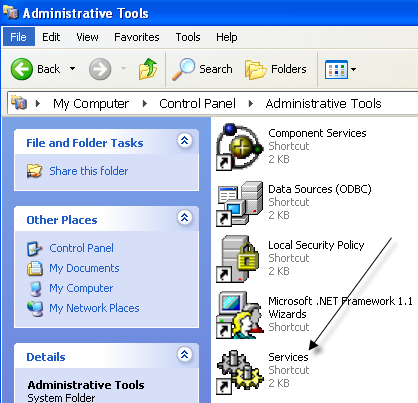
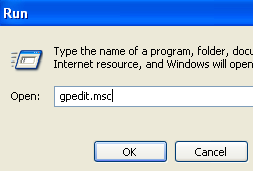
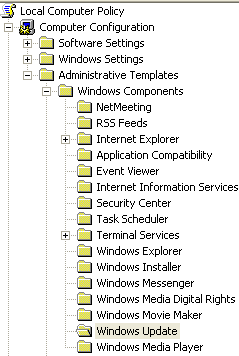
| Disable restart now message after Windows automatic update message [Online Tech Tips] Posted: 17 May 2008 06:22 AM CDT Don’t you just love Windows Automatic Update? On the second Tuesday of each month Microsoft releases their software updates and patches for Windows, which are usually numerous, and most computers receive these updates automatically if Windows Update is turned on. You might notice your computer slow down while these updates are installed in the background. After they are installed, you’ll always get a message to restart your computer. If you are not in the middle of doing work, which is probably not going to be the case considering the update always occurs in the middle of the work day for me, then you’ll probably click on Cancel or Restart Later. However, Microsoft felt that when you clicked that button, you were somehow dishonoring their great service, so they keep reminding you of your injustice by popping up the same NAGGING message every 10 minutes!!! Yes I know I have to restart the computer, I do it ALL THE TIME anyway, you don’t have to keep telling me to do it! Anyway I’ve gotten rid of this message for a long time on my computer and it’s wonderful not having to see that stupid message while I’m watching a movie on Netflix! There are two ways to get rid of the nagging Restart Now message, one of which is preferable over the other: 1. Stop the Automatic Updates Service Go to your Control Panel, then Administrative Tools and then click on Services. In the list of services, find Automatic Updates, right-click on it and click Stop. Once you have stopped the service, the nagging message stops also. Then you can reboot when you FEEL LIKE IT. Note that the Automatic Updates service will automatically restart when you reboot, so you will get future updates (and hence have to follow the same procedure again the next time your computer installs updates). 2. Modify Group Policy Settings The problem with the above-mentioned method for disabling Automatic Updates restart message is that it’s a one time fix. A better way is to modify some group policy settings so that your computer will always be updated, but you won’t be asked to restart constantly. To get to the Group Policy editor, click on Start, and then Run and type in gpedit.msc. Now navigate down to the following security settings: Local Computer Policy
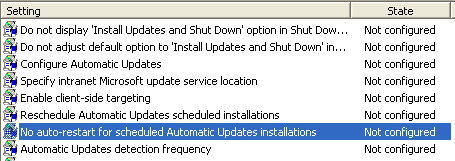
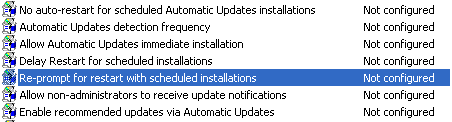
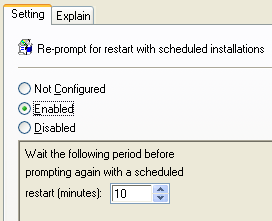
You’ll now see a bunch of options on the right hand side related to Windows Automatic Update. Here is where we can configure your message to disappear! There are basically two settings that we can manipulate to get what we want. No auto-restart for schedule Automatic Updates installations Set it to Enabled and Windows will wait for the logged on user to restart the computer instead of automatically trying to restart. No prompt will be displayed at all, so you will have to remember to restart yourself. Re-prompt for restart with scheduled installations Using this setting, you can configure the restart message to come up again, but at a longer interval. Go ahead and double-click on the setting and set it to Enabled. You’ll see the default value is 10 minutes. Go ahead and change it to something like 1440 minutes, which is one day. This is better if you want to still be reminded, but not so often. Hopefully, now you won’t see that message anymore and you can do your work without being interrupted every 10 minutes! Enjoy! Technorati Tags: restart after windows updates, restart now message, restart after automatic update, disable automatic update mesage
Related postsCopyright © 2007 Online Tech Tips. Aseem Kishore (digitalfingerprint: a59a56dce36427d83e23b501579944fcakmk1980 (66.150.96.121) ) Disable restart now message after Windows automatic update message        | ||||||||||
| KeePass Password Safe Takes Trouble Out of Password Management [Online Tech Tips] Posted: 17 May 2008 06:02 AM CDT Looking for a free password manager? In this age of technology, you need a password to do just about anything on your own computer. You have your Windows passwords, a few e-mail passwords, three or four IM accounts with passwords, and that's just to start your day. Who can keep track of all those different usernames and passwords? KeePass, that's who. KeePass Password Safe software is the latest and greatest password manager available for download today. KeePass is an user friendly, open source program that keeps all of your passwords safe and sound, in one place and with maximum encryption. If you have any interest at all in online security – and you should be very interested –you need to download KeePass today. What would happen if someone got a hold of that one password you use over and over again for all of your online accounts? You probably don't want to even think about it. Download KeePass and you'll never have to! KeePass allows you to stop using the same password, because KeePass comes with a super powerful password generator that creates your passwords for you every time you need one. And your KeePass passwords are safer than anything you could make up yourself. With KeePass, you only have to remember one master password to access your entire collection of passwords. Or you can have KeePass automatically generate random data to create a "master key" or key file that you could insert for access to your passwords. Your master password and key file are both protected by AES and Twofish, the two best encryption algorithms available. This encryption doesn't just protect your passwords either. It safeguards your usernames and other files as well. KeePass is portable. You can install it on your USB drive, and carry your password safe with you at all times. KeePass has an import and export feature, with which you can easily import data from old password managers like Password Keeper or Password Agent, and KeePass has plugins to support other file formats. KeePass has other efficient features like auto-type and global hot keys, and for additional ease of use, KeePass has a drag and drop feature that lets you move all fields, including the username, password, URL and notes, into other windows. KeePass securely uses Windows clipboard. A simple double-click on the desired field in your password list will quickly transfer the data to your clipboard. For added security, KeePass automatically clears the clipboard after pasting and only allows the paste feature to be used once. KeePass is a safe for your passwords – all of them. Usernames and URLs too. And amazingly, it is totally free for download. Besides that, it is open source software, so if you're a major techie you can check out the source code for yourself. You can also check out some other posts I had written about different password managers, such as Billeo Password Manager, Password Safe, and PassPack, one of the very best password managers. This is a guest post by Karen Worthy, a tech enthusiast. Technorati Tags: Windows, password, passwords, KeePass, KeePass Password Software Program, password protection, safe passwords
Related postsCopyright © 2007 Online Tech Tips. Aseem Kishore (digitalfingerprint: a59a56dce36427d83e23b501579944fcakmk1980 (66.150.96.121) ) KeePass Password Safe Takes Trouble Out of Password Management        | ||||||||||
| In case you are using Free Sms Sites for Tv Contest [Technospot.net] Posted: 17 May 2008 04:26 AM CDT In an interesting conversation with one of our readers Mr Chandrakumar he pointed on an important aspect on our post on Free Sms services in India. Here is what he said to me ” Sometime back I had received another tips from technospot regarding the ‘Free SMS’. I received it at a time when all the local TV channels were encouraging people to take part in a contest through SMS. The tip I received from you, I thought, would enable me to take part in the contest free of charge. However, I decided to read their conditions before registering the Free Service Provider. To my surprise, I noticed that there were many conditions enabling the telephone companies to charge for the SMS if the message is in connection with any commercial purpose. Normally, one would not bother to read all those pages of conditions before accepting it. I started to read it only out of curiosity. But my finding was terrible.”
Its is important to understand that these services are free to use if you are using it for personal messages but not for other services which charges and are not like normal sms. I hope we understand in order to avoid unnecessary charges. On our part we will be more careful to include such information in posts like this. Thanks to Mr Chandrakumar, who has 2 blogs one is for the ‘CONSUMER’, dealing mainly with Right to Information and Consumer Protection Act and matters connected with it. The other blog describes the various ways in which public money is wasted, looted and spent by various officials causing loss to the public. He is a senior guy and the effort he is making even at this stage is really great. Even his article has reached news papers and TV channels.
Your Play Ground
        | ||||||||||
| Why Gmail loads faster even in slow connection [Technospot.net] Posted: 17 May 2008 03:43 AM CDT Thanks to Swaroop who pointed out why the image we posted on our last post showed up and why people now see Gmail loading even faster. An Offical post where Gmail team explained
That really sounds a good technique. Here is what Spriting means Spriting is usually defined as the act of creating partially transparent 2d raster graphics for use in video games, commonly referred to as sprites; by extension, it is also used to refer to the act of creating pixel art, though not all sprites are necessarily done in that style. Pixel art comprises a large part of “sprite art” as a whole; though technological advances since the mid-nineties allowed pre-rendered raytraced imagery, or essentially any 2-dimensional image style to be used as a sprite. In some communities, “pixel art” is considered a synonym of “sprite art”, and classification of artwork as “sprite art” is held to the same standards. Thanks Swaroop.
Your Play Ground
        | ||||||||||
| Posted: 17 May 2008 02:31 AM CDT Forms were always the same on wordpress. While the rest of the world had all sorts of fancy ones with immediate response alerts and immediate database checks, wordpress users were all stuck up with the traditional form with a captcha that throws up errors galore ! Well, to break out of this, here’s a brand new form available for wordpress, which is a clean lite weight, ajax powered one that’s slick and cool. It performs quick checks and throws up error messages if the form is not rightly filled, as and when it is being filled. Yes, no annoying re filling. Check the plugin here. It’s worth a change from the traditional forms. Demo of the form is here. Copyright © 2008 DailySEOblog.com. This Feed is for personal non-commercial use only. If you are not reading this material in your news aggregator, the site you are looking at is guilty of copyright infringement. Please contact legal@www.dailyseoblog.com so we can take legal action immediately. Plugin by Taragana Do you want to place your link here for just $ 10 ? Contact me now. Ask your doubts on SEO at the discussion forums and get them answered by experts. FREE of course! A clean liteweight AJAX powered form for wordpress Random Posts   | ||||||||||
| New Gmail Loading Interface for Slow Connection [-| Life Rocks! 2.0 |-] Posted: 17 May 2008 02:28 AM CDT Google has rolled out a new Gmail loading interface for slow Internet connections. With this feature, Gmail gives you an option to switch from standard view to the basic HTML view if you are browsing with a slow Internet connection. The option to select the mail view can be found in the right hand bottom of the page. This new interface is also available for Gmail from Google Apps.       | ||||||||||
| Fifteen Puzzle Mobile Game for Nokia S60 with Motion Detection and Screen Rotation [Tech[dot]Blog] Posted: 17 May 2008 02:14 AM CDT The n-puzzle is known in various versions, including the 8 puzzle, the 15 puzzle, and with various names. It is a sliding puzzle that consists of a grid of numbered squares with one square missing, and the labels on the squares jumbled up. The goal of the puzzle is to unjumble the squares by only making moves which slide squares into the empty space, in turn revealing another empty space in the position of the moved piece. Now a mobile version of the puzzle is available for Nokia S60 3rd Edition mobile devices called Sixteen Puzzle for S60 (although it is in effect a Fifteen Puzzle game). This version supports screen rotation as well as moving puzzle tiles by tilting the device using the in-built accelerometer sensor. The idea of the mobile game is to shuffle the pieces and re-order them from 1 to 15, leaving the empty space at bottom right corner (#16). Here are the keyboard shortcuts to use on your mobile device: 1 - Preview the image to construct Click here to download 16 puzzle for Nokia S60 3rd Edition and place it in the Python scripts folder on your memory card.          | ||||||||||
| Apple agrees to non-exclusive iPhone sales in more countries [TechZilo] Posted: 17 May 2008 02:08 AM CDT iPhone buzz is on a climb. After announcing sale of iPhone in countries like Australia, the Czech Republic, Egypt, Greece, Italy, India, Portugal, New Zealand, South Africa and Turkey, Apple is now breaking away from the exclusive deals signed for sale of iPhones (like AT&T in USA). Apple has signed deals with Austria, Belgium, the Dominican Republic, Egypt, Jordan, Poland, Portugal, Romania, Slovakia, Switzerland, and some African countries. The notable part is that telecom companies have existing agreements for exclusive sale of iPhone. For example, Orange has now signed a deal to sell iPhones in Austria, where iPhone was sold exclusively by Deutsche Telekom. In Italy, Telekom Italia and Vodafone will sell iPhone. Vodafone has also agreed to sell iPhone in Egypt and Portugal (where Orange sells iPhone). This can only be good news for iPhone fans who are eager to buy iPhones but held back because of having to switch to a new network. The launch of iPhone in these countries may also coincide with the launch of iPhone 2.0, which promises updated interface and 3G compatibility (which translates to superior data transfer speeds). iPhone 2.0 is expected to be announced on June 9, when Apple holds WDC.    | ||||||||||
| Compare Contents of any Files In Different Folders and Remove Duplicates [Techie Buzz] Posted: 16 May 2008 11:55 PM CDT File management is a not a real easy task and over a period of time you may have gathered different documents, music files, images and stored it in your PC. During this period you may also made several copies of your files and stored them in different folders leading to duplicate files all over the place. Hunting down such duplicates can be quite a waste of time and comparing both documents to see that the documents are exactly similar is another headache. That said here is a very useful utility that will make comparing files a breeze.
File Comparator is a software which allows you to quickly compare contents of any files in specified folders and shows you pairs of file which contains the same data, allowing you to make a decision to delete the duplicate file. File Comparator can compare content of any type of files and spot the duplicates. The comparison does not take the filename, date etc into consideration for comparison. It will only compare the contents within the file. In short File Comparator is a duplicate finder which will help you easily find and delete duplicate content from your computer. I ran a small test and was impressed with the output. I am now raring to put this to test on my 500GB harddrive and run some spring cleaning. File Comparator is completely free to use and is definitely a worthwhile to have. This small and useful utility also makes it to the Techie Buzz must have utilities. Download: File Comparator Technorati Tags: Compare Files,Files Comparator,File Compare,Find Duplicates,Duplicate Finder,Utilities © Keith Dsouza for Techie Buzz, 2008. | Permalink | No comment | Add to del.icio.us ---
       | ||||||||||
| Slow Loading Gmail - Looks Changed [Technospot.net] Posted: 16 May 2008 11:54 PM CDT Not sure if any body noticed but the loading of Gmail when your net connection is slow seems to be changed and its pretty. Did any body else seen that ?
Your Play Ground
        | ||||||||||
| Do Away With Windows Restart by Cleaning Exiting Explorer.exe [Techie Buzz] Posted: 16 May 2008 11:07 PM CDT I have been installing quite a lot of softwares and many of those want me to restart the computer so that their changes are applied to the PC. While browsing my feeds I came across a cool unrelated tip by DailyApps which talked about restarting the Explorer.exe cleanly, in that I saw another cool tip which could allow you to also do away with the boring restart every application demands.
So I believe that cleanly exiting Explorer.exe will mean that I do not have to restart my PC after all, super cool. Here is how to exit explorer.exe cleanly.
Excerpt Credit [Daily Apps] Thanks Daily Apps for this cool tip. Featured Ads: Get 2 GB free space for free. Try Mozy now. © Keith Dsouza for Techie Buzz, 2008. | Permalink | No comment | Add to del.icio.us ---
       | ||||||||||
| How to Preview PDF, cs, vb, sql, js Files in Outlook 2007? [Lyte Byte] Posted: 16 May 2008 10:22 PM CDT As we all know Outlook 2007 has new features which allows to preview the files like Word, Excel, Picture files etc as we have it in Windows Vista.(check how you can enable preview pane in Windows Vista). This function allows to open the files within the message box and read them. But how to preview PDF files in Outlook 2007?
Even though you had installed Adobe Reader 8, you will get a message saying that there is no previewer installed.
One thing you can do is to update the Adobe Reader 8 to the latest version (Adobe Reader 8.2) which has the built in PDF previewer for Outlook 2007. If you are worried about the memory consumption of the Adobe Reader then here is a lightweight alternative. You can use Foxit PDF Preview Handler by Tim Heuer to render PDF files within the message box in Outlook 2007. (Found about Tim through MSDN Blog) Download Foxit PDF Preview Handler You can also use Office applications as PDF Creator code preview handlers for CS, VB, SQL, JS codes On the other note, if you are a developer and looking for some code preview handlers for codes like .cs, .vb, .sql, .js then you can Tim’s Code Preview handler for Outlook 2007. Copyright © 2008 This feed is for personal, non-commercial use only. The use of this feed on other websites breaches copyright. If this content is not in your news reader, it makes the page you are viewing an infringement of the copyright. (Digital Fingerprint: qfjk452hj34hjfjh12h4f1hj3dld45jd312j4112341d4hjdh) ---
    | ||||||||||
| Disable User Access Control (UAC) with One Click [Techie Buzz] Posted: 16 May 2008 10:00 PM CDT For many of the new Vista users the User Access Control (UAC) is probably the most annoying piece of software bundled in the Operating system. There are many ways to get rid of the UAC alerts but not all are geeks and not all would be able to follow the instructions properly. NoUAC (French language site) is a utility which will make your life much easier with regards do disabling the UAC completely. NoUAC works out of the box and does not require any installation, simply download the file and double click on it. Make a selection to either disable or enable the UAC based on your preferences and click Ok. Your preferences will be automatically applied to the system.
Note: You will have to restart your PC once for your UAC changes to be applied to the PC. On final thoughts thank god for such developers who make life much easier for people. Download: NoUAC © Keith Dsouza for Techie Buzz, 2008. | Permalink | No comment | Add to del.icio.us ---        | ||||||||||
| Work Folder: Fool Your Boss While You Enjoy Your Games [Techie Buzz] Posted: 16 May 2008 04:38 PM CDT I have had several experiences with having fun online but this takes the cake over all the others. Work Folder is a site which looks just like your regular Windows Explorer. The front page of the site contains numerous Word files and Powerpoint files which make the site look like a actual desktop.
But like I said the looks are only to deceive, clicking on any of the files will load a online game which you can play. (Now how’s that for wasting time by fooling your boss).
The games are based in flash and can be loaded on any browser with Flash support. There are lots of different games available and tried few of them. The site is a real time waster so you were warned before you start using it. The only flaw I saw in the site was that it does not have a quick way to go back to the main folder view which is shown when the site is first loaded. There are three different resolutions you can enter the site in to match with your desktop resolution. So what are you waiting for, go ahead and start fooling your boss. Hey don’t blame me if you get into trouble :). Featured Ads: Get Your Questions Answered. Visit the Techie Buzz Forums. © Keith Dsouza for Techie Buzz, 2008. | Permalink | 3 comments | Add to del.icio.us ---
       | ||||||||||
| Compress Audio Files without Losing Quality with FLAC [-| Life Rocks! 2.0 |-] Posted: 16 May 2008 03:30 PM CDT There are lots of audio compression softwares which can compress audio files like .wav to reduce the size. But the disadvantage with using them are that they reduce the quality of audio most of the times. FLAC is an audio format like mp3 which is a compressed one but without any loss of quality. FLAC stands for Free Lossless Audio Codec similar to how Zip works, except with FLAC you will get much better compression because it is designed specifically for audio, and you can play back compressed FLAC files in your favorite player just like you would an MP3 file. FLAC is available for Windows, Mac and Linux. You need to download the software to convert audio files into flac format. You can Download the Windows edition from here. How to Play FLAC files: In Windows FLAC files can be played using Windows Media player (using a work around), Winamp (full version), dbPowerAMP Audio player (plugin available), media monkey and media jukebox. After installing the software, select the wav files you like to compress and Click Encode. These files will be compressed to FLAC format. You can also decode the FLAC format back. You can check out the FAQ section to know more about FLAC format.       | ||||||||||
| Photoshop Express Intigrates with Flickr and More [Technospot.net] Posted: 16 May 2008 01:07 PM CDT A quick update on Photoshop express which is an online version of Photoshop from Adobe, now its integrated with Flickr which is the most awaited and will give it more points against the other online editing tool. Now you can pull photos from Flickr into Photoshop Express, amp them up, then upload them back into Flickr to show them off to the world. But this is not the end. You can also embed slide show of your photos in Myspace,facebook with their embeddable player which is another exciting feature. So just give it a try and share your experience
Your Play Ground
        | ||||||||||
| Accidents are Bound to Happen [Funny Pictures and Videos] [Techie Buzz] Posted: 16 May 2008 01:07 PM CDT Well its Friday folks time to get some dosage of your weekly laughter. Today we will be showing off some funny pictures of accidents than will make you laugh. So have fun and enjoy. Am I supposed to be Landing or Taking Off?
Can I park my Car In Your Building Today?
Am I Playing with the Wrong Balls?
I failed In My Flying Lessons Today
I thought Harry Potter was for real
Being At The Back of the Line is so much Fun
Parking Is so difficult in the City, I got the best spot though
Last but not the least check out this videos which has a collection of some weird and funny car accidents.  Hope you have had a good laugh keep tuning back and have a great weekend. Featured Ads: Get 5 Terabytes Bandwidth. Signup for Dreamhost. © Keith Dsouza for Techie Buzz, 2008. | Permalink | No comment | Add to del.icio.us ---
       | ||||||||||
| AOL Mail to Open Up for Third Party Applications [TechBuzz] Posted: 16 May 2008 01:02 PM CDT
AOL is also trying out Microsoft’s Silverlight technology to build a rich, high performance web mail application. Silverlight is a cross platform browser plugin that allows developers to create rich, multimedia internet applications. If everything works well, AOL’s new webmail service will go into beta testing by third quarter this year. We’ve seen this trend in the social networking segment with Facebook and OpenSocial. AOL Mail will be the first in the email segment to open up their API for third party developers. Honestly, I’m not against the idea of opening up a service to third party developers, but is it really needed for an email service? Only time will tell!  | ||||||||||
| Opera Dragonfly, Easy web apps debugging [Brajeshwar] Posted: 16 May 2008 12:22 PM CDT  Image from Opera Opera DragonflyDeveloper Tools to debut Javascript, inspect CSS and the DOM, and view errors. Opera released their new Developer Tools — Opera Dragonfly — about a week back. The initial alpha version include
Upcoming versions will also support editing of CSS/DOM/JavaScript, a single window mode and XHR/HTTP Headers inspection. Opera Dragonfly is built using Web technologies (XML, CSS and JavaScript) and will auto-update when a new version is released. The application will run in a persistent cache, so that it is accessible when offline, and so that it doesn’t have to communicate with the Opera server, except when it updates. Opera Dragonfly will support all browsers that include the Core-2.1 rendering engine (except Opera Mini). This currently includes Opera 9.5 beta 2 and the forthcoming Opera Mobile 9.5 release. A proxy exists that allows Opera Dragonfly on the desktop to communicate with Opera on supported mobiles and devices. This makes debugging on devices easier as you can use a regular keyboard, mouse and monitor. The early Alpha launch was received with great enthusiasm from the developer community and Opera received lots of feedback from people. There are few things which developers have found and Opera Dragonfly team is working on them;
The Opera Dragonfly is also working on the Scope documentation which they plan to release in the coming days. Chris Mills’ article on Introduction to Opera Dragonfly should give you much more details about Opera Dragonfly. Opera Dragonfly Architecture covers covers the architecture of Opera Dragonfly in detail, showing what the different components in the architecture are, and how they interact during Dragonfly’s running. Note: If you’re on the Mac, there’s a bug whereby OS X’s video memory gets corrupted, causing a crash. Download the latest drop to avoid this. Related Articles
Rights reserved © Brajeshwar 2001-2008. Quotes, excerpts or reproduction of any of the article is possible solely under the Attribution-Noncommercial-No Derivative License.  | ||||||||||
| Run Windows on OLPC XO Laptop! [Quick Online Tips] Posted: 16 May 2008 10:13 AM CDT Microsoft has partnered with the One Laptop per Child (OLPC) program to make the Microsoft Windows operating system available on OLPC's low-cost XO laptops for the world's poorest children.
Now the XO laptop will have the ability to host both Windows and Linux operating systems, giving users the ability to run either on the XO laptop. Microsoft has developed customized drivers for Windows on the XO laptop and Windows now supports the laptop's e-book reading mode, standard Wi-Fi networking, camera, writing pad and custom keys, power-saving and other features of the XO hardware. Now hundreds of third-party applications and devices available for Windows will be compatible with the XO laptop. This will help XO laptop to become more compatible and acceptable to the community at large. Microsoft aggressive marketing strategy to put Windows on every computer in the world is what made Bill Gates the richest man and Microsoft the world’s leading company. Even Apple had to incorporate Windows compatibility to reach a wider customer base to sell iMacs and Macbooks. Related Copyright 2008. Quick Online Tips. All Rights Reserved.      | ||||||||||
| Hack Attack : Terminate Explorer.exe Cleanly On Vista [dailyApps] Posted: 16 May 2008 09:56 AM CDT I keep trying variety of registry tricks everyday, and install and uninstall numerous applications that demand a restart whenever I install them. To get away with boring restart process I normally kill Explorer.exe from the task manager and wait for it to restart automagically. But the problem is that the Task Manager method is like forcibly killing the process instead of terminating it cleanly. Luckily there is a hidden option in both Windows XP and Windows Vista Start Menu that will allow you to terminate and restart Explorer.exe cleanly. As you can see in the screenshot above there’s a hidden option in the start menu to cleanly terminate Explorer.exe. Follow these steps to get that option visible and cleanly terminated Explorer.exe.
Click the Start button. Press and hold the CTRL and SHIFT keys, and right-click on an empty area in the Start menu. You'll see a Popup menu containing the two options namely Exit Explorer and Properties. Alternatively you could get the above Popup menu by holding the CTRL and SHIFT keys and then right-clicking on the Start menu power button itself.
After selecting the Exit Explorer command, the shell (Start menu, Taskbar and the Desktop) will exit and the other applications will continue to run normally. You need to manually start a new Explorer.exe process by launching Task Manager. Use the CTRL+SHIFT+ESC key sequence to launch Task Manager. From the File menu of Task Manager, choose New Task (Run…), type Explorer.exe and press ENTER. And you should now be looking at a clean shiny new Explorer process running at full speed. This way of restarting Explorer is a much safer process and has been recommended by Microsoft itself. Please let us know how this works for you in the comments. If you are a Windows XP user there is a similar hack described by Microsoft employee Jeff. Have a look at that as well. Credit : Aaron Margosis Related Posts at DailyApps      | ||||||||||
| Download Free Photoshop Anthology eBook PDF [Quick Online Tips] Posted: 16 May 2008 09:07 AM CDT Sitepoint is distributing a free ebook titled The Photoshop Anthology: 101 Web Design Tips, Tricks & Techniques as a free PDF Download for a limited time. Author Corrie Haffly shares her extensive Photoshop experience and will help you master the photoshop secrets of professionals. The Photoshop Anthology will teach you to design attractive web graphics, touch up photographs for web use, Create web site mock ups using Photoshop, improve your digital work flow, create master menus, buttons and background tiles and use nondestructive editing techniques and much more… Originally priced at $29.95, its a no-catch complete 278 page copy of Corrie Haffly's brilliant Photoshop web primer available for free. However, there is no direct download link and you need to enter your email address, where they will send you the download links. I downloaded the amazing book and believe me its totally worth it with amazing practical photoshop tips. So why is the book free? Its sponsored by 99designs. (NB - I could post the download links here, but I guess it is not fair and maybe not allowed). Related Copyright 2008. Quick Online Tips. All Rights Reserved.      |







 AOL has revealed its


| You are subscribed to email updates from India Technology Bloggers To stop receiving these emails, you may unsubscribe now. | Email Delivery powered by FeedBurner |
Inbox too full?  Subscribe to the feed version of India Technology Bloggers in a feed reader. Subscribe to the feed version of India Technology Bloggers in a feed reader. | |
| If you prefer to unsubscribe via postal mail, write to: India Technology Bloggers, c/o FeedBurner, 20 W Kinzie, 9th Floor, Chicago IL USA 60610 | |
