India Technology Blogs Network |
| Posted: 30 Apr 2008 07:35 AM CDT WalkMe is new software for Java J2ME mobile devices that keeps track of your performance when walking. It provides speed, distance, steps taken, and calories burned during exercise. After a walk the results can be exported and uploaded for further analysis to any community site. Key features of WalkMe include: + Exercise duration Visit getjar.com to download WalkMe for Java J2ME mobile devices.          | ||||||||||
| Enable more file types on Windows Vista Explorer Preview Pane [Online Tech Tips] Posted: 30 Apr 2008 06:29 AM CDT One of the great things about Windows Vista is the new Preview Pane in Windows Explorer. Now you can simply click on a file and get a preview of the document without having to open it! However, one of the not so great things about Vista is the fact that a lot of files types don’t work in the Preview Pane! The only work around to this problem was to edit the registry and manually put in each file extension. It’s a painfully long registry hack that even I would not want to do. Luckily, someone developed a GUI Windows program that finds all the different files types registered on your computer and lets you enable previews for them! Here’s a shot of the Windows Explorer Preview Pane in Windows Vista for a Word document: Image Source: ActiveWin So by default, Microsoft set the files types that will work with the Preview Pane for mostly common and proprietary formats, such as .txt, .doc, .ppt, .xls, etc, but not for other very common types of files such as .php, .css, etc. Just in case you don’t know, you can enable the Preview Pane in Vista Explorer by going to Organize at the top, then Layout and then choosing Preview Pane. PreviewConfig is a very nifty and useful application that was developed to solve just this problem. It allows you to add new file extensions to the default list of supported file extensions. Once you install and run it, you’ll see the listing of files types on the left hand side. Click on one of the extensions on the left and you’ll get information about it on the right pane. You’ll be able to see if the file is already configured for previews and if so, what the preview type is: plain-text, media file, or others. If it’s set to None, then you can activate previews by selecting one of the other options and clicking Apply. For PHP, CSS, REG files and more, you could select Plain-text and then go to Explorer to see a preview of your file! Enjoy! Source: HowToGeek Technorati Tags: previewconfig, explorer preview pane, enable file types preview pane, windows vista preview pane
Related postsCopyright © 2007 Online Tech Tips. Aseem Kishore (digitalfingerprint: a59a56dce36427d83e23b501579944fcakmk1980 (66.150.96.121) ) Enable more file types on Windows Vista Explorer Preview Pane  | ||||||||||
| Stop web procrastination with LeechBlock [Online Tech Tips] Posted: 30 Apr 2008 06:10 AM CDT The Internet is without a doubt, a wonderful place to be. It contains many useful elements that can be used to improve our life. However, the Internet has a dark side too - sometimes we get too addicted with certain websites e.g. social networking sites, online forums, etc. and we can’t stop accessing them every once in a while. To curb the addiction to websites like these, self control is definitely not enough (at least for me!). If you are looking for an online productivity tool that can ease this problem, try LeechBlock. LeechBlock is a simple productivity tool that comes in the form of a Mozilla Firefox extension. If web procrastination is your sickness, LeechBlock can be the cure. It works by blocking websites at a time that you have specified previously. Earlier, I had written about another service called 8AWeek, which also helped in trying to increase your productivity by curbing Internet usage, but LeechBlock is a little bit more proactive! To start, you need to install LeechBlock, restart your browser and access its option from the Tools menu. Next, you need to enter a list of websites that you want to block and set a few, time based rules. Whenever any of the rules are matched, LeechBlock will block you from accessing a website. It’s that simple. LeechBlock Features
If you have problem separating work from web browsing time (in short: web procrastination), then LeechBlock is one of the online productivity tool that you ought to have. I recommend that you set it with all the “disciplinary” settings turned on to get the best effect. However, if you are still procrastinating once all of these options are turned on, I recommend that you turn off your Internet modem (lol!) Try LeechBlock today! This is a guest post by Syahid A. from TechMalaya Tags: leechblock, online productivity, online producitivity tool, block websites
Related postsCopyright © 2007 Online Tech Tips. Aseem Kishore (digitalfingerprint: a59a56dce36427d83e23b501579944fcakmk1980 (66.150.96.121) ) Stop web procrastination with LeechBlock  | ||||||||||
| Stumbling - My Do’s and Dont’s [ Random Thoughts ] [Technospot.net] Posted: 30 Apr 2008 12:00 AM CDT
Do’s of Stumble
Don’ts of Stumble
So whats your habit and Whats wrong in my approach ? Is there anything I can do to improve ?
Your Play Ground
        | ||||||||||
| Google Page Rank Update. Life Rocks 2.0 is PR5 [-| Life Rocks! 2.0 |-] Posted: 29 Apr 2008 08:56 PM CDT Looks like there has been a Page Rank update by Google. today morning when I opened my blog, I found that the Search status add-on for Firefox was showing PR5 for my blog. But then I know that its not the most reliable mechanism to check page rank, so I went to PR Checker checked my PR. It was also showing PR5, so officially Life Rocks 2.0 is now PR5. The PR of Life Rocks has changed after a year, it was the same time during last year when this blog got a PR4, but then in the subsequent PR updates there was no change inspite of the fact that many of the top blogs lost their PR. I’m happy that this time Life Rocks has got a PR update. So has your blog PR changed?       | ||||||||||
| What are A1 and R1C1 Reference Style in Excel? [Lyte Byte] Posted: 29 Apr 2008 07:43 PM CDT There are two types of reference styles in Excel. The first one is A1 reference style where the columns are labeled using the Alphabets and the rows are labeled using numbers. In the R1C1 reference style both the rows and columns are labeled using numbers. Earlier versions of Excel from MS Office came with only R1C1 reference style. But recent versions like Office 2007 has both referencing styles. For example, in A1 Reference Style, E15 refers to the cell in 15th row and Eth (5th) column and the same cell in R1C1 Reference Style uses R15C5 (R followed by the row number and C followed by the column number).
I have always preferred to use A1 reference style as both the labels for rows and columns are different. But with the R1C1 reference style since both rows and columns are numbered its easy to get confused (especially while writing formulas) Also these reference styles are not only different in addressing but also very different in the way they are referenced in formulas or when selecting a range of cells. In A1 reference style, the range is referred by the starting cell address and ending cell address with a colon in between. Example, A1:A5. This refers to the first five cells in the first column and this reference remains the same where ever the range is called within the sheet. But in R1C1 reference style, the range is referred by how far the cells are located from the cell you are calling. For example, if you have 5 values from R1C1 to R5C1 and the range is called from R7C2, then the range would be R[-6]C[-1]:R[-2]C[-1]. Here the first cell in the range is 6 rows before the cell R7C2 and 1 column before the cell R7C2 and similarly for the last cell in the range. This method of referencing is called Relative Referencing. Though relative referencing is used by default in R1C1 reference mode, one can also use absolute reference with R1C1. For the same example as above, with absolute reference, the range would be referred as R1C1:R5C1. To know more about referencing, read How to use relative and absolute reference in Excel? Benefits of A1 and R1C1 Reference Style For human computation and understanding A1 reference style is better but if you are writing a macro, then R1C1 reference style would be better to compute with referencing to the positions. If you are writing a macro but you don't want to get confused then you may switch to A1 reference style and write all the formulas and then switch back to R1C1 reference style to get the value of the formulas in this reference style. Copyright © 2008 This feed is for personal, non-commercial use only. The use of this feed on other websites breaches copyright. If this content is not in your news reader, it makes the page you are viewing an infringement of the copyright. (Digital Fingerprint: qfjk452hj34hjfjh12h4f1hj3dld45jd312j4112341d4hjdh) ---
    | ||||||||||
| Blank Feed Problem with WP 2.5.1 Upgrade [TechBuzz] Posted: 29 Apr 2008 07:04 PM CDT Over the weekend, my RSS feed went totally blank, which made you people miss couple of posts. Thanks to everyone who sent out emails to let me know. It turns out that the culprit was WordPress 2.5.1 upgrade. I directly link to my feed generating files (wp-rss2.php) for FeedBurner to burn my feeds. For some weird reason, those files don’t send any content in WP 2.5.1 Fortunately, the fix was pretty simple. I had to change my FeedBurner settings to use pretty permalinks instead of wp-rss2.php. It’s really painful to see your feed go blank to for three days. My feed count took a small nose dive  | ||||||||||
| Apple Refreshes Its iMac Lineup [dailyApps] Posted: 29 Apr 2008 06:49 PM CDT Apple on Monday refreshed its iMac lineup with the latest and greatest in Core2Duo Processors and more powerful graphic options for the 24″ model. The updated iMac’s now feature Core2Duo processors using the latest penryn chips manufactured using the 45nm technology, more efficient compared to the older 65nm technology. Prior to Monday's update, the iMac featured either a 2GHz or 2.4GHz Core 2 Duo chip. The updated machines run at 2.4GHz, 2.66GHz or 2.8GHz, depending on configuration. Apple also offers a 3.06GHz processor as a build-to-order option. The only other Macs to top the 3GHz mark are build-to-order configurations of the Mac Pro, with either 3GHz or 3.2GHz Quad Core Xeon processors. So its nice to see the iMac receive some pro treatment ain’t it?
Apple also increased the amount of RAM that ships with two of the three standard iMac configurations. The 20-inch 2.66GHz iMac and the 24-inch 2.8GHz iMac ship with 2GB of RAM; in comparison to the previous offerings of 1GB of memory. Other changes to the iMac line include a 1,066MHz FSB on all three iMac configurations in comparison to the previous 800MHz. Also NVidia 8800GS is also an option on the 24″ model which is good news for hardcore gamers because NVidia cards seem to outperform ATI ones in every world. The new iMacs come in three basic models:
All iMac models are now available and are shipping immediately. For the performance comparisons on the new iMac with its other Mac cousins and the older iMac head over to Engadget Related Posts at DailyApps      | ||||||||||
| Madonna Live in Concert: Free Online Broadcast [Quick Online Tips] Posted: 29 Apr 2008 01:41 PM CDT
A Microsoft press release says the Madonna Live show will stream live Wednesday evening, April 30, at 10 p.m. EDT in the United States and will be available on demand to international audiences on May 15. Madonna will be debuting several new songs including her 37th No. 1 smash single "Four Minutes" from her upcoming CD Hard Candy. The show will also include never-before-seen rehearsal footage, a pre-recorded interview with Madonna and her full performance, giving fans access to one of the biggest music events by logging on to MSN Music In Concert. The Music In Concert series is available in 42 countries and 21 languages through the international MSN network, and gives music fans worldwide the chance to see live music performances from their favorite artists. Related Copyright 2008. Quick Online Tips. All Rights Reserved.      | ||||||||||
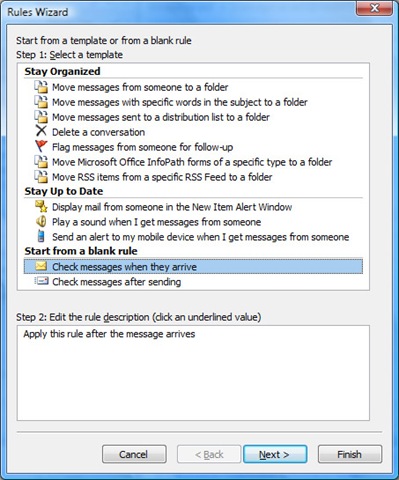
| How to Set up an Out of Office Reply in Outlook 2007 [-| Life Rocks! 2.0 |-] Posted: 29 Apr 2008 01:40 PM CDT Whenever you are out of Office or going on a vacation, its better to set up and Out of Office or auto reply, so that your friends will know that you wont be able to reply back to the mails. Outlook 2007 has an Out of Office assistant which will help you to set up an auto reply. But this feature is available in Microsoft Outlook only if it is using a Microsoft Exchange Server service. This means that if you are using POP or IMAP account in Outlook, then this feature will not be available. Alternatively, you can create a rule to send automatic emails. 1. Create a Auto Reply Template
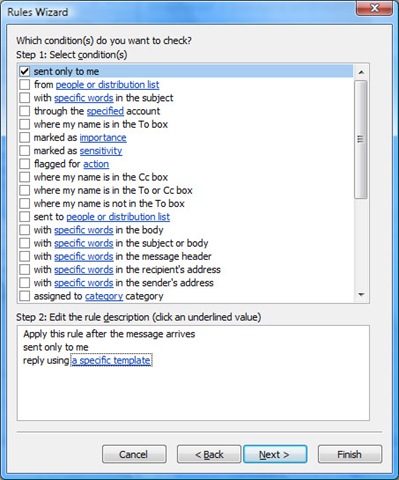
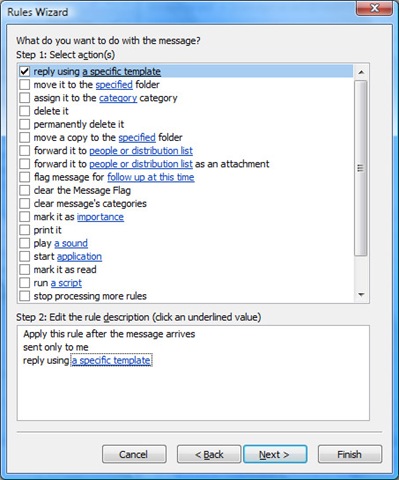
2. Creating a Rule for sending Auto Reply.
Now, auto reply message will be sent to all mails that arrive after the rule is applied. The feature of this rule (for rules created with Reply using a specific template option) is that it will remember the list of persons whom it has replied, so that this auto reply is not send to same person again and again. This rule is reset when you restart Outlook. NB: Outlook must be running for the Rules Wizard to automatically reply. In case you are using Microsoft Exchange Server (mostly in Offices), then you can use the Out of Office Assistant to configure Auto Reply.       | ||||||||||
| Shutdown Day: 24 Hours Without Computers [Quick Online Tips] Posted: 29 Apr 2008 01:21 PM CDT Shutdown day is back this year on 3rd May 2008 and encourages you to shutdown your computer for 24 hours. Last year the Shutdown Day was on 24 March 2008, and emerged as a popular experiment to find out how many people can go without a computer for one whole day. Last year, on Shutdown Day 2007 more than 65,000 people participated in the campaign by actually shutting down their computers for 24 hours on the 24th of March, 2007 and 450,000 visitors signed up for country locator on Shutdown Day website. This year you can gather a flash mob, to get people off their computers - and get them participating in creative events, outdoors, and in a public space. Check the map for events in your location. So what do you do with your shutdown laptop… here are some uses. Last year participants are looking forward to it… Remember similar events that encourage you to switch off TV, deactivate Akismet or turn off your lights. Will you shutdown your computer on 3rd May 2008? Related Copyright 2008. Quick Online Tips. All Rights Reserved.      | ||||||||||
| Give me a reason to stop using windows [ Random Thoughts ] [Technospot.net] Posted: 29 Apr 2008 11:28 AM CDT
Here is my experience: I have been using windows wince 9 yrs now. My current state of windows is,
Underline : You need to know how to use your computer an OS be it any. Its useless to say one is good than other. So just learn how to use and stop blaming any other OS,
Your Play Ground
        | ||||||||||
| Is CTRL+SHIFT+ENTER The New CTRL+ALT+DEL On Vista? [dailyApps] Posted: 28 Apr 2008 05:30 PM CDT Windows Vista’s UAC can be overly frustrating at times. There are times when a program needs to be launched with administrator privileges from the start menu, and right clicking and clicking on “Run as Administrator” just doesn’t cut it when you are in a hurry and need to get something to be done in a hurry. For example, to open Command Prompt as administrator, click Start, type cmd in the Search box and press CTRL+SHIFT+ENTER. You should see the User Account Control window popping up for task elevation confirmation. Press ALT+C to continue. By using the keyboard shortcuts life certainly becomes a lot more easier doesn’t it?
The CTRL+SHIFT+ENTER shortcut is extremely useful for Keyboard junkies like me. It should be noted that this shortcut works only on the Start menu and nowhere else. Windows Vista has been a lovely companion for me, but the UAC frustrates me all the time. With these keyboard shortcuts I’m actually trying to figure out if I’m using CTRL+SHIFT+ENTER more than CTRL+ALT+DEL on my PC! Did this shortcut make life easier for you? Related Posts at DailyApps      |


 I love stumbling. This is one way which not only freshens me but also lets me find new things. I have developed some habits and rules for myself and here is what I do and what I don’t. Am I going the right way ?


 You always wanted to watch Madonna Live in Concert. Now Madonna fans can



| You are subscribed to email updates from India Technology Bloggers To stop receiving these emails, you may unsubscribe now. | Email Delivery powered by FeedBurner |
Inbox too full?  Subscribe to the feed version of India Technology Bloggers in a feed reader. Subscribe to the feed version of India Technology Bloggers in a feed reader. | |
| If you prefer to unsubscribe via postal mail, write to: India Technology Bloggers, c/o FeedBurner, 20 W Kinzie, 9th Floor, Chicago IL USA 60610 | |


No comments:
Post a Comment