India Technology Blogs Network |
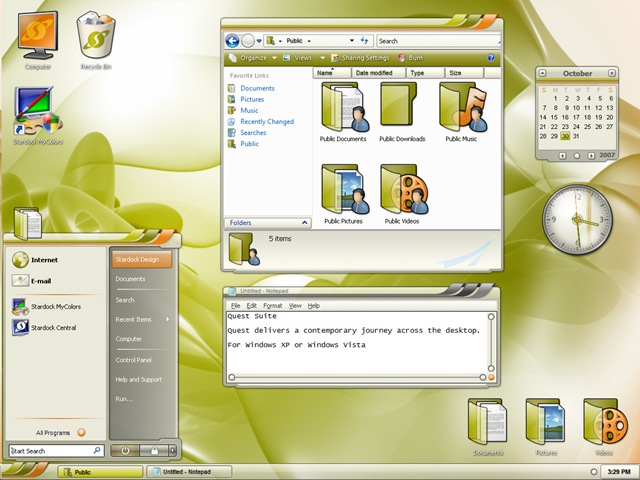
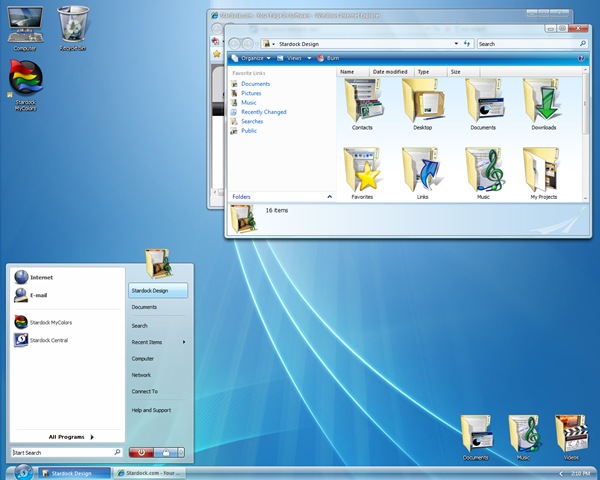
| Stardock Officially Releases MyColors [-| Life Rocks! 2.0 |-] Posted: 25 Apr 2008 01:46 PM CDT Stardock has officially released the their new software MyColors. Mycolors is a customization software for Windows XP and Vista. MyColors theme includes everything a user needs to completely transform the Windows experience - a new Windows GUI, a new set of icons, gadgets, wallpaper, etc. Currently there are two free themes available- Diamond and Quest. Diamond theme gives Windows XP and Windows Vista users a glimpse at Aero Diamond. Diamond includes a completely new icon set, gadgets and more. Users who already have WindowBlinds or Object Desktop can still download MyColors and get the Diamond MyColors theme, it will simply install the component parts into the appropriate locations. Quest theme Diamond Theme There are also few good theme available for purchase and each theme can cost you $20. Stardock MyColor is a freeware and also you can download the two free themes available.       | ||||||||||
| AVG 8.0 Free Version, includes Anti-Spyware [TechBuzz] Posted: 25 Apr 2008 01:29 PM CDT
Along with the new improved interface, AVG 8.0 Free can also bash spywares/adwares and includes basic LinkScanner for Safe Search. I’ve been using AVG for over year now, and I’d definitely recommend it to anyone who is looking for free anti-virus protection. It’s one of the best rated anti-virus suites available for Windows. Download AVG 8.0 Free [via: Life Rocks 2.0]  | ||||||||||
| Posted: 25 Apr 2008 09:16 AM CDT Skype has released an official beta version of their mobile client for Java J2ME mobile devices such as Nokia S60, Sony Ericsson UIQ, Motorola & Samsung. The application uses an Internet data connection for status, contact information and Skype chat (instant messaging). However, when you initiate a phone call (Skype Out) the application makes a voice call to a local server which then routes your call over the Internet (transfers calls from the PSTN network to the IP network). Similarly incoming calls (Skype In) are routed to your mobile phone over the PSTN network. Key features of Skype for Java Mobiles include:  + The software has three columns: Contacts, Chats, Events. In this beta version, anyone can receive calls, instant message and see who's online. If you want to call phones, mobiles, or any of your Skype contacts, this is limited to people in Brazil, Denmark, Estonia, Finland, Poland, Sweden and UK. Also, as described earlier, this isn’t a Voip application since calls are routed through your operator’s PSTN network, resulting in local call charges. Visit www.skype.com/m from your mobile phone browser to download and install Skype for Java.          | ||||||||||
| [OS X Apps] Macheist - Super Sale is on , go grab a copy! [ReviewSaurus - The Techie Dino!] Posted: 25 Apr 2008 07:15 AM CDT
MacHeist bundles 12 Top Mac applications and sells it for just $ 49, they pay some amount to the application developers and some in the charity and as a buyer, you get 12 applications at the cost of almost 1 application. Well, if you go out and buy the licenses of individual application, then I’m sure your pocket will be at least $300 lighter but that’s the beauty of MacHeist that you can legally own those wonderful applications at such low price. Well, If you are a Mac user and don’t get to use those wonderful applications, just because they’ve got a hefty price tag around them, then Mac Heist bundle is something you can’t miss! Not only you help in raising the money for charity, but you are also helping the developers along with that you are also helping yourself by getting access to those wonderful apps! The current MacHeist bundle contains the following software : 1. Awaken 2. Cha-Ching 3. CoverSutra 4. Devonthink Personal 5. iClip 6. OverFlow 7. Wallet 8. WriteRoom 9. XSlimmer 10. Enigmo 11. Bugdom 2 12. NanoSaur. Of course the last three applications are not real applications , they are games (yeah yeah, I know they are also applications but they are not productive for sure!). Anyway, Still this Bundle is a steal deal! Go for it! © BloggingSaurus - ReviewSaurus | TipsoSaurus       | ||||||||||
| AVG 8.0 Free Version Released with Anti-Spyware [-| Life Rocks! 2.0 |-] Posted: 25 Apr 2008 07:03 AM CDT Back in February, AVG had released its latest version AVG 8.0 Professional which had linkscanning, anti-spyware, and anti-rootkit software included in the suite. Now AVG has released AVG 8.0 Anti-Virus Free Edition. The free version has limitations and it does not feature the link scanner and anti-rootkit. The new version is compatible with Vista, XP and Windows 2000 (excluding server editions). Another important change in this version is the new improved layout. AVG has given the much needed facelift for its free version as well. NB: The image shown above is from full version. AVG anti-virus is one of the top downloaded free versions available today. Now the free version has got more features and an improved layout. Download AVG Anti-Virus 8.0 Free       | ||||||||||
| How to convert files to PDF using OpenOffice? [Killer Tech Tips] Posted: 25 Apr 2008 06:37 AM CDT OpenOffice comes with a little inbuilt tool that lets you convert your documents and create PDF files out of them. OpenOffice lets you import many types of documents, including .doc files created by Microsoft Word, so it’s possible for you to convert not just the files made by OpenOffice.org to PDF format, but also those created by other office suites like MS Office.
You’ll need to follow the steps below to create/convert documents to PDF format using OpenOffice. First, open up the document using OpenOffice. In this example, I’ll be using a .doc file that was created by MS Office. When you’ve opened the file in OpenOffice Writer, go to the ‘File’ menu and choose ‘Export as PDF’. As you can see in the Options window that appears, you can compress the images in the PDF file to reduce the file size. If you wish, you can specify a password to open the file from the Security tab. Additionally, you can check the necessary options in the same window to prevent editing or copying of your PDF file. Click Export and specify a location to save the file and click Save. You’re done. OpenOffice has created a PDF version of the current file that you have got opened.       | ||||||||||
| Convert YouTube videos to MP3, MP4, WAV [Online Tech Tips] Posted: 25 Apr 2008 06:31 AM CDT Copyright Feed Content - OnlineTechTips - Aseem Kishore 18254532AKMK Need a YouTube video in MP3 format? Maybe you just finished watching Girlfriend by Avril Lavigne for the 50th time on YouTube? With almost 81 million views, the video is popular! For goodness sake, why not just download it once and for all, convert it to MP3, and listen to it wherever you go! Avril’s not for me, but there are definitely a ton of music videos I wouldn’t mind downloading into MP3 format from YouTube. Once you have it in MP3 format, you can use iTunes and transfer it to your iPod or other mobile device. Record YouTube videos to MP3As with everything on the Internet, there are like 10 different ways to do this! You can either download a YouTube video as an FLV file and then convert the FLV to MP3. Or you can use some free online tools to do the whole thing for you! Hmmm…I’ll go for the second method, but if you really like to waste time, I’ll tell you the other way also. By far the easiest way to do this is to use FLV.TO, which is an online FLV to MP3 converter. You can either upload a file to convert it or (the cool part) paste in a URL for the video you want to convert. I know it works for YouTube, but I’m not sure about other video sharing sites. The conversion is fairly fast and the download starts automatically once your file is finished converting. You can click on the link if the download does not start automatically. That’s it! Super simple and very effective. Another very easy way to convert YouTube videos to MP3 is ZamZar. Zamzar has the disadvantage of being slower to convert a video and also slow to email you the final download link, so you have to wait some time on it. However, Zamzar is cool because you can convert your YouTube video to MP3, MP4, 3GP, AAC, AC3, iPhone format, iPod format, OGG, or WAV. It’s freakin awesome! In Step 2, just choose the desired format for your your video. You can also use Zamzar to convert YouTube videos to other video formats, such as MOV and AVI. If either of those sites are not working for you, check out Media Converter, a great site for audio and video converting. The cool thing about Media Converter is that you can convert a video directly from a video sharing site, upload a file on your computer, or convert a video or audio file by direct URL! The last option is very handy because it means you can convert a video that’s stored on a friends server or any other location directly without having to download it. Also, you can check out the following sites too if need be: Actually, me writing computer tips to make life more productive, it would be wrong for me to even write about how to first download and then convert your video as it’s completely unnecessary! So hopefully, one of the 10 links above will get your YouTube video into the audio format of your choice! Enjoy! Technorati Tags: convert youtube video to mp3, convert youtube videos to mp3, convert you tube video to mp3, convert you tube videos to mp3
Related postsCopyright © 2007 Online Tech Tips. Aseem Kishore (digitalfingerprint: a59a56dce36427d83e23b501579944fcakmk1980 (66.150.96.121) ) Convert YouTube videos to MP3, MP4, WAV  | ||||||||||
| Diigo - Powerful Online Research Tool [Online Tech Tips] Posted: 25 Apr 2008 06:08 AM CDT Copyright Feed Content - OnlineTechTips - Aseem Kishore 18254532AKMK If the Internet is your main medium for research, I believe that you know the importance of bookmarking and sharing your findings with colleagues to get the best information possible. Therefore, an online research tool will be very helpful in organizing gathered information while at the same time making it available to others for collaborative purposes. Diigo - a powerful online research tool fits perfectly for this need. Diigo is a browser plugin that functions as a web highlighter, sticky notes, social bookmarking tool, and a social information network rolled into one. Once you have download and install the Diigo toolbar, you can start bookmarking websites, highlighting texts inside it, leaving comments and more. Next, the knowledge sharing part of Diigo lets you share and discuss your findings with any available public or private groups. With Diigo, connecting with friends with similar interests can be done effortlessly through content sharing. Features of DiigoAs a personal research tool, you can use Diigo to,
As a collaborative research platform, you can use Diigo to,
After testing Diigo for a while, I love the fact that Diigo maintains all the annotations and comments that I’ve previously left on a web page, which speeds up future revisions on all of my previous findings. Furthermore, there are many specific public groups to join that will definitely help to expand my knowledge. Diigo, in my opinion, is not only an online research tool; it is a living knowledge sharing community. Sign-up and start using Diigo today! This is a guest post by Syahid A. from TechMalaya.com Tags: diigo, online research tool, research tool, social bookmarking
Related postsCopyright © 2007 Online Tech Tips. Aseem Kishore (digitalfingerprint: a59a56dce36427d83e23b501579944fcakmk1980 (66.150.96.121) ) Diigo - Powerful Online Research Tool  | ||||||||||
| GTA IV Makes It Onto BitTorrent Before A Copy Was Even Sold [dailyApps] Posted: 25 Apr 2008 04:10 AM CDT
Scores of people have already downloaded and judging from the comments, it looks like this is the real deal. At the moment only the XBOX 360 version has been released, which means PS3 users might as well wait until 29th of April. I’m not quite sure if this leaked version is a full featured version or just a demo, because the file is just about 7GB which is quite small. Youtube users have uploaded many videos of intro cinematic’s as well as videos of first few missions have been uploaded. But looks like Rockstar has been able to get Google remove the videos so that they don’t spoil the party.
Obviously the leaked version of GTA IV on torrents is illegal, and could potentially cause you some serious trouble with Microsoft, so it is safer and better if you wait a few more days and get a legal copy of the game, as everybody should - we have all been waiting for the game so long - one week will pass easily. Also both the PAL and NTSC versions have been leaked. There are also rumors that Rockstar has asked retailers to sell the game before the official date sets in, considering the leak. Also the history seems to repeat itself in weird ways doesn’t it? Even San Andreas was leaked onto the Interwebs a week before the official release. I won’t paste the links to the torrents, but you can easily find them on Mininova or Piratebay
Related Posts at DailyApps      | ||||||||||
| 10 Golden Google Design Principles [Quick Online Tips] Posted: 25 Apr 2008 03:52 AM CDT We all visit Google everyday - for search, email, RSS, adsense… have you ever wondered what golden principles have made Google the web starting page in these few years. Google is well known to create designs that are fast and simple. It was interesting to read these 10 principles that contribute to the Googley user experience. Its the outcome of the incredible Google Philosophy. These golden principles offer timeless wisdom - try these and you too can top in any niche you work on. Related Copyright 2008. Quick Online Tips. All Rights Reserved.      | ||||||||||
| How to adjust Vista for best performance by changing Visual Effects? [Lyte Byte] Posted: 24 Apr 2008 10:09 PM CDT Whether one like it or not, Windows Vista is one of the high memory resource intensity operating system that is available. Most of the applications that are running are set to improve the aesthetic look of the Windows by Visual Effects and are not necessarily adjusted for performance. If you have low memory (RAM) in your PC, you may want to change these settings from best appearance to best performance or you may want to choose settings manually. By doing this, one can greatly improve the performance of Windows Vista PC. So how to adjust the settings in Windows Vista from best appearance to best performance?
Go to Control Panel Home (Start -> Control Panel) -> System and Maintenance -> System. On the left side pane, under the Tasks, Click Advanced System Settings. Click Settings under Performance. You may have the setting, Let Windows choose what’s best for my computer. If you have good enough Memory (RAM) according to Windows Vista then almost all the settings would be checked. You can change the settings between Adjust for best performance or if you believe you have really good RAM and you want the best appearance then you may choose Adjust for best appearance. If you don’t want to compromise the full appearance but still want to improve the performance then you can manually uncheck the items that you don’t want. You can change the following settings and you may be surprised by the different features that are actually present in windows to improve the appearance.
Copyright © 2008 This feed is for personal, non-commercial use only. The use of this feed on other websites breaches copyright. If this content is not in your news reader, it makes the page you are viewing an infringement of the copyright. (Digital Fingerprint: qfjk452hj34hjfjh12h4f1hj3dld45jd312j4112341d4hjdh) ---
    | ||||||||||
| Posted: 24 Apr 2008 10:01 PM CDT AdSense is indeed a fine tool to generate some cool cash online. The problem with many young bloggers is that they simply don’t use the AdSense units to optimal use. By optimal use I mean, getting the maximum from the ads using the least resources. Many bloggers end up just adding the AdSense codes and just earn a few bucks from it even though there is good traffic. The problem here is that they are not able to make use of the traffic and use the ads in the right way to get the clicks. Well, after all, all AdSense gurus say is - put the ads in between the articles, mask them, use all the allowed ad units etc. Well, who doesn’t know that? Here are few AdSense plugins for wordpress I found interesting. Now, I can’t possibl tell you how and when to use it. That’s left for the clever guys, but I’ve found luck with most of them. They increase the revenue and also make managing ads a whole lot easier on AdSense.
Copyright © 2008 DailySEOblog.com. This Feed is for personal non-commercial use only. If you are not reading this material in your news aggregator, the site you are looking at is guilty of copyright infringement. Please contact legal@www.dailyseoblog.com so we can take legal action immediately. Plugin by Taragana    | ||||||||||
| Pitaschio - Get more control on Open Windows [Technospot.net] Posted: 24 Apr 2008 09:27 PM CDT Pitaschio is a great tool in case you arelooking for more control over windows ( XP and Vista Both ) like
This utility can be very handy at times but use it when required or configure properly. Not many of the features are desired to be on all the time. Here is more details on how you can manage individual windows and give them particular settings.
Your Play Ground
        | ||||||||||
| How to configure very high settings for Crysis using DX9 and Windows XP [Technospot.net] Posted: 24 Apr 2008 08:35 PM CDT By Default Crysis can not be played on very high setting on Windows XP due to DX 9 but A small hack can let you change it. This hack allows you to tweak some of the settings in \CVarGroups\ folder in Crysis and achieve very high settings in Windows XP using DX9 I found a couple of Tweaks at Crysis Forums which worked for many people. You get the whole deal: Motion blur, Depth of field, the so-called god-rays, every single "dx10 only" effect is active, and running perfectly on DX9 Windows XP. Suggestion 1: If you tweak the configuration files in \CVarGroups\ by copying and pasting the “very high” settings (1st paragraph) IN PLACE of the “high” settings (last paragraph) the game will load the highest possible settings even though the drop-down menus display “high.” Suggestion 2:
Original
e_particles_quality=4 [1] [2] [3] Copy all the red text and paste/replace the blue text with it so it looks like… Edited
e_particles_quality=4 [1] [2] [3] This tweak is taken from Crysis forums and is tested by one of my friends. He said it worked surprisingly good. Since DX10 is not available for XP achieving this high configuration is not possible but with this its straight on the face of Vista. Probably Microsoft does not allow when its not DX10 but tis tweak works like magic. Thanks to guys at Crysis forums and a Guy Sandman who referred this link to us.
Your Play Ground
        | ||||||||||
| How to Resize Image Attachments in Outlook 2007 [-| Life Rocks! 2.0 |-] Posted: 24 Apr 2008 03:31 PM CDT If you are using Outlook 2007, then you must be familiar with Ribbon. The Ribbon is a new feature in Office 2007 and has a lot of features and many of the old features in Outlook 2003 are hidden or rearranged in 2007 version. One such feature is the resize image option for attachments. This option is available in the ribbon after you attach the image. Click on the small icon in the Insert attachment option, this option will be available only after the image is attached. Once you click on the icon, you can attachment options. At the bottom you can see Picture Options where you can set resize options. This is useful if you have restriction in size of images being send through your mailbox.       | ||||||||||
| Ubuntu 8.04 Hardy Heron Released [TechBuzz] Posted: 24 Apr 2008 03:07 PM CDT Yesterday, Ubuntu reached yet another milestone with Ubuntu 8.04 (nicknamed as "Hard Heron"). Ubuntu 8.04 is the second version of Ubuntu to come with LTS (Long Term Support). Ubuntu 8.04 will be supported till 2011 for desktop and 2013 for server. Ubuntu 8.04 includes Wubi, which enables Windows users to install Ubuntu without creating a separate partition. Firefox 3 Beta 5, PulseAudio, Xorg 7.3, Totem and Inkscape are few other goodies that are packed into Ubuntu 8.04.
Ubuntu 8.04 is also available in Kubuntu, Edubuntu and Xubuntu flavors. You can download or upgrade or even request free CDs. At this time, Ubuntu servers are being hammered by downloads, so the speeds maybe running a little slow.  | ||||||||||
| Google Movie Search Now in India [TechBuzz] Posted: 24 Apr 2008 01:25 PM CDT Google has rolled out Movie Search in India. You can now search for movies and theaters near your city and get show timings and reviews for the nearby theaters.
Just go to Google Movies and type the name the film in the search box to get reviews, or just type "movies" to get your local movie listing. This incredibly useful feature was first introduced in US sometime back. To know more about Google Movies, visit google.co.in/movies. Check out the help section to know more about movie search feature. [Via: Digital Inspiration]  | ||||||||||
| Cell Broadcast on HTC Touch [Online Diary] Posted: 24 Apr 2008 01:19 PM CDT Cell Broadcast also know as Short Message Service - Cell Broadcast (SMS-CB) is a service designed for delivery of messages to multiple users in a specified area. Unlike SMS Point to Point which is manly a one to one service Cell Broadcast is a one to many service. Some mobile operators use Cell Broadcast for communicating the area code of the antenna cell to the mobile user (via channel 050), for nationwide or citywide alerting, weather reports, mass messaging, location based news, etc. The service might not be supported by all the operators; even some of the handsets don’t have the capability to receive Cell Broadcast messages. One of the readers on my earlier post on HTC Touch wanted to know whether the Cell Broadcast service could be enabled on HTC. The service can be enabled easily on a Nokia or a Sony Ericsson phone and isn’t so easy to configure on HTC. Steps to enable Cell Broadcast on HTC Touch
Note: The display of Broadcast messages is a battery sucker ! As you can see from the above image, the battery was fully charged before I enabled the broadcast feature. Within a day, the battery drained to 18% ! Every time a message is received, the display light is turned on and this is one major battery drainer. ---
      | ||||||||||
| Howto configure client alias for SQL Server [Alpesh Nakars' Blogosphere] Posted: 24 Apr 2008 12:49 PM CDT This post will show you how to configure client aliases for SQL Server. One of the security hardening measures is configuring non-standard port for SQL Server instances. A default instance of SQL Server listens for connections on TCP port 1433. If a client computer is unable to connect to the database on TCP port 1433, it queries the SQL Server Resolution Service on UDP port 1434. To protect the database server, you can block the standard ports used by SQL Server and configure your SQL Server instances to listen on a nonstandard port. Configuring client aliases for SQL Server 0. Open SQL Server Configuration Manager, and expand the SQL Native Client Configuration node. 1. Right-click Aliases, and then click New Alias. 2. In the Alias Name box, type the alias you wish to use when connecting to the database server. 3. In the Port No field, type the port number that you assigned to your SQL Server instance. 4. In the Server field, type the name of your database server. 5. Click Apply, and then click OK.
Alternatively Start, Run, clicnfg Enable TCP/IP protocol Select properties Select Alias Tab Configure client aliases on your WFE servers and application servers using the above steps. You must install SQL Native Client and SQL Server Configuration Manager on each server. Advertisement : Bloggers Make Money! Make money from your Website or Blog with BidVertiser
             | ||||||||||
| How To Market Your Business Online With Affiliate Marketing [Quick Online Tips] Posted: 24 Apr 2008 12:22 PM CDT This is a guest post by Emilia from AffiliateTips.com Affiliate Marketing Improves Your Company’s VisibilityAffiliate marketing is one of the farthest reaching, yet least expensive ways to promote your business. In fact, you don’t have to pay a cent for your advertising until you actually make a sale. Affiliate marketing is effective because the opportunity for success is unlimited. Here’s how it works: As a merchant, you can choose to add an affiliate sign-up link on your company website, or you can choose to find an affiliate program network to join. Affiliate networks work as a third party to attract people to sign up as your affiliate. When someone chooses to become your affiliate, they will promote your company by placing your ads or banners on their private website or blog. The affiliate understands that they will only make money when you do, so they do everything they can to promote your business. When a customer clicks on your affiliate link and makes a purchase, you will then pay your affiliate a commission, which is determined when you create your affiliate program. Up until the sale, every visitor to the site has seen your ads, increasing your company’s visibility exponentially. Now, imagine if you had 100 affiliates, or 1,000 affiliates! How to Increase Your Sales With Affiliate MarketingIn order for affiliate marketing to work best for your company, you should offer affiliates a host of different ads and banners from which to choose. Various colors, sizes and shapes can be used to better compliment the look and design of the individual’s website. Plus, you can offer simple, text-based ads for non-intrusive advertising. In addition to the regular ads or banners, you can create special promotional ads or banners that will be good for a certain time, like during the holidays. You can also offer a discount on your products. The opportunities are limitless, but don’t forget that there is no such thing as a free lunch; you need to work hard and try different things to succeed. This article can give you more insight to the new internet economy. When you get an inquiry from a person wanting to become an affiliate for you, it is always wise to check out the website before approving them. Your highest chance of success relies on your ad placement on complimentary websites. If you own a business that deals in toy trains, you don’t really want your ads to be placed on an adult-themed website. Not only will you probably not see any sales, but also the image could negatively affect your business. Stick with affiliates who have an interest in your market, even if that means having fewer affiliates, and you’ll see greater success. Author info: This guest article was written by Emilia from AffiliateTips.com - a resource for anyone interested in affiliate marketing. There you can find affiliate marketing articles, affiliate program reviews and lots more. If you write great content, you too can guest blog on QOT. Related Copyright 2008. Quick Online Tips. All Rights Reserved.      | ||||||||||
| Add Video Comments to Blogs! [Quick Online Tips] Posted: 24 Apr 2008 11:14 AM CDT A new trend is storming the blogosphere - video comments! Though Viddler had released a wordpress plugin earlier enabling video comments, it needed a word from Techcrunch to get the ball rolling. Be prepared for more fun with comments. Check out the Seesmic-wp-plugin that allows you to accept authenticated or anonymous video comments and moderate video comments exactly like text comments! After you enable it, readers can leave a video comments on every post. However, You need to create a Seesmic account to start leaving comments (as they will host the videos). Note that the plugin also integrates directly into the Wordpress admin page, allowing bloggers to create a video and embed it into their post directly. While video comments will bring more interactivity with the ability to see the commenter, their expressions and surroundings, most users with dial up internet connections will find discussion difficult. Upgrade your broadband internet connections, video comments are here to stay and will change the way you comment on blogs… Related Copyright 2008. Quick Online Tips. All Rights Reserved.      |


 Back in February, Grisoft released AVG 8.0 Professional which included anti-rookit and anti-spyware along with virus protection. I was a little disappointed because AVG 8.0 wasn’t available in free edition, and I was curiously waiting my favorite anti-virus to get a facelift. Yesterday, Grisoft released the free edition of AVG 8.0, which offers basic anti-virus protection for Windows XP and Vista.


 Piracy is one thing which most of us hate but still do it because the prices of the softwares are too high that people can’t afford all of them. However,


 Looks like the Pirates always manage to do the inevitable whatever the challenge may be. The most awaited game of the year


| You are subscribed to email updates from India Technology Bloggers To stop receiving these emails, you may unsubscribe now. | Email Delivery powered by FeedBurner |
Inbox too full?  Subscribe to the feed version of India Technology Bloggers in a feed reader. Subscribe to the feed version of India Technology Bloggers in a feed reader. | |
| If you prefer to unsubscribe via postal mail, write to: India Technology Bloggers, c/o FeedBurner, 20 W Kinzie, 9th Floor, Chicago IL USA 60610 | |


No comments:
Post a Comment